Electronics / Video Transmission
User Manual for VigilLink VLHA-DWM HDMI 2.0 Audio Downmixer
Quick guide for the VigilLink VLHA-DWM HDMI 2.0 Audio Downmixer. Learn about connections, audio settings, and technical specifications.
Quick answers from the manual
Quick answer
- The VLHA-DWM is an HDMI 2.0 Audio Extractor that pulls audio from an HDMI source and outputs it via optical or analog L/R connections, supporting up to 4K resolution. p. 3, 4
Key actions
- Connect power adapter p. 7
- Select audio mode p. 7
First start
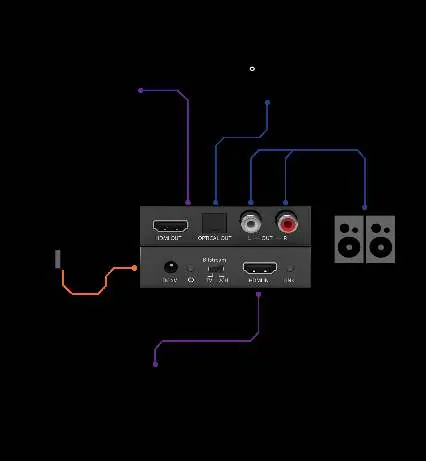
- Connect the HDMI source to the HDMI IN port, connect your display to the HDMI OUT port, and connect your audio system to the Optical or L/R outputs. p. 9
Problems and fixes
Status LED Red blinking
Dolby decoder is active.
p. 7
Status LED Green blinking
DTS decoder is active.
p. 7
Status LED Red illuminate
PCM decoder or No signal.
p. 7Technical specifications
| Parameter | Value | Meaning | Pages |
|---|---|---|---|
| Video Bandwidth | 18Gbps | Maximum data transfer rate. | p. 6 |
| Power Consumption | 1.25W (Max) | Maximum power usage. | p. 6 |
| Operating Temperature | 32 - 104°F / 0 - 40°C | Safe operating range. | p. 6 |
Where to find it in the PDF
- Front Panel p. 7
- Rear Panel p. 8
- Application Example p. 9
Table of contents
Quick Guide
The VigilLink VLHA-DWM is an HDMI 18Gbps Audio Extractor designed to extract audio signals from an HDMI source and output them to digital optical or analog stereo L/R audio outputs. It supports video resolutions up to 4K2K@50/60Hz and various high-resolution audio formats.
Package Contents
- 1x HDMI 18Gbps Audio Extractor
- 1x 5V/1A Power Adapter
- 1x User Manual
Operation Controls
Front Panel
- DC 5V: Connect the 5V/1A power adapter.
- Power LED: Indicates system power status.
- TV/Bitstream/2CH Switch: Allows selection of audio format:
- TV: Copies EDID from the connected TV.
- Bitstream: Supports multi-channel audio up to six channels.
- 2CH: Outputs 2-channel Stereo PCM.
- HDMI IN: Input for the HDMI video source.
- Status LED: Indicates audio decoding status (Red: PCM/No signal, Red blinking: Dolby, Green blinking: DTS).
Rear Panel
- HDMI OUT: HDMI output for display connectivity.
- OPTICAL Out: Toslink digital audio output (mirrors HDMI audio).
- R/L OUT: Stereo RCA analog audio output.
Application Example
To set up the device, connect your HDMI source (e.g., Blu-ray player) to the HDMI IN port. Connect your display to the HDMI OUT port. Connect your audio system (AV receiver or active speakers) to the Optical Out or L/R OUT ports as required. Finally, connect the power adapter to a wall outlet.
Specifications
- HDMI Compliance: HDMI 2.0b, HDCP 2.2/1.4
- Video Bandwidth: 18Gbps
- Video Resolutions: Up to 4K2K@50/60Hz (YUV4:4:4), 1080P@120Hz
- Audio Formats: Supports LPCM, Dolby Digital, DTS, Dolby TrueHD, DTS-HD Master Audio, Dolby Atmos, DTS:X
- Power Consumption: 1.25W (Max)
- Operating Temperature: 32 - 104°F (0 - 40°C)
Practical help
Common problems
No audio output
Check the TV/Bitstream/2CH switch setting to ensure it matches your audio system capabilities.
No signal on display
Verify that the HDMI cables are securely connected and that the source device is powered on.
Audio format not supported
Ensure the source device is outputting a format supported by the extractor (e.g., LPCM, Dolby, DTS).
Before use
- Ensure the 5V/1A power adapter is connected to a wall outlet.
- Verify HDMI cables are securely connected to both input and output devices.
- Set the audio mode switch (TV/Bitstream/2CH) according to your audio system requirements.
- Check that the display device is compatible with the resolution being output.
Images and diagrams
- Front Panel: Features power input, power LED, audio mode selection switch, HDMI input, and status LED.
- Rear Panel: Features HDMI output, optical audio output, and analog L/R RCA outputs.
Model compatibility
- Supports 4K2K@50/60Hz (YUV444).
- Supports HDCP 2.2 and 1.4.
- Optical output mirrors the HDMI audio signal.

Manual page author
Michael Turner
Technical manual editor
Reviews PDF manuals for structure, safety notes, and practical product details so readers can find the right information quickly.