Electronics / Security Cameras
Ring Power Pack User Guide
Quick start guide for the Ring Power Pack. Learn how to charge, install, and connect your backup power unit to Ring Alarm Pro or eero 6 Extenders.
Quick answers from the manual
Quick answer
- The Ring Power Pack is a backup battery for Ring Alarm Pro and eero 6 Extenders. Charge it using the Alarm Pro USB-C adapter, then connect it to your device using the provided USB-C cable. p. 2, 3
Key actions
- Charge the Power Pack p. 2, 3
- Connect to Alarm Pro p. 3
First start
- Charge the device fully before first use. p. 2, 3
Problems and fixes
Device is hot
Unplug power and let it cool down on a heat-resistant surface.
p. 6Technical specifications
| Parameter | Value | Meaning | Pages |
|---|---|---|---|
| Electrical Rating | 12V DC, 3A | Power requirements | p. 6 |
| Operating Temperature | 32°F to 104°F (0°C to 40°C) | Safe operating range | p. 6 |
Where to find it in the PDF
- Charging and Ports p. 2
- Installation Instructions p. 3
- Battery Backup Configuration p. 4
- Safety and Specs p. 6
Table of contents
Manual images
Click an image to enlargeQuick guide from the manual
The Ring Power Pack is designed to provide backup power for your Ring Alarm Pro or eero 6 Wi-Fi extender during power outages. Before using the device, it must be fully charged using the Alarm Pro USB-C power adapter.
Charging the Power Pack
The Power Pack does not include its own power adapter. You must use the Alarm Pro USB-C power adapter to charge it.
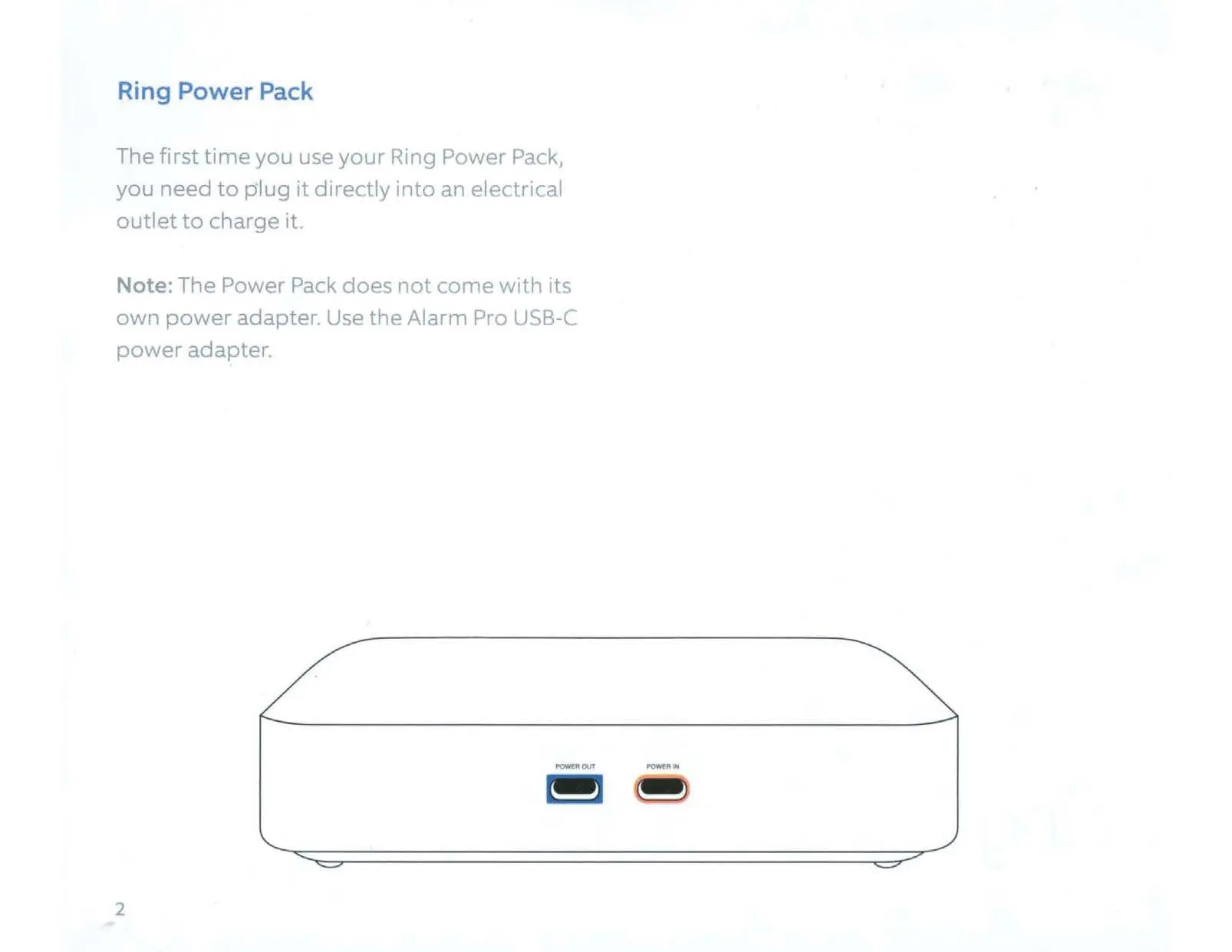
- Plug the power adapter from your Ring Alarm Pro into the orange Power In port on the Power Pack.
- Wait for the LED light to turn solid green, which indicates the device is charging.
- The LED will turn off when the device is fully charged.
Installation and Connection
Once charged, you can connect the Power Pack to your device:
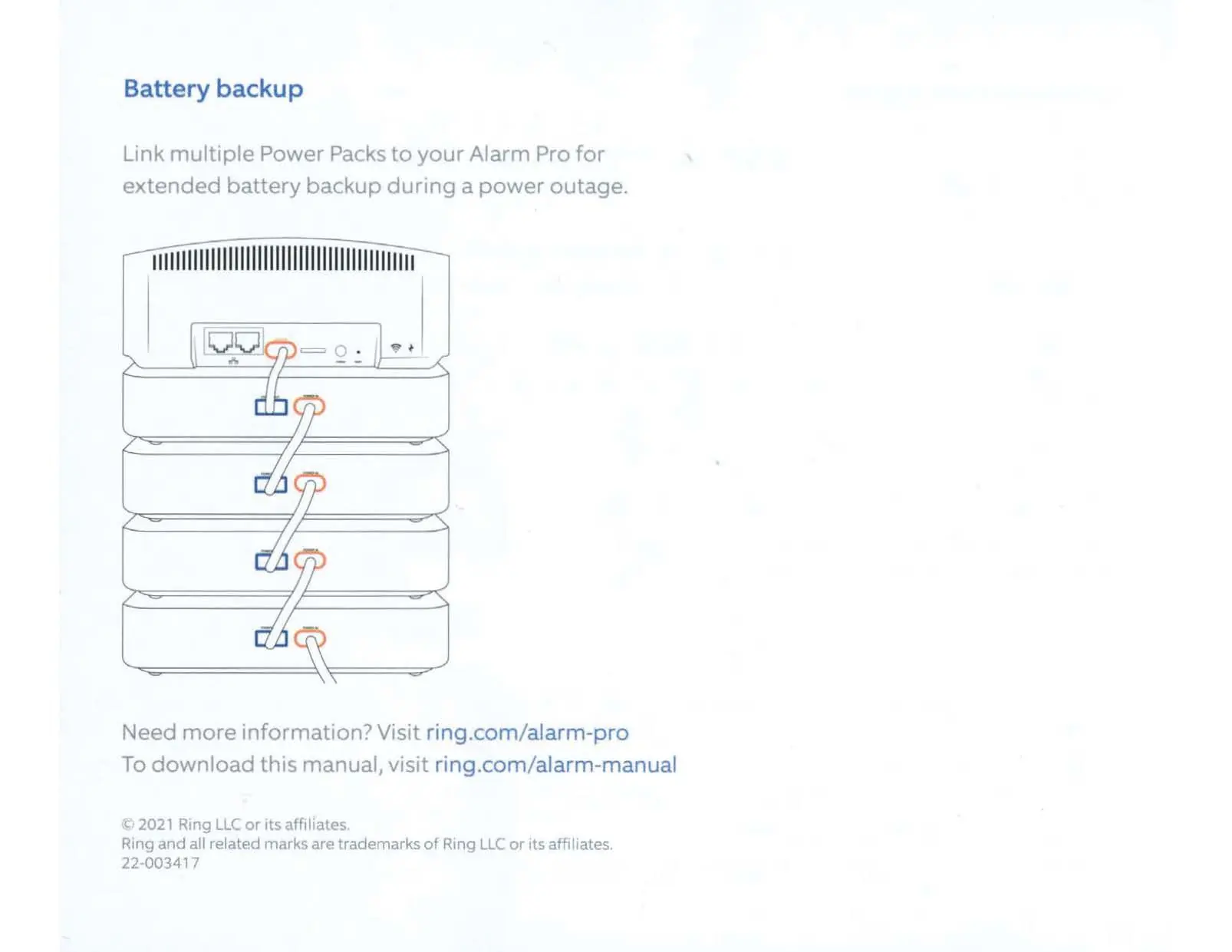
- Use the provided short, double-sided USB-C cable.
- Connect the cable between the Power Pack and your Alarm Pro or eero 6 Extender.
- Ensure the blue and orange connector ends match the corresponding Power In (orange) and Power Out (blue) ports.
- The Power Pack will continue to charge while connected to your Alarm Pro.
Battery Status
You can monitor the battery status of your connected Power Packs through the Ring app:
- Navigate to the Alarm Pro Base Station device page.
- Tap on the Battery Health tile to view the status of all connected Power Packs.
Safety Information
Handle with care: The device contains a rechargeable lithium-ion battery. Do not disassemble, crush, puncture, or expose the device to liquids, fire, or extreme heat.
- If the device gets wet, unplug all cables immediately and allow it to dry completely before use.
- Do not use external heat sources (like hair dryers) to dry the device.
- If the device becomes hot during use, place it on a heat-resistant surface, unplug it, and allow it to cool down.
- Use only the provided USB-C cable and specified power adapters.
Manufacturer information
Ring
Practical help
Common problems
Device becomes hot during use
Place the Power Pack on a heat-resistant surface, unplug the power, and let it cool down for a few minutes before handling.
Device or adapter gets wet
Carefully unplug all cables without getting your hands wet and wait for the device and adapter to dry completely before plugging them in again.
Before use
- Ensure you have the Alarm Pro USB-C power adapter (not included with the Power Pack).
- Verify the device is not damaged.
- Ensure you have a heat-resistant surface for placement.
- Charge the device fully before first use.
Specs in practice
- Electrical Rating
- 12V DC, 3A
- Temperature Rating
- 32°F to 104°F (0°C to 40°C)
Images and diagrams
- The device features an orange 'Power In' port and a blue 'Power Out' port.
- Multiple Power Packs can be linked together to the Alarm Pro for extended backup time.
Model compatibility
- Compatible with Ring Alarm Pro.
- Compatible with eero 6 Wi-Fi extender.

Manual page author
Emily Carter
User documentation editor
Prepares concise manual descriptions and highlights the most useful setup, operation, and maintenance information for readers.