Power / Batteries & Chargers
User Guide for Ring Mailbox Sensor
Quick start guide and safety information for the Ring Mailbox Sensor. Learn how to set up your device, battery requirements, and compliance details.
Quick answers from the manual
Quick answer
- The Ring Mailbox Sensor is a motion detector that requires a Ring Bridge to function. Setup involves installing the Bridge, using the Ring app to scan the device code, and inserting 3 AAA batteries. p. 1, 2
Key actions
- Set up Ring Bridge p. 1
- Scan device code in Ring app p. 1
First start
- Install Ring Bridge, open Ring app, select Set Up a Device, and scan the code on the sensor. p. 1
Technical specifications
| Parameter | Value | Meaning | Pages |
|---|---|---|---|
| Battery | 3 x AAA | Alkaline or 1.2V NiMH rechargeable | p. 2 |
Where to find it in the PDF
- Quick Start p. 1
- Safety and Specifications p. 2
Table of contents
Manual images
Click an image to enlargeQuick Start Guide
To begin using your Ring Mailbox Sensor, follow these steps:
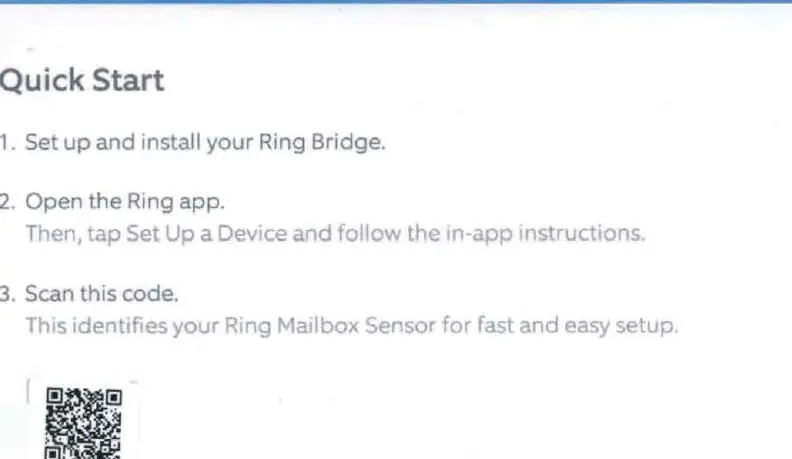
- Set up the Ring Bridge: Ensure your Ring Bridge is installed and set up before attempting to connect the sensor.
- Open the Ring App: Launch the app on your mobile device.
- Add Device: Tap Set Up a Device within the app and follow the on-screen instructions.
- Scan Code: When prompted, scan the QR code located on the device to identify your Mailbox Sensor for fast setup.
Battery Safety and Installation
This device is powered by batteries. Adhere to the following safety guidelines:

- Battery Type: Use only new 1.5V alkaline or 1.2V NiMH rechargeable AAA-sized batteries.
- Installation: Do not mix old and new batteries.
- Handling: Do not open, disassemble, puncture, cut, bend, shred, or heat the batteries.
- Maintenance: If batteries begin to leak, take steps to prevent fluid contact with skin or clothes. Remove batteries if the device is being stored for an extended period.
- Disposal: Dispose of batteries in accordance with local laws and regulations; do not throw them into a fire.
Technical Specifications
The device operates within the following parameters:
- Power Source: 3 x AAA batteries.
- Operating Temperature: -4°F to 122°F (-20°C to 50°C).
Regulatory Information
This device complies with Part 15 of the FCC Rules. Operation is subject to the conditions that the device may not cause harmful interference and must accept any interference received. For optimal performance and safety, the device should be installed and operated with at least 20 cm of distance between the radiator and your body.
Manufacturer information
Ring
Practical help
Common problems
Device fails to connect during setup
Ensure the Ring Bridge is already set up and installed before attempting to add the Mailbox Sensor.
Battery performance issues
Ensure you are using only new 1.5V alkaline or 1.2V NiMH rechargeable AAA batteries. Do not mix old and new batteries.
Before use
- Install and set up the Ring Bridge
- Download and open the Ring app
- Have 3 x AAA batteries ready for installation
Specs in practice
- Operating Temperature
- Device functions between -20°C and 50°C (-4°F to 122°F).
Model compatibility
- Requires a Ring Bridge for operation.

Manual page author
Michael Turner
Technical manual editor
Reviews PDF manuals for structure, safety notes, and practical product details so readers can find the right information quickly.