HVAC / Parts & Accessories
Rinnai Linear 1000 Burn Media Installation Guide
A comprehensive installation guide for the Rinnai Linear 1000 fireplace burn media. Includes step-by-step instructions for FlameTech logs, Designer logs, and modern glass media, along with critical maintenance and troubleshooting tips for...
Table of contents
Manual images
Click an image to enlargeImportant Information
Incorrect installation of burn media is the leading cause of performance problems and is not covered by warranty. Always ensure you have the correct media set for your specific model. The Linear 1000 burn media sets are not interchangeable. The burner must have a clear gap between the burner and the surrounds to allow secondary air to reach the unit. Never block this gap with glass or vermiculite.
FlameTech Log Set Installation
Before starting, unpack the set and inspect all parts for damage. Ensure the base panel is properly fixed and the brass aeration sleeves are correctly fitted over the injectors. The top of the sleeve should sit slightly above the fire base.
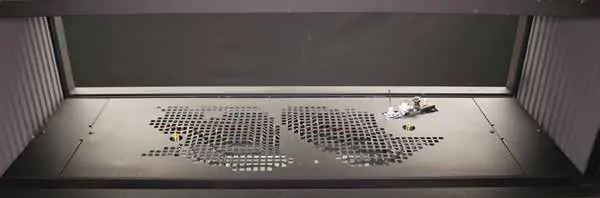
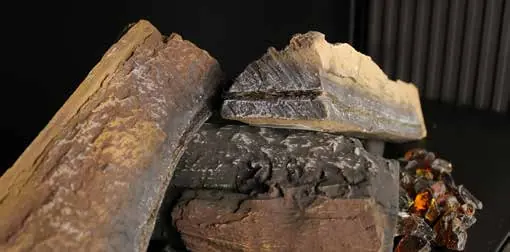
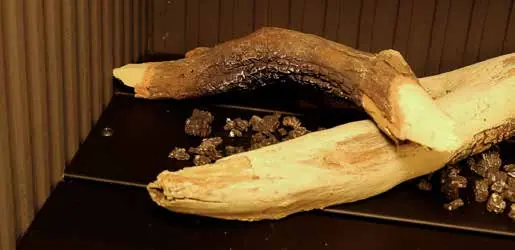
- Centre Log: Fit the centre log into the valley in the middle of the base panel. Align the slot in the front of the panel with the notch in the end of the log.
- Glass: Place a layer of glass over the holes in the base panel. Use approximately 80% of the supplied glass; do not pour directly from the bag to avoid dust.
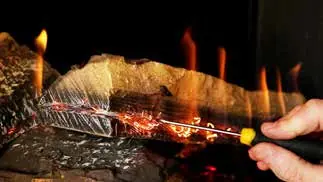
- FlameTech Logs: Identify the left and right logs (the left is slightly shorter). Inspect the wire wool channel for chips or cracks. The wire wool should sit inside the channel with only occasional strands sticking out.
- Positioning: Place the right-hand log, fitting the copper sleeve over the aeration sleeve. The log should sit evenly on the centre log with a 5mm gap to the flame rod. Repeat for the left-hand log. Snip off any wire wool strands near the flame rod to prevent ignition errors.
Designer Log Set Installation
Before proceeding, ensure the four log location points along the burner and surrounds are folded up. The NZ LPG burner is identified by a 'U' stamp in the left-hand corner.
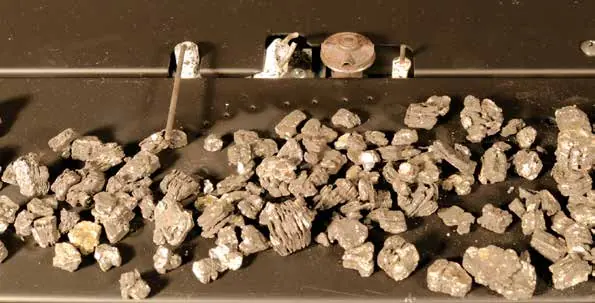
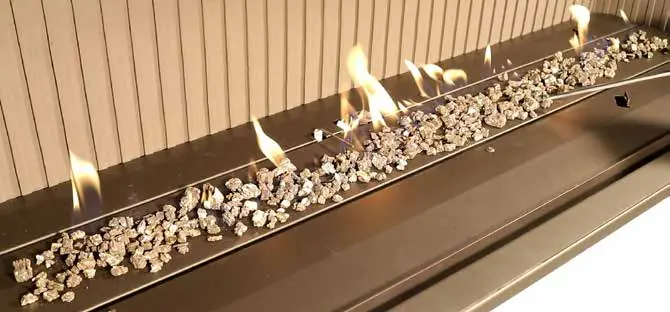
- Vermiculite: Place a thin layer of vermiculite across the burner bed. Do not pour directly from the bag. Ensure burner ports in front of the pilot and main burner flame rod are not covered.
- First Log: Lay the first log over the burner using the location tab behind the pilot and the tab on the burner surround. Ensure the charred section is facing down.
- Remaining Logs: Install the second log and the three smaller logs using the provided colour installation sheet as a guide.
Modern Media (Glass) Installation
This process uses specialty glass. Do not use non-Rinnai products as this may damage the fire. Ensure log location tabs are flattened if switching from a log set to glass.
- Spread a thin layer of glass across the burner top using the smaller bag first.
- Start the fire to check flame tracking. Adjust glass as needed, ensuring burner ports are not blocked.
- Once satisfied, install the remaining glass. You may cover the entire base or just the burner area, but keep the gap between the burner and surrounds clear for secondary air.
Troubleshooting and Maintenance
If the fire cuts out, it is likely a strand of wire wool shorting the flame rod. If flames are thin or look like candles, adjust the wire wool in the channel. Always run the burners on high and low settings to ensure the flame rod is working correctly. The flame rod works best on the edge of the flame, not in the middle.
Contact Information
Rinnai Australia Pty Ltd: 100 Atlantic Drive, Keysborough, Victoria 3173. National Help Line: 1300 555 545. www.rinnai.com.au. Rinnai New Zealand Ltd: 105 Pavilion Drive, Mangere, Auckland 2022. Tel: +64 9 257 3800. www.rinnai.co.nz.
Official resources from the manual
Practical help
Common problems
Fire cuts out shortly after starting
Check for strands of wire wool shorting out the pilot or main burner flame rod.
Flames are thin with no glow
Wire wool may be pushed too tightly into the channel; carefully tweeze it out.
Flames look like a row of candles
Wire wool is sitting too far out in the channel; push it back into the channel.
Sooting on logs
Ensure there is no impingement on the logs and that burner ports are not blocked.
Before use
- Inspect all media parts for damage before installation.
- Verify the correct media set is used for your model.
- Ensure the base panel is properly fixed.
- Check that brass aeration sleeves are correctly fitted.
- Ensure burner ports are clear of vermiculite or glass.
- Fold up log location tabs (for Designer log sets).
Specs in practice
- Secondary Air Gap
- The space between the burner and the front/back surrounds; must remain clear for air intake.
Images and diagrams
- Log location tabs: Metal points that must be folded up to secure logs.
- Burner ports: Holes in the base panel that must remain clear for proper ignition.
Model compatibility
- NZ LPG burner is identified by a 'U' stamp in the left-hand corner.
- Linear 1000 burn media sets are not interchangeable.
- Double-sided fires require checking the media bed from both sides.

Manual page author
Emily Carter
User documentation editor
Prepares concise manual descriptions and highlights the most useful setup, operation, and maintenance information for readers.