Tools / Drills
User Manual for Ronix 8905K Cordless Hammer Drill Driver
Quick guide for the Ronix 8905K 20V Brushless Hammer Drill Driver. Learn about operation, torque adjustment, speed settings, battery maintenance, and safety instructions.
Quick answers from the manual
Quick answer
- The Ronix 8905K is a 20V brushless hammer drill driver. It features a 13mm keyless chuck, 21+3 torque settings, and two speed ranges (0-450/0-2000 rpm). p. 2
Key actions
- Installing Battery p. 8
- Changing Speed p. 9, 10
- Adjusting Torque p. 10
First start
- Charge the battery, insert it into the tool, select the desired speed and torque, and ensure the bit is securely tightened. p. 7, 8, 10, 11
Problems and fixes
Tool stops working
Battery discharged or overheated. Allow to cool or recharge.
p. 7, 13
Stuck bit
Use reversing switch to back out.
p. 13Maintenance and reset
- Keep handles dry, clean and free from oil and grease. Never use gasoline, benzene, thinner, alcohol or the like. p. 5, 13
Technical specifications
| Parameter | Value | Meaning | Pages |
|---|---|---|---|
| No-load speed | 0-450/0-2000 rpm | Variable speed settings | p. 2 |
| Max torque | 55 N.m | Maximum fastening force | p. 2 |
Where to find it in the PDF
- Technical Specifications p. 2
- Safety Rules p. 3, 4, 5, 6
- Operation p. 8, 9, 10, 11
Table of contents
Manual images
Click an image to enlargeQuick guide from the manual
The Ronix 8905K is a 20V brushless hammer drill driver designed for drilling and screw driving. Before using the tool, ensure the battery is fully charged and the correct speed and torque settings are selected for your specific task. Always remove the battery before performing any maintenance or changing accessories.
Product overview
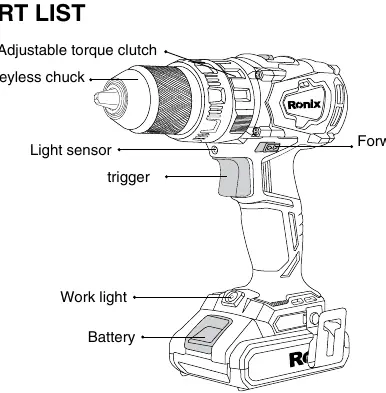
The tool features a keyless chuck, an adjustable torque clutch, a work light, a trigger switch, and a forward/reverse switch. The battery pack is located at the base of the handle.
Technical specifications
- Model: 8905K
- Voltage: 20V
- No-load speed: 0-450 / 0-2000 rpm
- Impact rate: 0-30000 ipm
- Max torque: 55 N.m
- Torque settings: 21+3
- Chuck: 13mm metal single sleeve with lock
- Weight: 1.18 kg
Operation
Installing or removing the battery
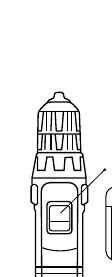
To remove the battery, slide the red button on the front of the cartridge and withdraw it from the tool. To insert, align the tongue on the battery with the groove in the housing and slide it into place until it clicks.
Switch action
The trigger switch controls the tool. The reversing switch changes the direction of rotation. Always set the reversing switch to the neutral position when the tool is not in use.
Speed change
Switch off the tool before changing speeds. Slide the speed change lever to '2' for high speed or '1' for low speed.
Adjusting fastening torque
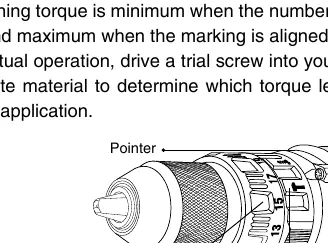
The torque can be adjusted in 18 steps by turning the adjusting ring. Align the desired number with the pointer on the tool body. Use lower settings for smaller screws and higher settings for larger screws or harder materials.
Drilling and hammer drilling
For drilling, set the ring to the drill mark. For hammer drilling (walls), set the ring to the hammer mark. Do not use the hammer mode when drilling in wood or metal.
Maintenance
Keep the tool clean and free of oil and grease. Never use gasoline, benzene, thinner, or alcohol for cleaning as these may cause discoloration or cracks. If the tool is operated continuously until the battery is discharged, allow it to rest for 15 minutes before using a fresh battery.
Manufacturer information
Ronix Tools
Practical help
Common problems
Tool stops working during operation
The battery may be discharged or overheated. Allow the tool to rest for 15 minutes or recharge the battery.
Drill bit slips in the chuck
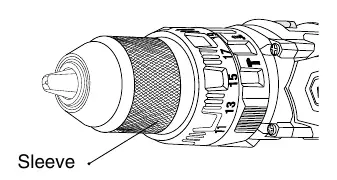
Ensure the bit is inserted straight and the chuck is tightened securely by turning the sleeve clockwise.
Tool damaged or overheating
Do not force the tool. Use the correct speed and torque settings for the application.
Before use
- Ensure the battery is fully charged.
- Check that the reversing switch is in the neutral position when not in use.
- Verify the correct speed setting (1 or 2) is selected.
- Ensure the correct torque setting is selected for the material.
- Check that the drill bit is securely tightened in the chuck.
Specs in practice
- No-load speed
- The rotational speed of the chuck without a load. 0-450 rpm is for low speed/high torque, 0-2000 rpm is for high speed.
- Torque setting
- Adjustable clutch settings (21+3) to control the force applied to screws, preventing over-tightening.
Images and diagrams
- The part list diagram identifies the keyless chuck, torque clutch, trigger, and battery location.
- The torque adjustment diagram shows how to align the ring graduations with the pointer.
Model compatibility
- Use only with 20V Ronix battery packs.
- Use only the specified Ronix fast charger.

Manual page author
Michael Turner
Technical manual editor
Reviews PDF manuals for structure, safety notes, and practical product details so readers can find the right information quickly.