Electronics / Amplifiers Receivers
Schiit Midgard Headphone Amp and Preamp User Manual
Quick guide for the Schiit Midgard Halo headphone amplifier and preamp. Learn about connections, operation, troubleshooting, and power requirements.
Table of contents
Quick Guide
The Schiit Midgard is a fully-discrete high-power headphone amplifier and preamp featuring the Halo mixed-mode feedback system. Please note the following critical operational details:
- Power Requirements: Use only the supplied AC wall-wart (14-16VAC, 1-2A). Do not use DC power supplies.
- Startup Delay: There is a normal 8-10 second delay after turning the unit on before sound is output to the headphones.
- Preamp Outputs: Both balanced and single-ended preamp outputs are always active and do not mute when headphones are plugged in.
- Headphone Protection: If sound drops out or the amp clicks, it may be in over-current protection mode, often caused by shorted cables or incompatible TRRS headphone plugs.
In the Box
- Midgard Headphone Amp and Preamp
- Wall-Wart (linear power supply)
- Stickers
Connections
The rear panel provides the following connectivity options:
- Balanced Inputs: Connect balanced sources using XLR cables.
- Single-Ended Inputs: Connect sources using RCA cables.
- Balanced Preamp Outputs: Connect to powered monitors or external power amps with XLR inputs.
- Single-Ended Preamp Outputs: Connect to powered monitors or external power amps using RCA cables.
- AC Input: Connect the supplied 14-16VAC wall-wart here.
Operation
The front panel controls allow you to manage your audio experience:
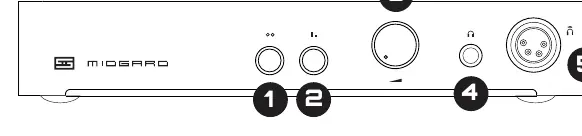
- Input Switch: Selects the input source. Out position is for balanced XLR; in position is for single-ended RCA.
- Gain Switch: Adjusts gain levels. Out is high gain; in is low gain.
- Volume Knob: Adjusts the output volume.
- SE Headphone Jack: Standard 1/4 inch jack for most headphones.
- Halo Headphone Jack: 4-pin XLR balanced jack for headphones to utilize the Halo mixed-mode feedback system.
Troubleshooting
If you encounter issues, check the following:
- Sound drops out/clicking: Check for shorted headphone cables or incorrect TRRS adapters.
- Hum: Check your source equipment or consider using a ground loop breaker like the EbTech HumX.
- No sound on startup: This is normal; wait 8-10 seconds for the protection relay to engage.
- Unit won't turn on: Verify the AC power connection and ensure the outlet is functional.
Safety and Warranty
Schiit Audio provides a two-year warranty covering defects in material and workmanship. Do not expose the device to rain or moisture. Refer all servicing to qualified personnel. For warranty service, contact [email protected] to obtain a Return Authorization before shipping the product.
Manufacturer information
Schiit Audio
Practical help
Common problems
Sound drops out and the amp clicks
The unit is in over-current protection. Check for shorted headphone cables or incompatible TRRS plugs. Use a proper adapter if necessary.
Hum through headphones
Check the source device for the cause of the hum or use a ground loop breaker (e.g., EbTech HumX).
No sound immediately after turning on
This is normal. The amp delays headphone output for 8-10 seconds after power-on.
Unit does not turn on
Ensure the AC wall-wart is securely plugged into a working outlet.
Before use
- Verify you are using the supplied 14-16VAC, 1-2A power supply.
- Ensure your headphones use a standard 1/4 inch or 4-pin XLR plug.
- Check that your source cables (XLR or RCA) are connected to the correct inputs.
- Confirm the input switch is set correctly (Out for XLR, In for RCA).
Specs in practice
- Preamp Outputs
- These outputs are always active and do not mute when headphones are connected.
Images and diagrams
- The rear panel contains the AC power input, balanced/SE inputs, and balanced/SE preamp outputs.
- The front panel contains the input switch, gain switch, volume knob, and both 1/4 inch and 4-pin XLR headphone jacks.
Model compatibility
- 1/8 inch TRRS-terminated headphones (with microphones) may require a specific adapter to avoid shorting the outputs.
- Preamp outputs are always active; consider a remote switch if using active monitors that you wish to mute.

Manual page author
Michael Turner
Technical manual editor
Reviews PDF manuals for structure, safety notes, and practical product details so readers can find the right information quickly.