Power / Uninterruptible Power Supplies
User Manual for Schneider Electric Easy UPS SMV Series
Quick guide for the Schneider Electric Easy UPS SMV Series (750-3000 VA). Includes installation steps, battery connection, troubleshooting, error codes, and technical specifications.
Quick answers from the manual
Quick answer
- The Easy UPS SMV Series is an uninterruptible power supply for PCs. Installation requires connecting the internal battery, plugging into a wall outlet, and charging for 8 hours. p. 5
Key actions
- Connect battery p. 5
- Cold start p. 5
First start
- Charge battery for at least 8 hours to ensure sufficient runtime. p. 5
Problems and fixes
Err 01
Fan fault detected. Clean dust or foreign materials clogging cooling fan.
p. 7
Err 02
Inverter short detected. Disconnect non-essential equipment.
p. 7Error codes
| Code | Meaning | Action | Pages |
|---|---|---|---|
| Err 01 | Fan fault detected | Turn off, clean dust, restart. | p. 7 |
| Err 02 | Inverter short detected | Disconnect non-essential equipment, restart. | p. 7 |
| Err 03 | Inverter over voltage detected | Contact Schneider Electric Technical Support. | p. 7 |
Technical specifications
| Parameter | Value | Meaning | Pages |
|---|---|---|---|
| Waveform | Pure Sine Wave | Output waveform type | p. 6 |
| Charging time | 4-6 hours | Time to recover to 90% capacity | p. 6 |
Where to find it in the PDF
- Safety and Handling p. 1, 2
- Installation p. 5
- Specifications p. 6
- Troubleshooting p. 7
Table of contents
Manual images
Click an image to enlargeQuick guide from the manual
The Schneider Electric Easy UPS SMV Series is an uninterruptible power supply designed for PCs. Before installation, ensure the input breaker on the UPS upstream is Type C rated at 16A. The unit must be installed indoors in a temperature and humidity-controlled environment. Always charge the battery for at least 8 hours before initial use.
Safety and handling
- Indoor use only: Install in an area free of conductive contaminants, excessive dust, or corrosive air.
- Battery safety: Do not dispose of batteries in fire. Do not open or mutilate batteries as they contain toxic electrolyte.
- Handling: Use proper lifting techniques based on the weight of the unit (ranging from 55 kg).
- Electrical safety: Do not remove the chassis cover. Servicing must be performed by a qualified engineer.
Installation and power on
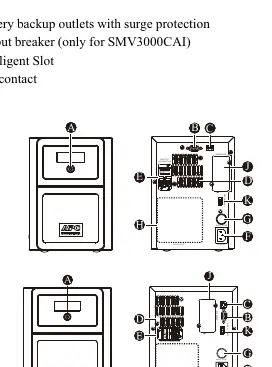
- Inspection: Ensure the unit is placed on a stable floor, away from direct sunlight, water, and heat sources.
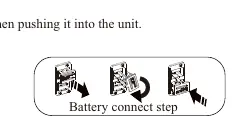
- Connect battery: Pull the battery handle up and push it into the unit. The connector is located on the rear panel.
- Connect equipment: Avoid using extension cords. Do not connect printers, heaters, or copiers to the UPS.
- Power connection: Plug the power cord directly into a wall outlet, not a surge protector or power strip.
- Start-up: Press the ON/OFF button for 1-3 seconds. A buzzer sound confirms the unit is on.
Audible indicators and status
- Beeps every 2 seconds: Running on battery. Save work.
- Continuous beeping: Low battery. Save work and shut down immediately.
- Continuous tone with icon: Battery backup outlets are overloaded.
- Beeps every 4 seconds: Battery is near end of life or damaged.
Troubleshooting
If the UPS fails to turn on, ensure the battery is connected and the power cord is securely plugged into a wall outlet. If the unit displays error codes:
- Err 01: Fan fault detected. Turn off, clean dust/debris, and restart.
- Err 02: Inverter short. Disconnect non-essential equipment and restart.
- Err 03: Inverter over voltage. Contact technical support.
Technical specifications
The SMV series supports 220/230/240VAC input. The transfer time is typically 2-6 ms (12ms max). The output waveform is Pure Sine Wave. Charging time to 90% capacity is 4-6 hours.
Manufacturer information
Schneider Electric
Practical help
Common problems
UPS will not turn on
Press the ON/OFF button, check battery connection, or ensure the wall outlet has power.
Connected equipment loses power
Check for overload conditions or fully discharged battery. Remove non-essential equipment.
Err 01 (Fan fault)
Turn off the UPS, clean dust or foreign materials from the cooling fan, and restart.
Err 02 (Inverter short)
Turn off the UPS, disconnect non-essential equipment, and restart.
Before use
- Ensure input breaker is Type C rated at 16A
- Connect internal battery (pull handle up, push into unit)
- Charge battery for at least 8 hours
- Do not connect printers, heaters, or copiers
- Plug directly into a wall outlet (no surge protectors)
Specs in practice
- Transfer time
- Typical 2-6 ms, 12ms max.
- Charging time
- 4-6 hours to recover to 90% capacity.
Images and diagrams
- Battery connection: Pull the handle up and push the battery into the unit.
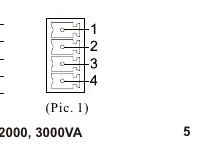
- Dry contact interface: Pin configurations for AC mode, Backup mode, and Standby mode.
Model compatibility
- Designed for PCs only.
- Not for outdoor use.
- Category C2 UPS product.

Manual page author
Michael Turner
Technical manual editor
Reviews PDF manuals for structure, safety notes, and practical product details so readers can find the right information quickly.