Electronics / Networking
User Manual for Secomp Line-Interactive UPS 1KVA-3KVA
Comprehensive user guide for Secomp Line-Interactive UPS (1KVA-3KVA). Includes installation steps, operation instructions, battery maintenance, troubleshooting, and technical specifications.
Quick answers from the manual
Quick answer
- The Secomp Line-Interactive UPS (1KVA-3KVA) provides power regulation and backup. It requires an initial 8-hour battery charge and should not be used with inductive loads like motors or printers. p. 5, 6
Key actions
- Turning on the UPS p. 7
- Replacing batteries p. 9, 10
First start
- Charge the batteries for at least 8 hours before use. p. 6
Problems and fixes
UPS can't operate/switching on
Check power source, button press duration, or potential overload.
p. 11Maintenance and reset
- Regular 6-12 months checkup is advised for batteries. p. 9
Technical specifications
| Parameter | Value | Meaning | Pages |
|---|---|---|---|
| Capacity | 1000VA - 3000VA | Power rating of the UPS models. | p. 12 |
Where to find it in the PDF
- Safety Instructions p. 3
- Rear Panel Views p. 5
- Troubleshooting p. 11
- Technical Specifications p. 12
Table of contents
Quick guide from the manual
This manual provides essential instructions for the Secomp Line-Interactive UPS (1KVA-3KVA). Before using the device, it is highly recommended to charge the batteries for at least 8 hours. Ensure the UPS is installed in a temperature-controlled environment (ANSI/NFPA75 room) with adequate ventilation (300mm clearance). Do not connect inductive loads such as vacuum cleaners, laser printers, or hairdryers to the UPS.
Safety Instructions
- Warning: The UPS contains hazardous electric components. Do not open the unit cover; there are no user-serviceable parts inside.
- Battery Safety: Batteries can cause shock and short circuits. Remove metal objects (watches, rings) before servicing. Use insulated tools and wear rubber gloves.
- Environment: Install in a clean, dry area free from conductive particles. Avoid direct sunlight and heat sources.
- Disposal: Do not dispose of the UPS or batteries in fire; they may explode.
Installation
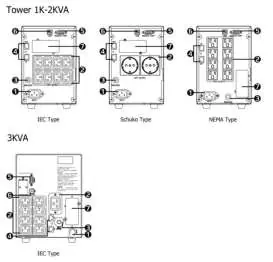
The UPS must be connected to a grounded main power source. Ensure the input voltage matches the UPS rating (110V/220V). Connect the input cable to the mains and the load devices to the UPS output receptacles. For telecom protection, use the RJ45/RJ11 ports.
Operation
The UPS operates automatically. It provides power regulation and battery backup during power failures. The control panel features an LCD display and buttons for ON/OFF/TEST/Silence and Select. The UPS includes a 'Green Mode' for energy saving, which shuts down the unit during no-load or light-load conditions while on battery power.
Maintenance
Regular maintenance ensures a longer product lifetime. Keep the unit clean and free of dust, especially around air inlets. Batteries should be checked every 6-12 months. If replacement is necessary, ensure the new batteries are of the same type and quantity. Always turn off and disconnect the UPS before performing any maintenance or battery replacement.
Troubleshooting
If the UPS fails to switch on, check the power source connection, ensure the button was pressed for the correct duration, or check for overload. If the UPS remains on battery mode, check the input power and fuses. For overload conditions, remove less essential loads.
Technical Specifications
The series covers models from 1000VA to 3000VA. Key parameters include a pure sine wave output, 2-4ms transfer time, and operating humidity of 0-90% RH at 0-40°C.
Practical help
Common problems
UPS will not switch on
Check main power connection, ensure battery is charged, or check for output short circuit/overload.
UPS remains on battery mode despite main power
Check main power source, cable, and input fuses/circuit breakers.
Overload indicator lit or constant buzzer
Remove or shut down less essential loads connected to the UPS.
Battery mode duration is too short
Ensure batteries are fully charged (recharge for 8 hours) or replace worn-out batteries.
Before use
- Charge batteries for a minimum of 8 hours before first use.
- Ensure the main power voltage matches the UPS rating (110V/220V).
- Verify that the installation environment is temperature-controlled.
- Ensure 300mm of clearance at the rear and sides for ventilation.
- Connect the UPS to a grounded main power outlet.
Specs in practice
- Capacity (VA/Watts)
- Indicates the maximum power load the UPS can support.
- Transfer Time
- The time taken to switch to battery power during a failure (typically 2-4ms).
Images and diagrams
- Rear panel diagrams illustrate the location of input/output receptacles, communication ports (USB/RS232), and breakers for both Tower and Rack configurations.
Model compatibility
- Not suitable for inductive loads such as motors, hairdryers, vacuum cleaners, laser printers, or plotters.

Manual page author
Michael Turner
Technical manual editor
Reviews PDF manuals for structure, safety notes, and practical product details so readers can find the right information quickly.