Computers / PC Components
Gigabyte 12WE6-ASBGUI-2XR Graphics Card Anti-Sag Bracket Installation Guide
Quick installation guide for the Gigabyte 12WE6-ASBGUI-2XR graphics card anti-sag bracket. Includes a complete part list and step-by-step instructions for mounting the support bracket to your GPU and PC case.
Table of contents
Manual images
Click an image to enlargeQuick guide from the manual
This document provides instructions for installing the Gigabyte anti-sag bracket, designed to support heavy graphics cards and prevent sagging within the PC case. Before beginning, ensure you have all the necessary components and that your PC is powered off and disconnected from the power supply.
Part List
Verify that the following components are included in your package:
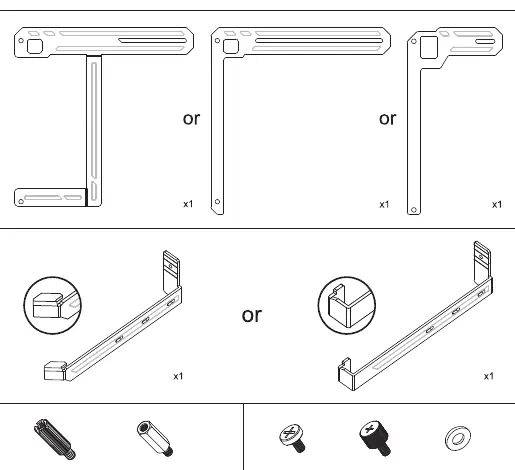
- Anti-sag bracket (various shapes provided)
- Support arm
- Standoffs (#6-32 and M3)
- Screws
- Washers
Installation Steps
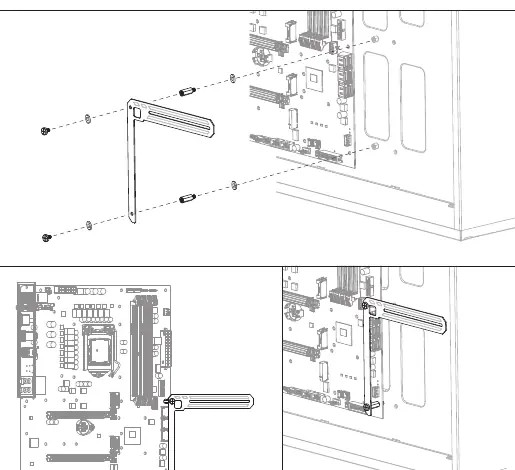
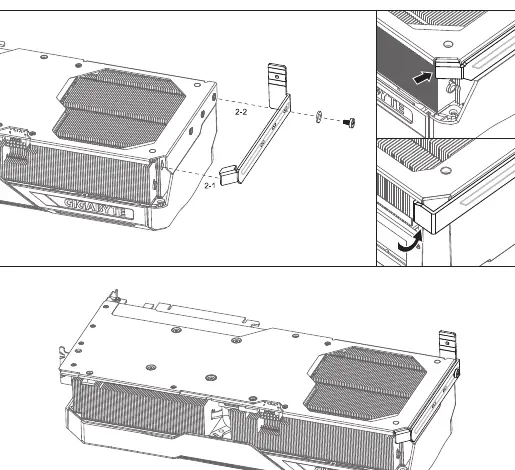
Step 1: Mounting the bracket
Align the anti-sag bracket with the motherboard standoff holes. Secure the bracket to the motherboard standoffs using the provided screws and washers. Ensure the bracket is firmly attached to the case/motherboard mounting points.
Step 2: Attaching the support arm
Attach the support arm to the graphics card. Ensure the arm is positioned correctly to provide support to the GPU structure. Secure it using the provided screws and washers as indicated in the diagram.
Step 3: Final installation
Insert the graphics card into the PCIe slot. Once the card is seated, secure the anti-sag bracket to the case or the previously installed bracket assembly to ensure the GPU is properly supported and level.
Manufacturer information
Gigabyte Technology Co., Ltd.
Practical help
Common problems
Bracket does not align with motherboard holes
Verify that you are using the correct standoffs (#6-32 or M3) for your specific motherboard and case configuration.
GPU still sags after installation
Ensure the support arm is tightly fastened to the GPU and that the main bracket is securely anchored to the case standoffs.
Before use
- Power off the PC and disconnect the power cable.
- Verify all parts (brackets, screws, standoffs, washers) are present.
- Ensure there is sufficient clearance in the PC case for the bracket installation.
- Identify the correct standoff type (#6-32 or M3) required for your motherboard.
Images and diagrams
- The bracket mounts directly to the motherboard standoffs.
- The support arm attaches to the side of the graphics card.
- The final assembly connects the GPU support arm to the main bracket.
Model compatibility
- Designed for use with compatible Gigabyte graphics cards.
- Requires standard motherboard standoff mounting points.

Manual page author
Emily Carter
User documentation editor
Prepares concise manual descriptions and highlights the most useful setup, operation, and maintenance information for readers.