Tools / Measuring Tools
User Manual for Sealey MM21 Digital Multimeter
Quick guide for the Sealey MM21 digital multimeter. Learn how to perform voltage, current, resistance, and temperature measurements, replace batteries and fuses, and understand safety precautions.
Table of contents
Quick Guide
The Sealey MM21 is a professional auto-ranging digital multimeter. Before use, always inspect the test leads for damage and ensure the back cover is securely fastened. The device features auto-power-off, data hold, and non-contact voltage detection. Always select the correct function and range on the rotary switch before connecting to a circuit.
Safety Precautions
- CAT III 600V: This meter is designed for measurements on circuits directly connected to low voltage installations.
- Test Leads: Use only genuine Sealey leads. Inspect for cracks or exposed wire before every use.
- High Voltage: Use extreme caution with voltages above 60V DC or 30V AC. Keep fingers behind probe barriers.
- Live Circuits: Never perform resistance, transistor, diode, or continuity measurements on live circuits.
- Environment: Do not use in potentially explosive atmospheres or where flammable materials are present.
Operation
Voltage Measurement
- Set the rotary switch to the V range.
- Press the FUNC key to select DCV or ACV mode.
- Connect the black lead to the COM terminal and the red lead to the V terminal.
- Connect probes to the circuit and read the display.
Current Measurement
- Turn off power to the circuit and discharge capacitors.
- Set the rotary switch to the mA/A position.
- Connect the black lead to COM and the red lead to the mA/A terminal.
- Break the circuit path and connect the meter in series.
- Turn on power and read the display.
Resistance, Continuity, and Diode Test
- Set the rotary switch to the appropriate symbol (Ω for resistance, diode symbol, or continuity symbol).
- Connect leads to COM and V terminals.
- For continuity, the meter will beep if the circuit resistance is below 50Ω.
- Warning: Do not input voltage when in these modes.
Temperature Measurement
- Set the rotary switch to the Temperature range.
- Connect the K-type thermocouple sensor to the COM and V terminals.
- Read the temperature on the display.
Key Functions
- Hold/Backlight: Press once to hold the current reading. Press and hold for 3 seconds to toggle the backlight.
- NCV (Non-Contact Voltage): Set the switch to NCV. Place the upper right corner of the device near the wire/socket to detect live voltage.
- Auto Power Off: The meter enters sleep mode after 30 minutes of inactivity. To disable, hold the FUNC key while turning the meter on.
Maintenance
- Battery Replacement: If the 'BAT' symbol appears, replace the two 1.5V AAA batteries.
- Fuse Replacement: If the fuse blows, replace it with an F 10A/600V Ø6x30 (Quick Acting) fuse.
- Cleaning: Wipe the case with a slightly damp cloth and mild detergent. Do not use solvents.
Manufacturer information
Sealey Group
Practical help
Common problems
Meter display stops updating
Data Hold mode may be active. Press the HOLD key to resume.
Battery symbol appears on LCD
Replace the two 1.5V AAA batteries.
No reading or 'OL' displayed
Check if the measurement range is exceeded or if test leads are connected correctly.
Beeper sounds and red LED illuminates
This indicates a Current Plug-in Alarm; the test lead is in the mA/A terminal while the function is not set to current measurement.
Before use
- Inspect test leads for cracks, breaks, or exposed wire.
- Ensure the back cover is securely fastened.
- Verify the battery is installed and not discharged.
- Select the correct function and range on the rotary switch.
- Ensure fingers are kept behind the probe barriers during measurement.
Specs in practice
- CAT III 600V
- Safety rating for measurements on circuits directly connected to low voltage installations.
- Auto-ranging
- The meter automatically selects the appropriate measurement range, simplifying operation.
Images and diagrams
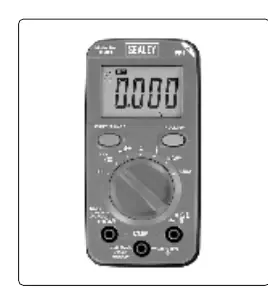
- The rotary switch is the primary control for selecting measurement modes (Voltage, Current, Resistance, etc.).
- The COM terminal is used for the black test lead in all measurements.
- The V terminal is used for the red lead for voltage, resistance, temperature, and diode tests.
- The mA/A terminal is used for the red lead only when measuring current.
Model compatibility
- Use only genuine Sealey test leads to maintain safety compliance.
- Not suitable for use in potentially explosive atmospheres.
- Requires 2 x 1.5V AAA batteries.

Manual page author
David Miller
Documentation analyst
Organizes user manual content into clear summaries, with attention to model details, product context, and everyday usability.