Power / Batteries Chargers
User Manual for Sealey Cordless Impact Wrench CP400LI / CP400LIHV
Quick guide for the Sealey Cordless Impact Wrench (CP400LI, CP400LIHV). Includes safety instructions, battery charging procedures, operation steps, and maintenance tips.
Table of contents
Manual images
Jump to the sectionQuick guide from the manual
This manual provides essential safety and operational instructions for the Sealey Cordless Impact Wrench. Key points include:
- Safety First: Always wear eye, ear, and hand protection. Use only impact-rated sockets.
- Battery Care: Charge the battery before first use. Do not charge in temperatures below 10°C or above 40°C.
- Operation: Ensure the battery is latched correctly. Use the direction switch to select rotation or lock the trigger.
- Maintenance: Keep the tool clean and free from grease. Do not wash with water.
Safety Instructions
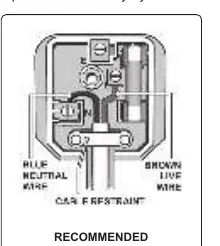
Electrical and General Safety
Ensure all electrical equipment is safe before use. Inspect power supply leads and plugs for wear. If used in a business environment, the tool must be PAT tested. Do not pull the plug by the cable. When working around vehicle brake systems, wear respiratory protection due to potential asbestos dust.
Battery and Charger Safety
Use only the provided charger. Do not attempt to charge other battery types. Do not short-circuit the battery terminals. Allow the charger to cool for 15 minutes between consecutive charges. Store the battery and charger in a dry, childproof area where the temperature does not exceed 40°C.
Operation
Charging the Battery
- Remove the battery pack from the wrench by depressing the release clip.
- Connect the charger to the mains. The green LED will light.
- Align the battery with the docking point and insert it into the slot.
- The red charge light will illuminate while charging. When fully charged, the light will turn green.
- Normal charging time is approximately 80 minutes.
Using the Wrench
Fit an impact-rated socket onto the 1/2" square drive. Align the battery tongue with the housing groove and slide it in until it clicks. Use the direction control switch to select rotation. To lock the trigger, place the switch in the middle position. Release the trigger immediately once the impact sound is heard to avoid over-torquing.
Maintenance
Keep the outer case clean using a damp cloth; do not use solvents or abrasives. This tool is subject to vibration testing; ensure it is operated in accordance with these instructions to minimize the risk of Hand Arm Vibration Syndrome. If the tool requires service, contact an authorized service agent.
Environment and Disposal
Dispose of the product and battery in compliance with WEEE regulations and local environmental laws. Do not dispose of as general waste.
Manufacturer information
Sealey Group
Practical help
Common problems
Battery not charging
Ensure the charger is connected to mains, the battery is inserted correctly, and the room temperature is between 10°C and 40°C.
Charger overheating
Do not recharge a second battery immediately. Allow the charger to cool for 15 minutes between charges.
Risk of Hand Arm Vibration Syndrome
Operate the tool according to instructions, maintain the tool properly, and use appropriate PPE. Consult the HSE website for guidance.
Before use
- Check insulation on all cables and plugs.
- Ensure the battery is charged.
- Wear eye, ear, and hand protection.
- Use only impact-rated sockets (do not use chrome vanadium).
- Ensure the work area is free from flammable gases or solvents.
- Check that the battery is latched securely in the handle.
Specs in practice
- Breakaway Torque
- 550Nm (Maximum force available to loosen a fastener).
- Fastening Torque
- 420Nm (Maximum force available to tighten a fastener).
Images and diagrams
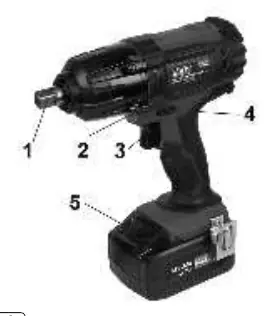
- 1.1: 1/2" Square Drive
- 1.2: Work light
- 1.4: Direction Control
- 1.5: Battery Release Clip
Model compatibility
- Use only impact sockets specifically designed for impact wrenches.
- Use only the charger supplied with the wrench.
- Do not connect the charger to an engine generator or DC power source.

Manual page author
Michael Turner
Technical manual editor
Reviews PDF manuals for structure, safety notes, and practical product details so readers can find the right information quickly.