HVAC / Compressor Controllers
User Manual for Secop Gateway 105N9518
Quick guide for the Secop Gateway 105N9518. Learn how to connect your Secop compressor, select communication modes (LIN vs. Transistor), and install the necessary drivers.
Table of contents
Manual images
Click an image to enlargeQuick guide from the manual
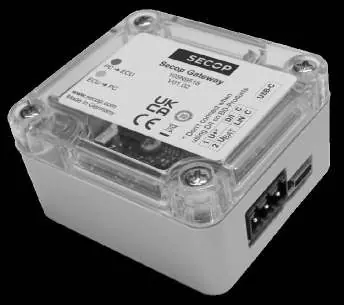
The Secop Gateway 105N9518 is an interface device designed to connect Secop compressors to a PC. It replaces the older 105N9501 interface and is compatible with all existing Secop electronic units (controllers) featuring a communication interface. The device supports two communication modes: Transistor interface (I, D/I, or COM) and LIN interface. The mode is determined by the connection status of the U+/UBAT pin.
Package contents
- Secop Gateway unit
- USB 2.0 A/C cable
- Gateway communication (Comm.) cables for various Secop compressor series/controllers
Installation and connection
The gateway connects via USB to a PC and via the communication cable to the compressor controller. Ensure you follow the specific connection requirements for your compressor series:
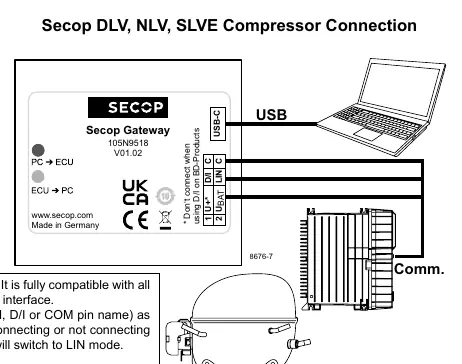
- BD-Series Compressors: Connect the communication cable to the controller. Note that the U+/UBAT pin should only be connected when using a BD controller equipped with LIN. On BD controllers equipped with a communication line labeled I, D/I, or COM, the U+/UBAT pin must not be connected.
- DLV, NLV, SLVE Compressors: Follow the specific wiring diagram provided in the manual for these series to ensure proper communication.
Communication modes
The gateway automatically switches modes based on the U+/UBAT pin connection:
- LIN Mode: Activated when the U+/UBAT pin is connected to a battery.
- Transistor Interface Mode: Activated when the U+/UBAT pin is left disconnected.
Driver installation
To ensure proper communication between the gateway and your PC, you must install the latest Virtual COM Port Driver. This driver is provided by Future Technology Devices International Ltd. and can be downloaded from www.ftdichip.com.
Official resources from the manual
Practical help
Common problems
Device not recognized by PC
Ensure the latest Virtual COM Port Driver from www.ftdichip.com is installed.
Communication failure with BD-Series compressor
Verify the U+/UBAT pin connection. If using a controller with I, D/I, or COM labels, ensure the U+/UBAT pin is NOT connected.
Before use
- Verify you have the USB 2.0 A/C cable and communication cables.
- Identify your compressor series (BD, DLV, NLV, or SLVE).
- Determine if your controller requires LIN or Transistor interface mode.
- Download and install the FTDI Virtual COM Port Driver.
- Check the U+/UBAT pin connection status based on your required communication mode.
Model compatibility
- Compatible with all existing Secop electronic units (controllers) featuring a communication interface.
- Replaces the older 105N9501 interface.

Manual page author
Michael Turner
Technical manual editor
Reviews PDF manuals for structure, safety notes, and practical product details so readers can find the right information quickly.