Industrial / Communication Modules
User Manual for Secop SDD Power Management Module 101N3110
Quick guide for the Secop SDD Power Management Module 101N3110. Learn about installation, wiring connections, PV panel setup, MPPT configuration, and error handling for your BD Nano compressor system.
Table of contents
Quick guide from the manual
The Secop SDD Power Management Module (PMM) 101N3110 is a specialized add-on power supply designed for off-grid and weak-grid appliances using the BD Nano compressor. It manages power from AC sources and PV panels, providing a regulated output for the compressor and auxiliary devices.
Installation
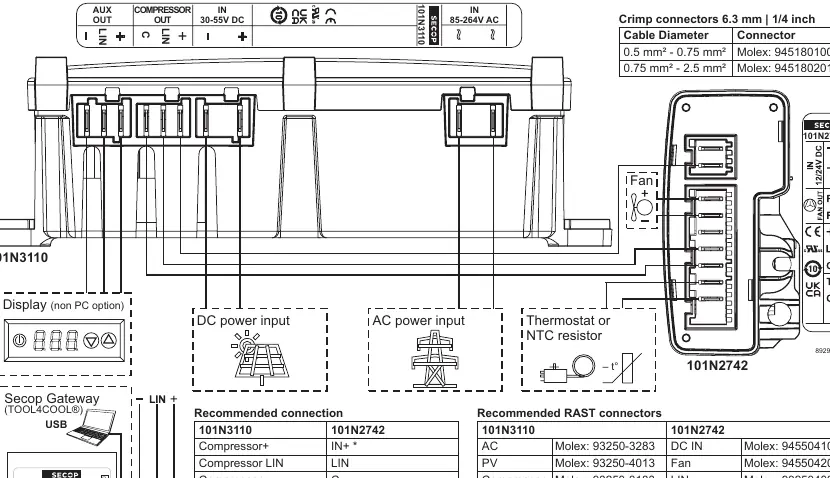
The module is designed for fixed installation using 4 screws. Ensure the interconnection between the compressor's electronic unit (101N2742) and the SDD PMM is executed according to the wiring diagram provided in the manual.
AC Power Input
The AC input supports a wide range from 85V to 264V AC (40Hz to 65Hz). Note that the unit is enclosed in plastic and does not have a protective earth connection. It can withstand voltage spikes up to 510V AC. The AC supply must be fused with a standard 10A household circuit breaker as the unit has no internal fuse.
PV Input and MPPT
The PV input is designed for use with up to 72-cell panels. It features a built-in Maximum Power Point Tracking (MPPT) algorithm to optimize compressor RPM based on available solar energy. The input is protected against reverse polarity and can withstand voltages up to 58V. A 15A automotive fuse is required for the PV input.
Outputs and Communication
- Compressor Output: Specifically designed for the BD Nano-Series controller 101N2742. The SDD PMM acts as the master controller.
- AUX Output: Delivers stabilized 24V and up to 30W continuous power. It remains active as long as the compressor output is enabled.
- AUX LIN: A communication interface used to connect a master controller, Secop Gateway, or datalogger. It supports Modbus communication and is configurable via the TOOL4COOL software.
Error Handling
If an operational error is detected by the SDD PMM or the compressor controller, it is reported to the LIN interface via a Modbus register. Errors can be accessed using the Secop Gateway and TOOL4COOL software. The unit also features an internal LED that blinks the error code.
Practical help
Common problems
Compressor not running
Check if the AUX output is disabled due to power loss or insufficient power supply (e.g., bad sun conditions or no AC).
Communication error
Verify the LIN interface connection and check the error log via the Secop Gateway and TOOL4COOL software.
Damage to electronic unit
Ensure supply voltage is not connected to the LIN+ pin, as this is a voltage output for displays and will damage the unit.
Before use
- Ensure AC supply is fused with a 10A household circuit breaker.
- Install a 15A automotive fuse for the PV input.
- Verify wiring connections match the recommended RAST connector list.
- Ensure the compressor controller is the compatible BD Nano-Series 101N2742.
- Use TOOL4COOL software for initial configuration.
Images and diagrams
- The wiring diagram illustrates the connections for AC input, DC PV input, Compressor output, and the AUX LIN interface.
- The connector table provides specific Molex part numbers for all required RAST connectors.
Model compatibility
- Compatible only with BD Nano-Series controller 101N2742.
- AUX LIN interface is compatible with Secop Gateway (109N9518).

Manual page author
Emily Carter
User documentation editor
Prepares concise manual descriptions and highlights the most useful setup, operation, and maintenance information for readers.