Electronics / Special Effects
User Manual for SHOWVEN SONICBOOM RGB Fog Machine
Comprehensive user guide for the SHOWVEN SONICBOOM RGB fog machine. Includes installation, DMX control, safety instructions, maintenance, and troubleshooting steps.
Table of contents
Manual images
Click an image to enlargeQuick Guide from the Manual
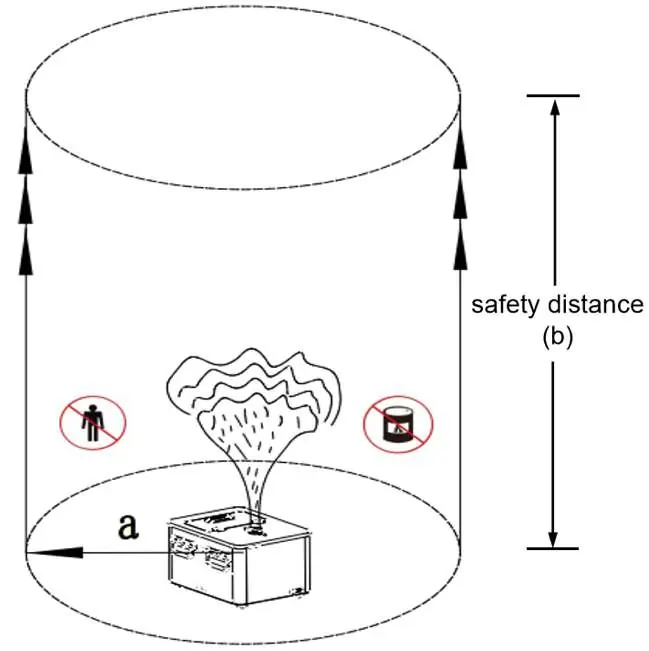
The SHOWVEN SONICBOOM RGB is a professional fog machine. Before operation, ensure the power supply matches the rated voltage and the unit is well-grounded. Always use original SHOWVEN FX-S series or FX-CI fog fluid. The machine requires a 17-minute heating-up period. Ensure a safety distance of at least 4m-8m (depending on wind) and 20m in the firing direction. Never point the nozzle at people or objects.
Structure and Components
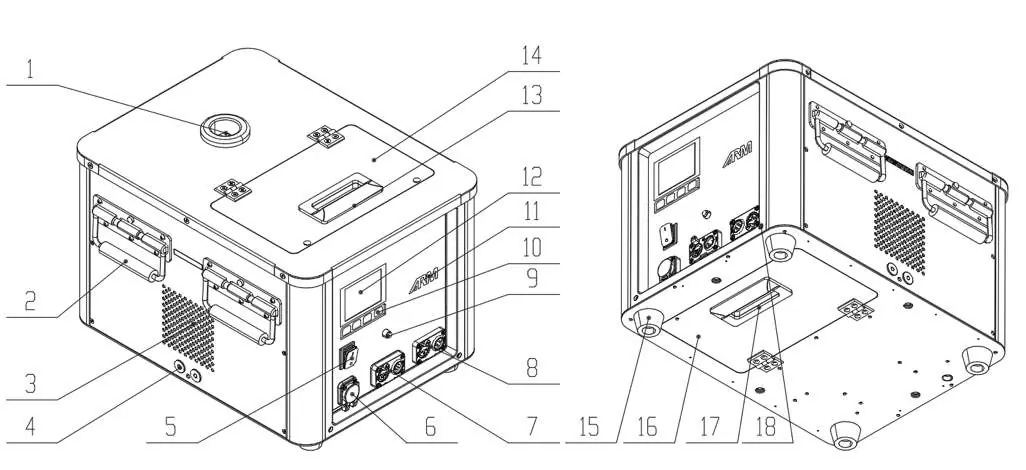
The device features 18 key components, including the output nozzle, handle, air inlet, bracket installation holes, power switch, power input, 3-pin and 5-pin DMX ports, fuse, LCD screen, and fluid tank access panels. Refer to the structure diagram for the exact location of these parts.
Installation
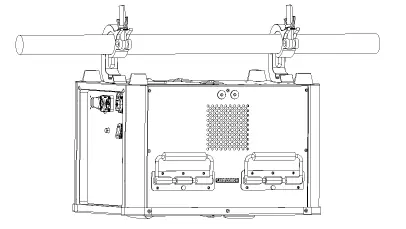
The machine is suitable for outdoor and well-ventilated environments. It can be installed in any direction, including upside down. If installing upside down, remove the fluid tank, turn the machine, and replace the tank. Always use a safety rope for hanging installations. Ensure at least 50cm of space around the machine for ventilation.
Operation
Filling: Fill the tank with original SHOWVEN color smoke fluid. Always wear gloves when handling fluid and the equipment.
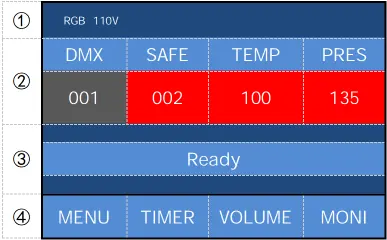
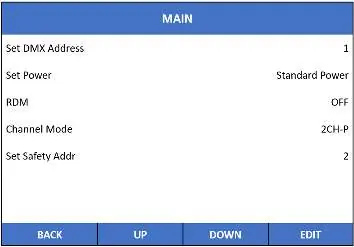
Powering On: Connect to a suitable power supply and turn on the switch. The LCD will display "Warm up". Heating takes approximately 17 minutes. You can switch between Standard and Low power modes in the menu.
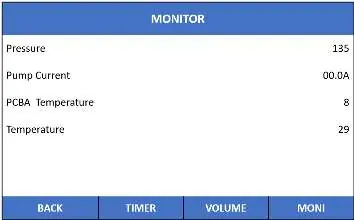
Firing: Once the TEMP and PRES values reach 100 and 135 respectively (background turns red), the machine is ready. Use the "VOLUME" button for manual firing or control via DMX.
DMX Control
The machine supports two DMX modes: 1CH-N (Single channel) and 1CH-P (Single channel with safety channel). Connect machines in series using DMX cables and use a terminator on the last unit.
Maintenance and Cleaning
Cleaning is critical for machine longevity. After each show, remove the fluid bottle and use FX-CI or distilled water to flush the pipe system. Fire the machine 5-10 times with the cleaning fluid until the output is white or colorless. Depressurize the device before turning it off.
Troubleshooting
If the machine fails to work, check the fog fluid level, fuse, and power connections. If the machine cannot be controlled, check the DMX connector and cable. For heating issues, ensure the cooling fan is working and allow the machine to cool down before restarting.
Practical help
Common problems
Few smoke output
Check if fog fluid is sufficient. Clean or replace the filter in the fluid tank. Check the pipe system for blockages.
Reached setting temp but no smoke
Replace fluid with FX-CI, fire the machine several times after heating up, or replace the heating block.
Temperature cannot reach setting
Check if the cooling fan is working normally. Power off the machine, let it cool down, and restart.
Machine cannot be controlled by controller
Check the DMX connector on the machine and verify the DMX cable integrity.
Before use
- Ensure power supply is consistent with rated voltage and the socket is well-grounded.
- Ensure at least 50cm of space around the machine for ventilation.
- Fill the tank with original SHOWVEN FX-S or FX-CI fog fluid.
- Verify the safety isolation zone (4m-8m radius, 20m height).
- Ensure the nozzle is not pointed at personnel or easily stainable objects.
- If hanging, ensure a safety rope is installed.
Specs in practice
- Heating up time
- Approximately 17 minutes (longer in low power mode).
- Max output distance
- 12 meters.
- Tank capacity
- 3 liters.
Images and diagrams
- Safety isolation zone: A cylindrical space defined by radius 'a' and height 'b' where unauthorized persons are prohibited.
- Structure diagram: Identifies 18 parts including nozzle, handle, DMX ports, and tank covers.
Model compatibility
- Use only original SHOWVEN FX-S/PINK, GREEN, BLUE, YELLOW, PURPLE or FX-CI fluid.
- Do not add pigment, water, or other materials to the fuel tank.
- No low power mode is available when using RGB smoke mode.

Manual page author
David Miller
Documentation analyst
Organizes user manual content into clear summaries, with attention to model details, product context, and everyday usability.