Power / Solar Inverters
Installation Guide for Solplanet ASW 05-15kH-T2-T3-DG Hybrid Inverter
Quick installation guide for Solplanet ASW 05-15kH-T2-T3-DG series hybrid inverters. Includes mounting instructions, electrical connection steps for AC, DC, battery, and communication setup.
Table of contents
Manual images
Click an image to enlargeQuick guide from the manual
This document provides essential installation instructions for the Solplanet ASW 05-15kH-T2-T3-DG series hybrid inverters. Before beginning, ensure the battery is not fully discharged and that all safety precautions are followed. The inverter is designed for indoor and outdoor use and must be connected to PV modules of protection class II. Always disconnect the product from all voltage and energy sources before performing any work.
Overview
The inverter features several ports for system integration:
- Battery Connector Port
- DC-Switch
- PV Input
- Ai-Dongle
- Communication Ports
- Diesel Generator Connector Port
- AC Connector Port
- EPS Load Connector Port
- Additional Grounding Screw
Mounting
Ensure the mounting environment is suitable for the inverter, considering temperature and ventilation requirements. Use the provided mounting bracket to secure the unit to the wall. Follow the drilling and fastening steps carefully to ensure the unit is stable.

AC Connection
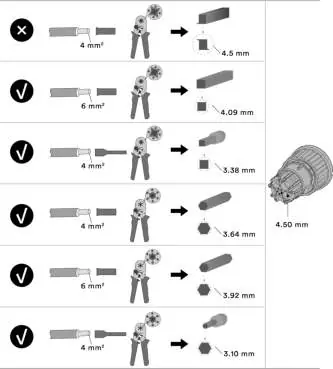
The AC terminals (GEN, Load, Grid) are color-coded. Ensure correct wiring according to the terminal color requirements. Use properly insulated tools and follow the crimping instructions provided in the manual to prepare the cables.
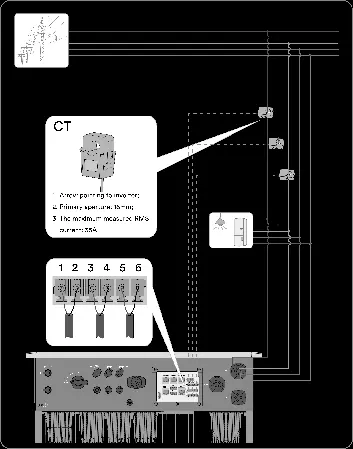
E-Meter communication
The inverter supports optional Current Transformer (CT) connection or Smart Meter connection (Eastron SDM630-Modbus V2 or CHINT DTSU666). One E-Meter communication option is mandatory when operating in Self-Consumption mode.
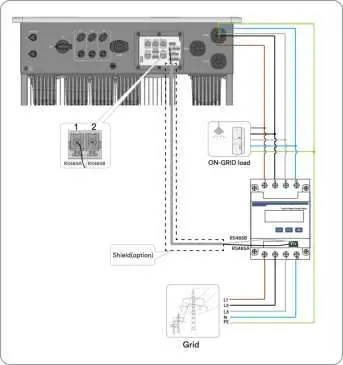
Communication Setup
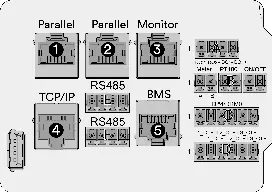
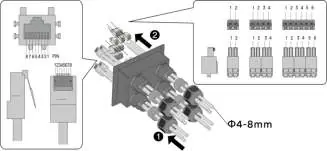
The inverter includes various communication ports, including RJ45 connectors for TCP/IP, BMS, and Monitor functions. Refer to the pin definition tables provided in the manual for correct wiring of RS485 and other communication lines.
System Communication Connection: LAN Stick
The system supports communication via a LAN stick for remote monitoring and maintenance. Ensure the connection is established according to the system diagram to enable app connectivity.
Contact
For technical assistance, contact the Solplanet Service Department. Provide the inverter model, serial number, PV module details, fault code, and installation location. Contact details for EMEA, APAC, LATAM, and China are available in the manual.
Manufacturer information
Solplanet
Practical help
Common problems
Battery fully discharged
Contact the battery manufacturer for further proceedings before commissioning the system.
Ground fault
Disconnect the product from voltage and energy sources immediately. Do not connect PV strings with ground faults.
Overvoltage during measurement
Use measuring devices with a measurement span higher than the DC input voltage range.
Before use
- Ensure the battery is not fully discharged.
- Verify PV modules are protection class II.
- Check that the installation site allows for proper ventilation.
- Ensure all tools are properly insulated.
- Verify grid structure (TN-S supported).
Specs in practice
- Battery Connector
- Connection for approved intrinsically safe lithium-ion batteries.
Images and diagrams
- Wiring diagrams for Australia and Europe are provided to guide AC and EPS connections.
- Pin definitions for RJ45 and terminal blocks are detailed for communication setup.
- Smart meter connection diagrams for Eastron and CHINT models are included.
Model compatibility
- Requires intrinsically safe lithium-ion battery approved by Solplanet.
- Supports Eastron SDM630-Modbus V2 and CHINT DTSU666 smart meters.
- Grid structure supported is TN-S.

Manual page author
Emily Carter
User documentation editor
Prepares concise manual descriptions and highlights the most useful setup, operation, and maintenance information for readers.