Smart Home / Motor Controllers
User Manual for Somfy Sonesse2 40 Zigbee Motor
Quick guide for the Somfy Sonesse2 40 Zigbee motor. Learn how to install, wire, commission, and operate your blind motor using the TaHoma app or a control point.
Table of contents
Manual images
Click an image to enlargeQuick guide from the manual
The Sonesse2 40 Zigbee motor is designed for interior vertical blinds and tiltable venetian blinds. This manual covers installation, wiring, and commissioning via the TaHoma pro application (recommended) or a manual control point. The motor supports two main solutions: TaHoma switch (connected mode) and TaHoma ready (control point only).
Installation
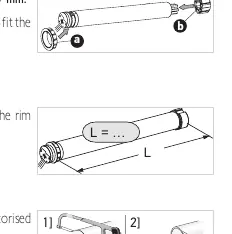
The motor must be installed by a home motorisation and automation professional. Ensure the tube inner diameter is greater than 37 mm. The crown is mandatory for installation. Secure the drive wheel to the winding tube using 4 self-tapping screws or pop rivets to prevent movement.

Wiring
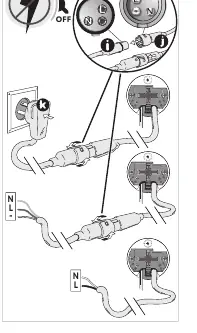
Connection must be done in a junction box. Ensure cables passing through metal walls are protected. The motor cable is not removable. Follow the voltage-specific wiring table provided in the manual for 120V, 220V, or 230V connections.
Commissioning
Commissioning can be performed in two ways:
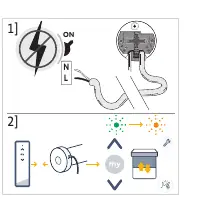
- TaHoma pro application: Recommended for easier setup. Requires a Somfypro account and internet access.
- Control point: Use the PROG button on the motor to enter programming mode (LED blinks orange). Use the control point to pair with the motor.
Operation
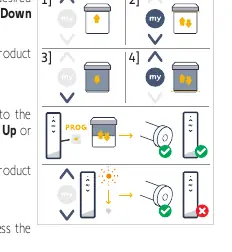
The motor supports a favourite position (my). To program it, move the blind to the desired position, stop it, and hold the 'my' button until the motor moves briefly. To use it, press the 'my' button twice in succession.
Troubleshooting
If the motor is noisy, check if the wheel and crown are adapted to the tube, or if there is debris in the tube. If the motor does not work, check the wiring, thermal protection status, or the control point battery.
Technical Data
The motor operates on the 2.4 GHz - 2.4835 GHz frequency band. It is rated IP30 (indoor use only) and is a Class II device. Operating temperature range is 0°C to 60°C.
Practical help
Common problems
Motor is noisy
Check if the wheel and crown are adapted to the tube, reduce mechanical play between drive and tube, or remove debris from the tube.
Motor stops too soon or too late
Readjust the end limits using the commissioning procedure.
Motor does not work
Check wiring, wait for the motor to cool down if in thermal protection mode, or check the control point battery.
Before use
- Verify tube inner diameter is > 37 mm
- Ensure professional installation
- Check power supply voltage (120V, 220V, or 230V)
- Download TaHoma pro app for recommended setup
Specs in practice
- Safety Level
- Class II
Images and diagrams
- Wiring diagram showing Neutral (N) and Live (L) connections
- Assembly steps for crown and drive wheel
- End limit setting sequences using control point buttons
Model compatibility
- Compatible with TaHoma switch and TaHoma ready solutions

Manual page author
Emily Carter
User documentation editor
Prepares concise manual descriptions and highlights the most useful setup, operation, and maintenance information for readers.