Home / Garage Door Openers
Sommer 4026 2-Channel Transmitter User Manual
A comprehensive guide for the Sommer 4026 2-Channel Transmitter. Learn how to pair your transmitter, delete existing radio codes, and configure the light function with step-by-step instructions.
Table of contents
Manual images
Click an image to enlargeQuick guide from the manual
This guide covers the initial operation of the Sommer 4026 2-Channel Transmitter. It includes procedures for pairing the transmitter with the receiver, deleting previously learned codes, and configuring the light function.
Learning the radio code
Follow these steps to pair your transmitter with the receiver:
- Press the Learn button (1) on the control housing once. The LED (Radio) will turn solid.
- Press the desired transmitter button (2).
- The LED (Radio) will flash briefly. If the LED lights up for a second, the transmitter has been successfully learned.
You can repeat these steps to program additional transmitters. A maximum of 20 storage locations are available.
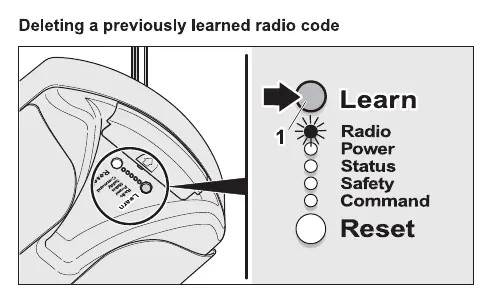
Deleting a previously learned radio code
If you need to remove a transmitter from the receiver's memory:
- Press the Learn button (1) on the control housing for at least five seconds until the LED (Radio) blinks slowly.
- Press the desired transmitter button (2).
- When the LED (Radio) turns off, the radio code for this transmitter button has been deleted.
Light function
To switch the light on the opener on or off separately using the transmitter, you must "learn in" a second transmitter button function:
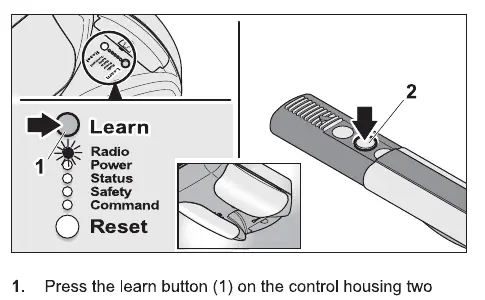
- Press the Learn button (1) on the control housing two times. The LED (Radio) will blink briefly.
- Press the desired transmitter button (2).
- When the LED (Radio) lights up for a second, the transmitter button has been learned for the light function.
Other functions
Depending on the DIP switch settings, other functions such as "partial opening" or "defined operation" can be learned in for a second transmitter button using the same procedure described in the light function section. Refer to the "Settings" chapter in your full manual for more details.
Practical help
Common problems
Transmitter does not control the opener
Ensure the radio code has been learned correctly by following the 'Learning the radio code' procedure.
Need to clear a transmitter from memory
Use the 'Deleting a previously learned radio code' procedure to remove the specific transmitter button code.
Before use
- Ensure you have access to the control housing where the Learn button is located.
- Verify the transmitter has a working battery.
- Confirm the receiver is powered on.
- Identify the Learn button and the LED indicator on the control housing.
Specs in practice
- Storage locations
- The receiver can store a maximum of 20 transmitter codes.
- Learn button
- The primary interface on the control housing used to pair or delete transmitters.
Images and diagrams
- The control housing features a Learn button and an LED indicator labeled 'Radio'.
- The transmitter has buttons (labeled 2 in diagrams) used for pairing and triggering functions.
Model compatibility
- Compatible with Sommer openers supporting radio code learning.
- Supports additional functions like partial opening or defined operation depending on DIP switch settings.

Manual page author
Michael Turner
Technical manual editor
Reviews PDF manuals for structure, safety notes, and practical product details so readers can find the right information quickly.