Electronics / Remote Controls
Replacement Remote Control for Dane-Elec So-Speaky PVR 1TB
A comprehensive button mapping guide for the Mandis replacement remote control designed for the Dane-Elec So-Speaky PVR 1TB. This guide helps you identify the correct button functions on your replacement remote.
Quick answers from the manual
Quick answer
- This document is a button mapping guide for the Mandis replacement remote control for the Dane-Elec So-Speaky PVR 1TB, showing how to access all original functions using the new remote layout. p. 1, 2
Key actions
- Use the 'Shift' button in combination with other keys to access secondary functions as indicated in the mapping table. p. 1, 2
Problems and fixes
Function not found on primary button
Check the 'Replacement' column for 'Shift +' combinations.
p. 1, 2Where to find it in the PDF
- Remote Button Mapping Page 1 p. 1
- Remote Button Mapping Page 2 p. 2
Table of contents
Quick guide from the manual
This document serves as a reference guide for the Mandis replacement remote control designed for the Dane-Elec So-Speaky PVR 1TB. It provides a direct mapping between the original remote control buttons and the corresponding buttons on the replacement unit.
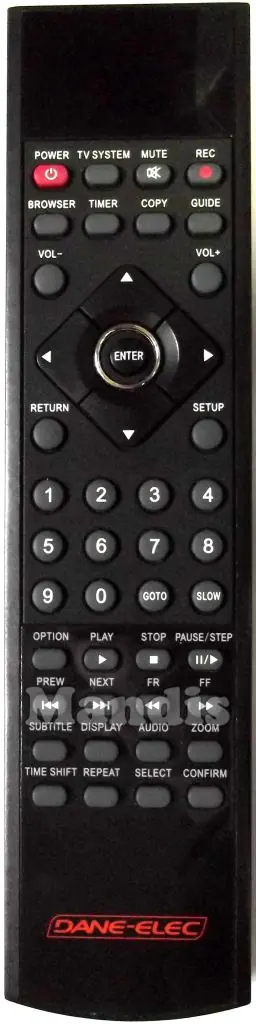
Using the Replacement Remote
The replacement remote control may feature a different physical layout compared to the original device. To ensure full functionality, refer to the mapping tables provided in this document. Note that some functions on the replacement remote are accessed by using the Shift button in combination with another key.
Button Mapping Reference
The document is organized into tables that list the Original button name on the left and the Replacement button or button combination on the right. Use these tables to locate specific features such as Power, Menu, Playback controls, and Navigation.
- Primary Functions: Standard buttons like Power, Volume, and Channel navigation are mapped directly.
- Secondary Functions: Functions labeled as 'Shift +' require pressing the Shift button followed by the indicated key to activate the specific command.
- Playback Controls: Play, Pause, Stop, and navigation controls are clearly mapped to ensure compatibility with the PVR functions.
Manufacturer information
Mandis
Practical help
Common problems
Function not working as expected
Check the mapping table to see if the function requires pressing the 'Shift' button first.
Cannot find a specific button
The replacement remote may use different labeling; refer to the 'Replacement' column in the mapping table to find the equivalent button.
Before use
- Ensure the replacement remote has fresh batteries installed.
- Verify the device is powered on.
- Keep the mapping guide handy to identify button functions.
- Test basic functions like Power and Volume first.
Images and diagrams
- The document includes visual representations of both the original and the replacement remote controls.
- The mapping tables provide a clear 'Original' vs 'Replacement' comparison for every button.
Model compatibility
- This remote is specifically configured for the Dane-Elec So-Speaky PVR 1TB.

Manual page author
Michael Turner
Technical manual editor
Reviews PDF manuals for structure, safety notes, and practical product details so readers can find the right information quickly.