Lighting / Controllers & Dimmers
SuperLightingLED RBX and RCX Series 2.4G Touch Remote Control User Manual
User manual for SuperLightingLED RBX and RCX series 2.4G touch remote controls. Includes pairing instructions, zone control, technical specifications, and troubleshooting tips.
Quick answers from the manual
Quick answer
- To bind the remote, power on the controller and long press the ON button within 20 seconds. To clear all bound remotes, power on the controller, turn off the lights completely, and long press the OFF button within 20 seconds. p. 4, 5
Key actions
- Bind remote p. 4, 5
- Clear bound remotes p. 4, 5
Problems and fixes
Unresponsive or chaotically flashing LED
Replace the battery; do not use inferior batteries.
p. 6Maintenance and reset
- Clear all bound remotes p. 4, 5
Technical specifications
| Parameter | Value | Meaning | Pages |
|---|---|---|---|
| Working Voltage | 3V | CR2032 battery | p. 6 |
| RF Frequency | 2.4GHz | Wireless communication frequency | p. 6 |
| Remote Range | 30M | Maximum transmission distance | p. 6 |
Where to find it in the PDF
- Remote Control Instructions p. 1
- Remote Models p. 2
- 86-Type Panel Models p. 3
- Remote Button Functions p. 4
- Panel Button Functions p. 5
- Technical Parameters and Cautions p. 6
Table of contents
Manual images
Click an image to enlargeQuick guide from the manual
This manual covers the operation of the SuperLightingLED RBX (RB1-RB4) and RCX (RC1-RC4) series 2.4G RF wireless touch remote controls. These remotes are designed to work with SP63XE, SP52XE, and similar series controllers. Key features include 2.4G wireless technology, touch-sensitive controls, and support for multi-zone and multi-remote configurations.
Remote and Panel Models
The RBX series consists of handheld remotes (RB1, RB2, RB3, RB4), while the RCX series consists of wall-mounted 86-type panels (RC1, RC2, RC3, RC4). Each model offers specific functions such as brightness adjustment, color temperature control, or RGB color hue control depending on the specific version.
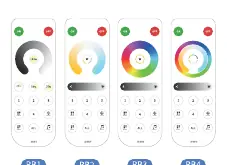

Binding and Unbinding Remotes
To ensure the remote controls the light, it must be bound to the controller:
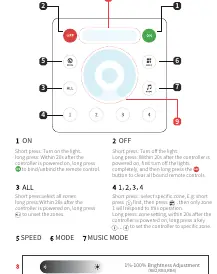
- Binding: Within 20 seconds after the controller is powered on, long press the ON button to bind the remote.
- Unbinding/Clearing: Within 20 seconds after the controller is powered on, first turn off the lights completely, and then long press the OFF button to clear all bound remote controls.
Zone and Control Operations
- Select Zone: Short press the zone number (1-4) to select a specific zone.
- Zone Setting: Within 20 seconds after the controller is powered on, long press a zone key (1-4) to set the controller to that specific zone.
- All Zones: Short press ALL to select all zones. Long press ALL within 20 seconds of powering on the controller to unset the zones.
- Power Control: Short press ON to turn on the light; short press OFF to turn off the light.
Technical Parameters
- Working Voltage: 3V (CR2032 battery)
- RF Frequency: 2.4GHz
- Remote Range: 30 meters
- Quiescent Current: 26uA
Cautions
- Ensure the remote model matches the controller model.
- If the LED indicator is unresponsive or flashes chaotically, replace the battery. Do not use inferior batteries.
- Do not touch the touch panel within 2 seconds after installing a new battery.
- Avoid using the remote in environments with high humidity, high temperature, dust, or high pressure.
- Avoid areas with strong electromagnetic interference, as this will significantly reduce the remote control distance.
Practical help
Common problems
Remote is unresponsive or LED flashes chaotically
Replace the battery with a high-quality CR2032 battery.
Remote does not control the lights
Ensure the remote is correctly bound to the controller. Perform the binding procedure within 20 seconds of powering on the controller.
Reduced remote control distance
Ensure the remote is not being used in an area with strong electromagnetic interference.
Before use
- Verify the remote model is compatible with your controller model.
- Install a fresh CR2032 battery.
- Ensure the controller is powered on before attempting to bind.
- Do not touch the panel for 2 seconds after inserting the battery.
Specs in practice
- Working Voltage
- Requires a 3V CR2032 battery.
- RF Frequency
- Operates on 2.4GHz wireless frequency.
- Remote Range
- Maximum effective distance is 30 meters.
Images and diagrams
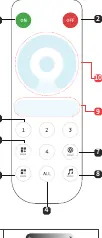
- The remote diagram identifies buttons for ON/OFF, Zone selection (1-4), ALL zones, Mode, Speed, and Music mode.
- The panel diagram shows the layout of the 86-type wall panels, which mirror the functionality of the handheld remotes.
Model compatibility
- Compatible with SP63XE, SP52XE, and similar series controllers.

Manual page author
Emily Carter
User documentation editor
Prepares concise manual descriptions and highlights the most useful setup, operation, and maintenance information for readers.