Automotive / Electrical Accessories
User Manual for SP Connect 12V Hard Wire Cable
Quick guide for the SP Connect 12V Hard Wire Cable. Includes wiring instructions, mounting steps, and technical specifications for safe installation.
Table of contents
Manual images
Click an image to enlargeQuick Guide from the Manual
This document provides installation and usage instructions for the SP Connect 12V Hard Wire Cable. It is designed to power the SP Wireless Charging Module. Important: To avoid battery drainage, the cable must be wired to the ignition positive, not a steady positive source. It is highly recommended to visit an authorized workshop for installation to ensure your vehicle's warranty remains valid.
Wiring and Installation
The cable connects the 12-24V battery to the Wireless Charging Module. Ensure the connection is made to the ignition-switched power source so the charger turns off when the vehicle is off.
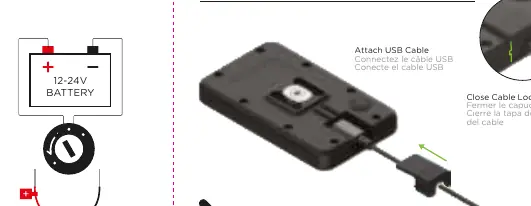
Cable Lock Cap: The module features a cable lock cap to secure the USB connection. To remove the cap, lift the lock cap at the rear and push in the direction of the cable. To close, ensure the cap is securely fastened over the cable connection.
Mounting the Cable
Follow these steps to mount the cable securely to your vehicle:

- Clean the surface where the cable will be mounted.
- Apply the provided sticker to the mounting surface.
- Use the included zip ties to secure the cable firmly in place.
- Connect the USB-A end to the power source and the USB-C end to the charging module.
Specifications
- Input Voltage: DC 12-24V
- Max Power Output: 18W
- Output Modes: DC 5V/2A, 9V/2A, 12V/1.5A
- Operating Temperature: -20 to +60 C
- Features: USB-A to USB-C cable, fast charging for Samsung and iPhone, reverse polarity protected.
Practical help
Common problems
Battery drainage
Ensure the cable is wired to the ignition positive, not a steady positive. Unplug the charger when not in use for long periods.
Risk of voiding vehicle warranty
Visit an authorized workshop for professional installation.
Before use
- Verify the power source is 12-24V.
- Ensure the connection is wired to ignition positive.
- Check that the cable lock cap is properly closed.
- Confirm the mounting surface is clean before applying the sticker.
Specs in practice
- Input Voltage
- DC 12-24V range compatible with most motorcycle batteries.
- Max Power Output
- 18W total power capacity for fast charging.
- Reverse Polarity Protected
- Prevents damage if the positive and negative wires are accidentally swapped.
Images and diagrams
- The wiring diagram illustrates the connection between the 12-24V battery and the charging module.
- The mounting diagram shows the application of the sticker and the use of zip ties for cable management.
Model compatibility
- Compatible with SP Wireless Charging Module #53220.
- Supports fast charging for Samsung and iPhone devices.

Manual page author
Michael Turner
Technical manual editor
Reviews PDF manuals for structure, safety notes, and practical product details so readers can find the right information quickly.