Electronics / USB Hubs & Docking
User Manual for StarTech 1110C-MOBILE-TV-CART Height-Adjustable Mobile TV Cart
Comprehensive user guide for the StarTech 1110C-MOBILE-TV-CART. Includes assembly instructions, safety warnings, weight capacities, and operation steps for height adjustment and TV mounting.
Table of contents
Manual images
Click an image to enlargeQuick Guide
The StarTech 1110C-MOBILE-TV-CART is a height-adjustable mobile cart designed for indoor use. Assembly requires two people. Before beginning, ensure you have a Phillips head screwdriver and a clear, flat workspace. The cart supports a maximum TV weight of 220 lbs (100 kg) and VESA mounting patterns ranging from 200x200 to 1000x600.
Installation
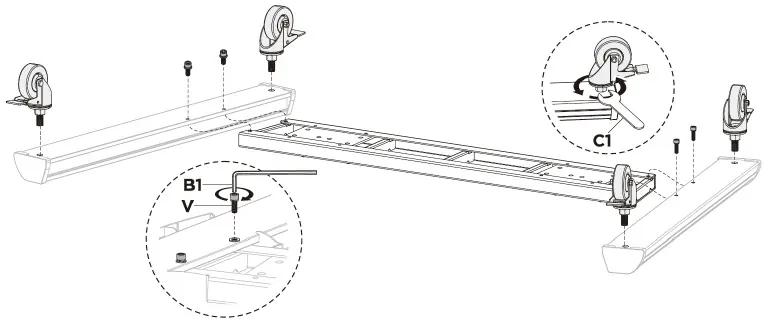
Attach the Legs and Casters
Flip the Middle Base, Left Leg, and Right Leg upside down on a soft surface to prevent scratching. Secure the legs to the base using the provided M6 x 25mm screws and the Hex Key. Insert the casters into the corner holes and tighten with the Wrench. Flip the assembly upright.
Attach Columns and Mounting Plate
Insert the Left and Right Columns into the base receptacles. Secure them from the bottom using M8 x 25mm screws. Once upright, attach the Plastic Handles and covers. Install the Mounting Plate to the top of the columns using M6 x 14mm screws. Attach the Crank Handle to the outer column.
Install Shelves
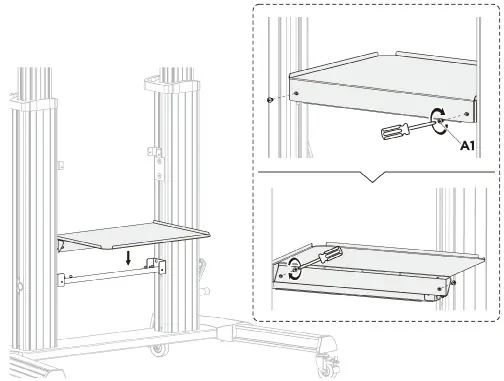
Install the Lower Shelf first by positioning it over the Connecting Bar and securing it to the brackets with M6 x 8mm screws. Repeat the process for the Upper Shelf.
Mount the TV
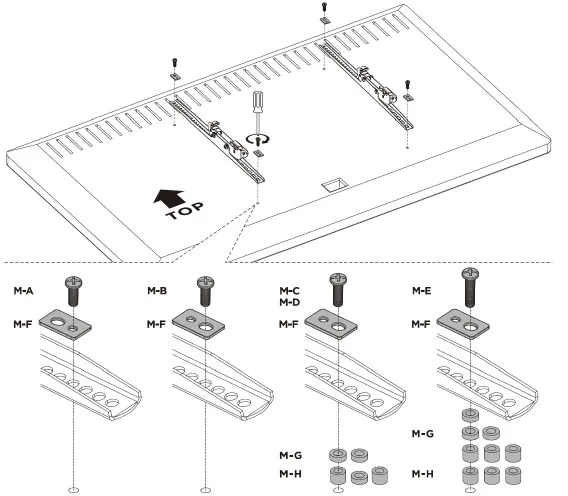
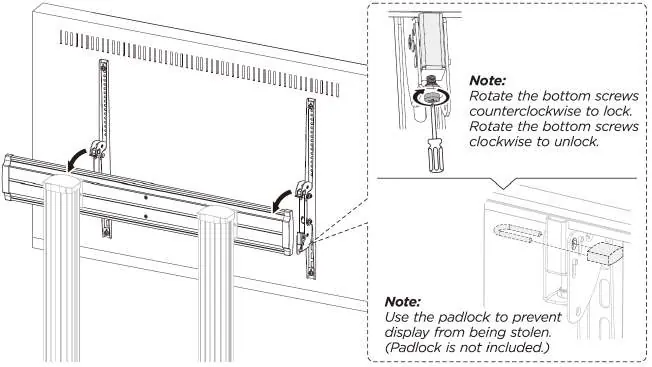
Determine the VESA hole depth and diameter on your TV. Attach the TV Mounting Brackets to the back of the TV using the appropriate M-Type screws and spacers. With two people, lift the TV and hang it onto the Mounting Plate. Tighten the bottom screws on the brackets to secure the TV.
Assemble the Camera Shelf
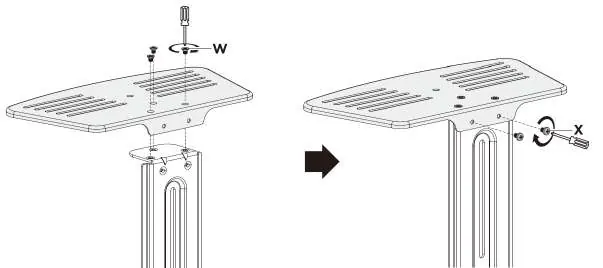
Attach the Camera Shelf to the Connecting Plate using M4 x 6mm screws. Secure the assembly to the Mounting Plate at the desired height.
Operation
Adjusting Height
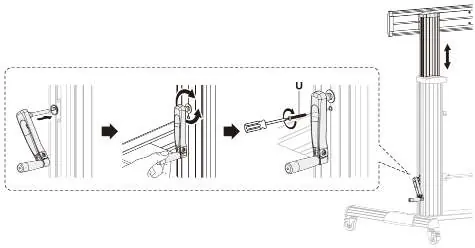
To adjust the TV height, remove the M5 x 40mm screw from the Crank Handle. Rotate the handle to raise or lower the mount to the desired height, then re-insert and tighten the screw to lock the position. Use the height markings on the columns as a guide.
Moving the Cart
Always disconnect cables and remove media devices before moving the cart. Ensure casters are unlocked. Two people are required to move the cart safely.
Safety and Warnings
- Two-Person Task: Do not attempt to assemble or mount the TV alone.
- Weight Limits: Do not exceed 220 lbs (100 kg) for the TV mount, or 11 lbs (5 kg) for the camera/multimedia shelves.
- Stored Energy: The spring mechanism can cause the assembly to move forcibly. Exercise caution.
- Pinch Hazards: Keep hands away from mechanical components when adjusting height.
- Indoor Use Only: Do not use this product outdoors.
Practical help
Common problems
TV is not level
Ensure both TV mounting brackets are positioned at an even height and are parallel to each other.
Difficulty moving the cart
Ensure all caster brakes are disengaged and that no cables are interfering with the wheels.
Height adjustment is stiff
Ensure the crank handle is properly installed and that the locking screw has been fully removed before attempting to rotate.
Before use
- Verify TV weight is under 220 lbs (100 kg).
- Check VESA pattern compatibility (200x200 to 1000x600).
- Ensure two people are available for assembly and TV mounting.
- Clear a flat, clean workspace.
- Have a Phillips head screwdriver ready.
Specs in practice
- TV Weight Capacity
- Maximum 220 lbs (100 kg).
- Shelf Capacity
- 11 lbs (5 kg) for both camera and multimedia shelves.
- VESA Compatibility
- Supports patterns from 200x200 up to 1000x600.
Images and diagrams
- Figure 1: Base and caster assembly.
- Figure 7: Crank handle installation and height adjustment.
- Figure 10: TV mounting bracket attachment.
- Figure 16: Height markings for TV center.
Model compatibility
- Indoor use only.
- Not for outdoor use.

Manual page author
Michael Turner
Technical manual editor
Reviews PDF manuals for structure, safety notes, and practical product details so readers can find the right information quickly.