Furniture / TV Stands
Installation and User Manual for Vogel's 062.287X Business & VC Trolley
Comprehensive installation and user guide for the Vogel's 062.287X Business & VC Trolley. Includes assembly steps, safety warnings, height adjustment instructions, control box reset procedures, and technical specifications.
Table of contents
Manual images
Click an image to enlargeQuick Guide
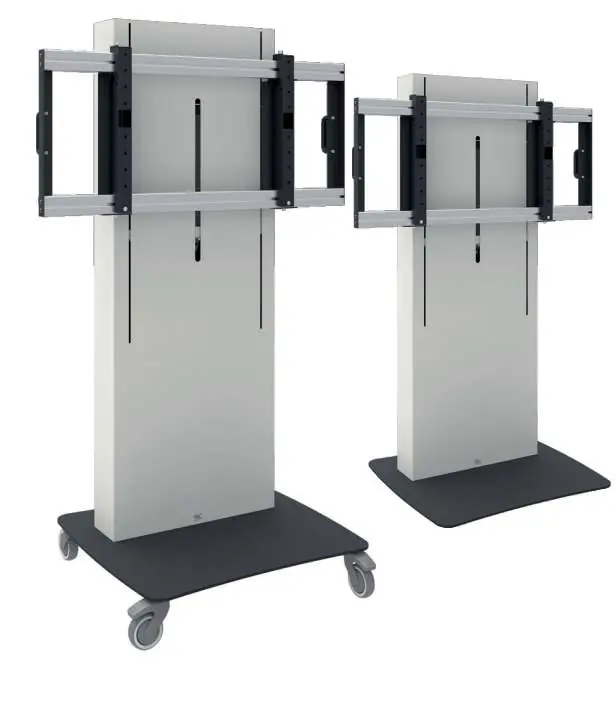
The Vogel's 062.287X Business & VC Trolley is designed for professional AV equipment. Key operational requirements include a maximum load capacity of 100 kg (220.5 lbs) and the necessity of two people to move the trolley safely. Always ensure the power cord is accessible and the trolley is used on a stable surface.
Safety Information
- Weight Limit: Do not exceed the maximum load of 100 kg (220.5 lbs). Exceeding this may cause instability, tipping, or equipment damage.
- Tipping Hazard: Do not place remote controls, toys, or other objects on the lift system. Do not place video equipment on the trolley legs.
- Electrical Safety: Connect only to a properly grounded outlet. Unplug before cleaning or performing maintenance.
- Moving the Trolley: Always disconnect the mains plug before moving. Two persons are required to move the product. Use caution when passing doorsteps.
- Supervision: Children older than six years may use the product only under adult supervision.
Installation Instructions
The installation must be performed by a certified installer. Ensure the structure to which the trolley is attached can support five times the combined weight of all equipment.
- Preparation: Ensure all parts are present. The trolley requires assembly with the mounting system.
- Mounting: Follow the specific steps provided in the manual (pages 7-9) to attach the mounting interface to the trolley and the screen.
- Cable Management: Fix all cables securely using the provided cable hooks and strain relief features.
- Final Check: Ensure all screws are tightened and the trolley is stable before mounting the display.
Operation
The trolley features electric height adjustment.
- Height Adjustment: Use the control buttons (Up/Down) to adjust the display height.
- Lowering: Always lower the display to the lowest position before transporting the trolley.
- Brakes: Lock the two wheel brakes when the trolley is in the desired position.
Instructions Reset Controlbox
If the lift system is not functioning correctly, follow these steps to reset the control box:
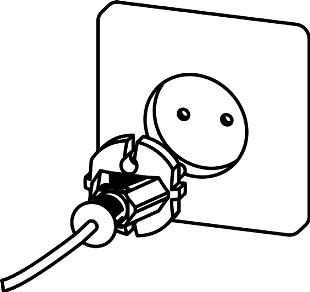
- Check all connections from the remote and power plug to the control box.
- Connect the power plug to the outlet.
- Move the display to the lowest position.
- Release the down button.
- Push and hold the down button for 30 seconds to complete the reset.
Technical Specifications
- Max Load: 100 kg / 220.5 lbs.
- Screen Sizes: 1x 55-86 inch or 2x 55-65 inch.
- Power Supply: 100-240V ~ 50/60Hz.
- Orientation: Landscape.
- Stroke: 660 mm (26 inches).
Practical help
Common problems
Lift system not moving or unresponsive
Perform a control box reset: ensure connections are secure, move to the lowest position, and hold the down button for 30 seconds.
Trolley instability or tipping risk
Ensure the total weight does not exceed 100 kg. Do not place objects on the lift mechanism or trolley legs.
Difficulty moving the trolley
Ensure two people are moving the unit, the mains plug is disconnected, and wheel brakes are unlocked.
Before use
- Verify the floor structure can support the total weight of the trolley and equipment.
- Ensure two people are available to move the trolley.
- Check that the power cord is accessible at all times.
- Confirm the screen size and weight are within the specified limits (100 kg max).
- Ensure the trolley is on a level surface before use.
Specs in practice
- Power Supply
- 100-240V ~ 50/60Hz. Ensure the outlet is properly grounded.
Images and diagrams
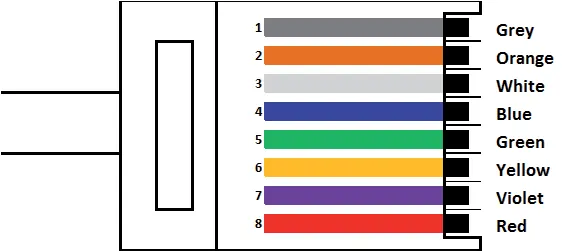
- Wiring Diagram: Details the RJ45 pinout for the control cable, showing which wire colors correspond to specific Up/Down functions.
- Assembly Steps: Illustrates the sequence for attaching the mounting interface and securing cables.
Model compatibility
- Compatible with 1x 55-86 inch screens or 2x 55-65 inch screens.
- Supports various VESA patterns depending on the interface used (e.g., 1000x400, 2000x400).
- Not for outdoor use.

Manual page author
Michael Turner
Technical manual editor
Reviews PDF manuals for structure, safety notes, and practical product details so readers can find the right information quickly.