Lighting / Controllers Dimmers
User Guide for Sunricher 0-10V Fixture-integrated PIR Sensor Controller
Quick guide for the Sunricher 0-10V PIR Sensor Controller. Learn about installation, wiring, reset procedures, detection patterns, and safety precautions.
Table of contents
Manual images
Click an image to enlargeQuick guide from the manual
The Sunricher 0-10V Fixture-integrated PIR Sensor Controller (SR-IG9035A-PIR-V) is a device designed for lighting control within a Wirepas mesh network. It operates on 12-24VDC power and provides a 0-10V signal output. Key features include daylight harvesting, occupancy detection, and a magnetic reset function. Important: Do not install the device while power is applied, and avoid exposing it to moisture.
Product Overview
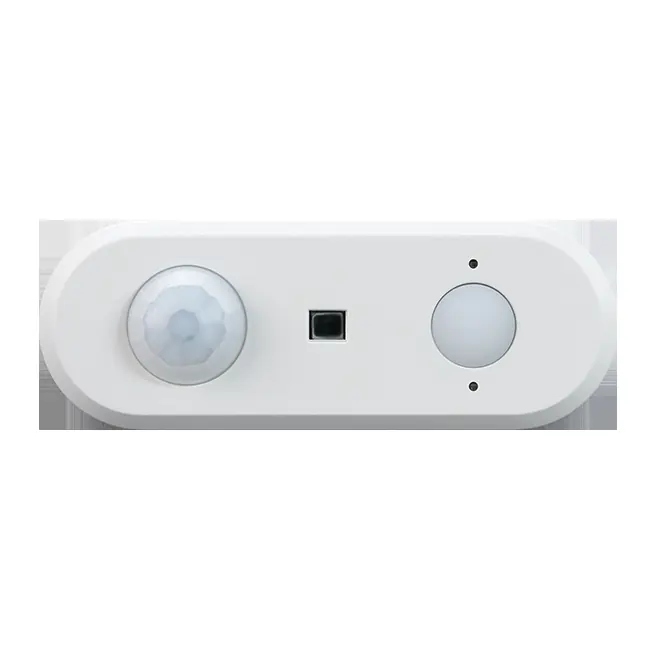
The controller features a PIR lens for motion detection, a light sensor for ambient light detection, and a reset key. It supports kinetic energy switches and EnOcean switches (EWSSB and EWSDB). The device is designed for indoor use with a typical wireless communication range of 20m to 25m.
Installation and Wiring
Follow the connection diagram provided in the manual to wire the device. Ensure the power supply is 12-24VDC. The wiring requires connection to a 0-10V dimmable driver. Warning: Ensure power is disconnected before starting installation.
Operation and Reset
To reset the device, you have two options:
- Reset Button: Press and hold the reset button on the controller for over 5 seconds until the indicator flashes.
- Magnetic Reset: Touch the top part of the sensor with a magnet for 5 seconds.
Successful reset is indicated by the LED flashing quickly.
Detection Pattern
The sensor is optimized for a mounting height of 2.5m, providing a detection area diameter of 5m. The detection area is divided into slow movement (person moving < 0.3m/s) and quick movement (person moving > 0.4m/s).
Installation Precautions
To ensure optimal performance and avoid false alarms, follow these guidelines:
- Avoid areas with frequent temperature changes (e.g., near air conditioners, fans, refrigerators, ovens).
- Avoid areas with significant air flow.
- Do not face glass doors or windows directly to avoid interference from strong light.
- Avoid installing opposite large, constantly moving objects.
- Avoid areas with screens, furniture, large potted plants, or other obstacles within the detection range.
- Avoid areas exposed to direct sunlight.
Practical help
Common problems
False alarms or unexpected triggering
Ensure the sensor is not placed near air conditioners, fans, heaters, or large moving objects. Check for direct sunlight or strong light interference.
Device not responding or not connecting
Verify the 12-24VDC power supply. Perform a reset by holding the button or using a magnet on the top of the sensor for 5 seconds.
Before use
- Ensure the power supply is 12-24VDC.
- Verify the 0-10V dimmable driver is compatible.
- Confirm the mounting height is approximately 2.5m.
- Ensure the installation location is free from direct sunlight and significant air flow.
- Check that no large obstacles are blocking the detection range.
Specs in practice
- Detection Area
- 5m diameter at 2.5m mounting height.
- Operating Temperature
- 0°C to 45°C.
Images and diagrams
- PIR lens: The primary sensor for detecting motion.
- Light sensor: Detects ambient light levels for daylight harvesting.
- Reset Key: Used to withdraw the device from the network/APP.
Model compatibility
- Compatible with kinetic energy switches.
- Compatible with EnOcean switches (EWSSB and EWSDB).
- Requires Wirepas mesh network environment.

Manual page author
David Miller
Documentation analyst
Organizes user manual content into clear summaries, with attention to model details, product context, and everyday usability.