Lighting / Fixtures
Tecnolite 15ETLED18MV Indoor LED Lighting Fixture
Quick guide for the Tecnolite 15ETLED18MV indoor LED lighting fixture. Includes installation steps, CCT color temperature settings, and safety instructions.
Table of contents
Quick guide from the manual
This document provides installation and operation instructions for the Tecnolite 15ETLED18MV indoor LED lighting fixture. Key features include a selectable color temperature (CCT) switch and a surface-mount design. Ensure the power is disconnected before starting any installation work.
Installation
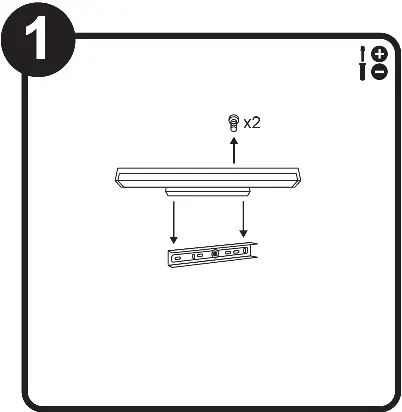
- Preparation: Ensure the power supply is disconnected.
- Mounting Bracket: Remove the mounting bracket from the fixture. Use the bracket to mark the drilling points on the surface.
- Drilling and Anchoring: Drill the necessary holes and insert the provided anchors (A-02). Secure the mounting bracket using the provided screws (A-01).
- Wiring: Connect the electrical wires according to the diagram. Ensure the ground connection is physical.
- Final Assembly: Attach the fixture to the mounted bracket and secure it with the screws.
CCT Color Temperature Selection
The fixture features a CCT selector switch that allows you to choose between three color temperatures:
- WW (Warm White): 3000 K
- NW (Neutral White): 4000 K
- CW (Cool White): 6500 K
Adjust the switch on the fixture to your preferred setting before or after installation.
Safety and Maintenance
Safety Precautions:
- The fixture must be installed at a minimum distance of 0.50 m from any combustible material to avoid fire hazards.
- The ground connection must be physical.
- Always disconnect the power source before installation or maintenance.
Maintenance:
- Clean the fixture and its internal parts with a dry cloth.
- Periodically check all electrical connections to ensure they remain secure.
- Wear gloves when handling the fixture to avoid burns, as parts may heat up during operation.
Technical Specifications
- Model: 15ETLED18MV
- Power Supply: 100-240 V ~ 50/60 Hz
- Power Consumption: 15 W
- Type: LED
Manufacturer information
Tecnolite
Practical help
Common problems
Fixture does not turn on
Verify that the power supply is connected and the circuit breaker is on. Check all wiring connections.
Risk of fire
Ensure the fixture is installed at least 0.50 m away from any combustible materials.
Before use
- Ensure the main power supply is disconnected.
- Verify the mounting surface is stable and suitable for the fixture.
- Confirm the ground connection is physical.
- Check that the voltage matches the 100-240V specification.
Images and diagrams
- Step 1: Detach the mounting bracket from the main fixture body.
- Step 2: Use the bracket to mark holes, drill, and secure with anchors and screws.
- Step 3: Wire the fixture, ensuring the ground wire is properly connected.
- Step 4: Mount the fixture to the bracket and use the CCT selector to set the desired light color.
Model compatibility
- Designed for indoor use only.
- Not suitable for constant voltage work if it exceeds the limits indicated on the product label.

Manual page author
David Miller
Documentation analyst
Organizes user manual content into clear summaries, with attention to model details, product context, and everyday usability.