Automotive / Bicycle Carriers
User Manual for Thule EasyFold XT F 2-bike Carrier
Comprehensive user guide for the Thule EasyFold XT F 2-bike carrier (Model 9655). Includes installation steps, safety instructions, weight limits, bike mounting procedures, and maintenance tips.
Quick answers from the manual
Quick answer
- The Thule EasyFold XT F 2-bike (9655) is a tow bar-mounted bike carrier designed exclusively for FIX4BIKE tow bars. It features a foldable design, locking mechanisms for security, and supports a maximum bike weight of 30 kg per bike. p. 1, 11, 12
Key actions
- Installing the carrier p. 14
- Mounting bikes p. 18
First start
- Record your key number and ensure the tow bar is a FIX4BIKE type. p. 12
Maintenance and reset
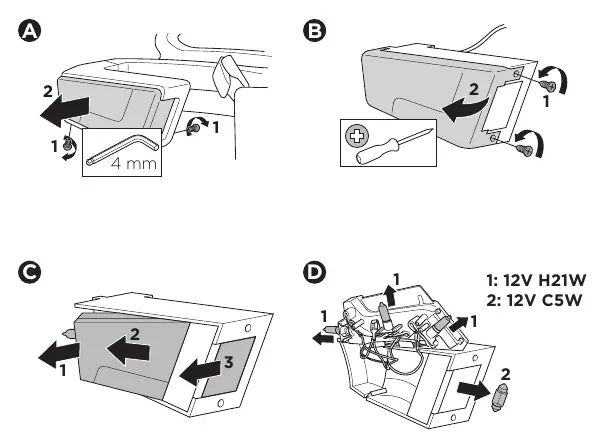
- Replace light bulbs using a 4mm Allen key or screwdriver. p. 23
Technical specifications
| Parameter | Value | Meaning | Pages |
|---|---|---|---|
| Max bike weight | 30 kg | Maximum weight per bike | p. 13 |
| Bulb 1 | 12V H21W | Light bulb type | p. 23 |
| Bulb 2 | 12V C5W | Light bulb type | p. 23 |
Where to find it in the PDF
- Safety Symbols p. 2, 10
- Installation p. 14, 17
- Bike Mounting p. 18
- Maintenance p. 23
Table of contents
Manual images
Click an image to enlargeQuick guide from the manual
The Thule EasyFold XT F 2-bike carrier (Model 9655) is designed specifically for use with FIX4BIKE tow bars. Before use, ensure your vehicle's tow bar is compatible. Always record your key number in the manual for future reference. The maximum speed limit when using the carrier is 130 km/h.
Safety information
- Always adhere to the weight limits specified for your tow bar.
- Do not stand on the carrier.
- Use the Thule Carbon Frame Protector (984) if transporting bikes with carbon frames to prevent damage.
- Ensure the carrier is properly locked onto the tow bar before driving.
Installation
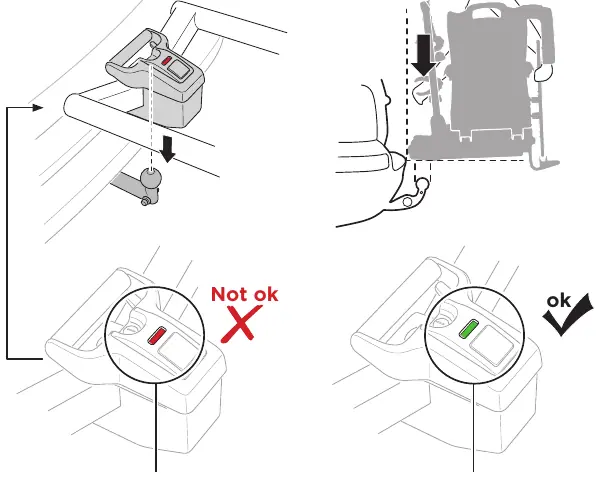
- Place the carrier onto the FIX4BIKE tow bar.
- Ensure the locking mechanism is fully engaged (check for the green indicator).
- Connect the electrical plug to the vehicle's socket, ensuring it is rotated 90 degrees to lock.
- Unfold the carrier arms and ensure they click into place.
Mounting bikes
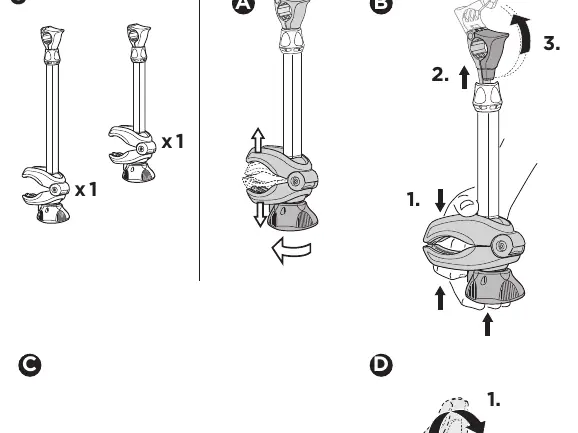
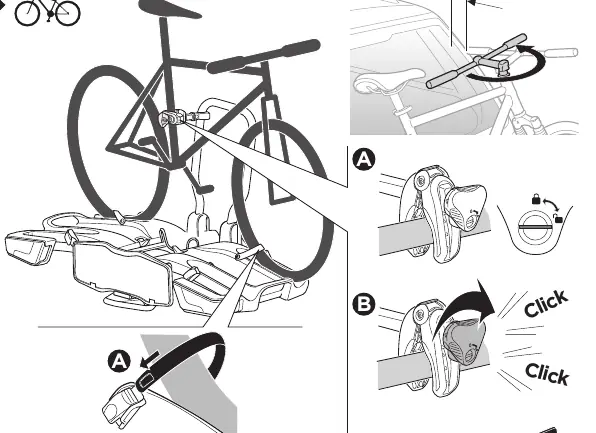
- Place the first bike on the carrier and secure the frame holder.
- Tighten the frame holder until you hear a 'click' to ensure proper tension.
- Secure the wheels using the provided straps.
- Repeat the process for the second bike.
Maintenance
If a light bulb needs replacement, the light housing can be accessed using a 4mm Allen key or a screwdriver, depending on the specific screw type. Use 12V H21W and 12V C5W bulbs as specified in the manual.
Accessories
The carrier supports various accessories, including loading ramps (9334), bike frame adapters (982), and carrying bags (9311). Always use genuine Thule accessories for compatibility.
Manufacturer information
Thule
Practical help
Common problems
Carrier does not fit the tow bar
Verify that your vehicle is equipped with a FIX4BIKE tow bar. This carrier is not compatible with standard tow balls.
Risk of damage to carbon bike frames
Use the Thule Carbon Frame Protector (984) to distribute pressure and protect the frame.
Before use
- Verify tow bar is FIX4BIKE compatible
- Record your key number
- Clean the tow bar ball
- Check tire pressure on the bikes
- Ensure the carrier is locked and the indicator is green
Specs in practice
- Max bike weight
- 30 kg per bike
Images and diagrams
- The green indicator on the locking handle confirms the carrier is safely attached.
- The 90-degree rotation of the electrical plug is required for a secure connection.
- The frame holder must be tightened until a 'click' is heard.
Model compatibility
- Compatible only with FIX4BIKE tow bars.
- Requires Thule Carbon Frame Protector for carbon frames.

Manual page author
David Miller
Documentation analyst
Organizes user manual content into clear summaries, with attention to model details, product context, and everyday usability.