Power / Wireless Chargers
User Manual for Sunsky T6 Wireless Charger Stand
Quick guide for the Sunsky T6 Wireless Charger Stand. Learn how to set up, adjust the height, understand indicator lights, and check compatibility with your Qi-enabled devices.
Quick answers from the manual
Quick answer
- The Sunsky T6 is a foldable wireless charging stand. Connect it to a power source via USB, place your Qi-compatible phone on the stand, and ensure the indicator lights turn blue to confirm charging. p. 1
Key actions
- Adjusting height and feet p. 1
First start
- Connect to power and place phone p. 1
Problems and fixes
Indicator lights flash red and blue
Remove foreign objects or check for functional errors.
p. 1Technical specifications
| Parameter | Value | Meaning | Pages |
|---|---|---|---|
| Input | 9V/2A | Required power input | p. 1 |
| Output | 10W / 7.5W / 5W | Wireless charging power output | p. 1 |
Where to find it in the PDF
- User Manual p. 1
Table of contents
Manual images
Click an image to enlargeQuick guide from the manual
The Sunsky T6 is a foldable wireless charging stand designed for Qi-compatible smartphones. To begin, connect the stand to a power source using the provided USB cable. Place your device on the charging area; the indicator lights will turn blue to confirm charging. If the lights flash red and blue, remove any foreign objects from the charging area or check for device errors.
Operation guide
The device features two indicator lights to show the current status:
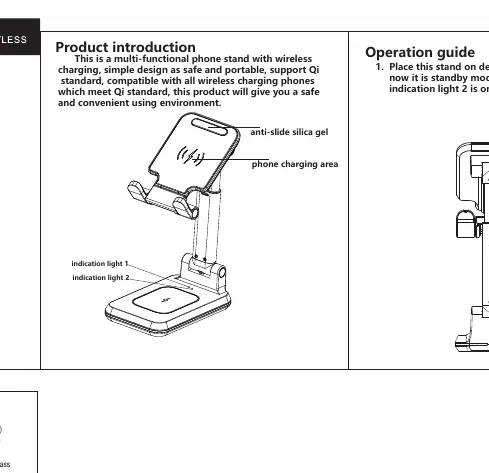
- Standby mode: Both indicator lights are green.
- Charging mode: Both indicator lights are blue.
- Error/Obstruction: The indicator lights flash red and blue. This occurs if a foreign object is detected on the charging area or if there is a functional error.
Adjusting the stand
The T6 stand is designed for flexibility:
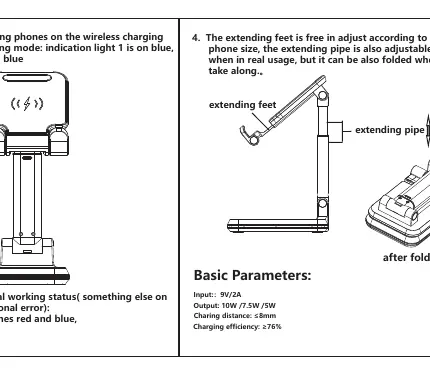
- Extending feet: Can be adjusted to accommodate different phone sizes.
- Extending pipe: The height of the stand can be adjusted for better viewing angles.
- Folding: The stand can be folded down for easy transport or storage.
Technical specifications
- Input: 9V/2A
- Output: 10W / 7.5W / 5W
- Charging distance: ≤8mm
- Charging efficiency: ≥76%
Compatibility
This charger is compatible with all devices that support the Qi wireless charging standard. Supported devices include various models from Huawei (P30 Pro, Mate 20 Pro, Mate 30, Mate 40, P40 Pro), iPhone (8, 8 Plus, X, XR, 12, 12 Pro Max), Samsung (Note 9, S9, S9+, Note 8, S8, S8+, S7 Edge, S7, Note 5, Note 6, Note 7, S6 Edge, S6 Edge+, SM-W2019, SM-W2018, SM-W2017), Nokia Lumia (930, 830, 1520, 1020, 820, 720, 920, 925), Google Nexus (4, 5, 6, 7), and Xiaomi (MIX2S, 10, 10 Pro, 9, 9 Pro, MIX3).
Safety and usage notice
Keep the device away from water and other liquids. Ensure that no metal or magnetic objects are placed on the charging area, as these are not supported and may cause errors.
Practical help
Common problems
Indicator lights flash red and blue
This indicates a foreign object is detected on the charging area or a functional error. Remove any metal or magnetic objects and ensure the phone is positioned correctly.
Before use
- Connect the stand to a power source using the provided USB cable.
- Ensure your phone supports the Qi wireless charging standard.
- Place the phone in the center of the charging area.
- Adjust the extending feet and pipe to fit your phone size.
Specs in practice
- Output: 10W / 7.5W / 5W
- The charger automatically adjusts power output based on the connected device's requirements.
- Charging distance: ≤8mm
- The phone must be within 8mm of the charging surface; thick cases may interfere with charging.
Images and diagrams
- The diagram shows the location of the charging area, the extending pipe for height adjustment, and the extending feet for phone stability.
- The folding mechanism allows the stand to be collapsed for portability.
Model compatibility
- Compatible with all devices supporting the Qi standard.
- Phone cases with metal or magnetic components are not supported.

Manual page author
Emily Carter
User documentation editor
Prepares concise manual descriptions and highlights the most useful setup, operation, and maintenance information for readers.