Electronics / Networking
TP-Link TL-FC111PB-20 10/100Mbps WDM Media Converter with 1-Port PoE
Quick guide for the TP-Link TL-FC111PB-20 media converter. Learn how to connect devices with or without optical interfaces, understand LED indicators, and review technical specifications and PoE power limits.
Table of contents
Manual images
Click an image to enlargeQuick guide from the manual
The TP-Link TL-FC111PB-20 is a WDM Media Converter designed to extend Ethernet networks. It supports 10/100Mbps speeds and provides 1-Port PoE (Power over Ethernet) to connected devices. Before installation, ensure your PoE device does not require more than 15.4W of power, as this is the maximum output of the converter.
LED Explanation
Monitor the device status using the front panel LEDs:
- PWR: On indicates the device is powered on; Off indicates it is powered off.
- Link/Act: On indicates a valid link; Flashing indicates data is being transmitted or received; Off indicates an invalid link.
- PoE: On indicates the device is supplying power normally; Off indicates abnormal power supply or no power supply.
Connection Scenarios
The device supports two primary connection scenarios depending on your network equipment:
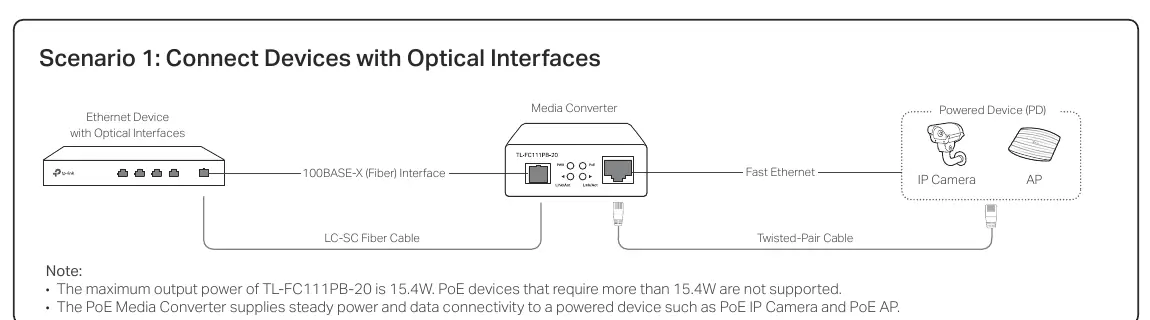
- Scenario 1: Connect Devices with Optical Interfaces: Connect your Ethernet device with an optical interface directly to the Media Converter using an LC-SC Fiber Cable. Connect the Media Converter to your Powered Device (e.g., PoE IP Camera or AP) using a Twisted-Pair Cable.
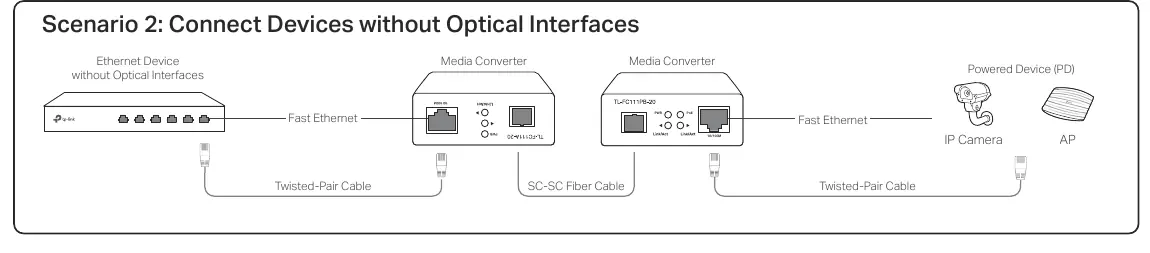
- Scenario 2: Connect Devices without Optical Interfaces: Use two Media Converters to bridge two Ethernet devices that lack optical interfaces. Connect each Ethernet device to a Media Converter via Twisted-Pair Cable, and connect the two Media Converters to each other using an SC-SC Fiber Cable.
Specifications
Key technical parameters for the TL-FC111PB-20:
- Standards: IEEE 802.3, 802.3i, 802.3u, 802.3af.
- Fiber Type: 9/125 μm single-mode fiber.
- Transmission Distance: Up to 20 km.
- Wavelength: 1310 nm TX, 1550 nm RX.
- PoE Output: 802.3af, up to 15.4 W.
- Operating Temperature: 0°C to 50°C (32°F to 122°F).
Safety Information
To ensure safe operation, follow these guidelines:
- Keep the device away from water, fire, humidity, and hot environments.
- Do not attempt to disassemble, repair, or modify the device.
- Use only the power supply provided by the manufacturer.
- Do not look directly into the beam or optical port while the transceiver is operating to avoid eye injury.
- Ensure the adapter is installed near the equipment and is easily accessible.
Practical help
Common problems
PoE device not powering on
Verify the device does not require more than 15.4W. The converter only supports up to 15.4W.
Link/Act LED is off
Check that the fiber cable is securely connected and that the link is valid.
PoE LED is off
Check for abnormal power supply or ensure the connected device is PoE compatible.
Before use
- Verify the PoE device power requirement is 15.4W or less.
- Ensure you have the correct fiber cable (9/125 μm single-mode).
- Check that your Ethernet cables meet Cat 3 or above (10BASE-T) or Cat 5 or above (100BASE-TX) standards.
- Ensure the power adapter provided is used.
Specs in practice
- 1310 nm / 1550 nm
- Wavelengths used for transmission (TX) and reception (RX).
Images and diagrams
- Scenario 1: Direct connection between an optical-enabled Ethernet device and the converter.
- Scenario 2: Using two converters to connect two non-optical Ethernet devices via fiber.
Model compatibility
- Supports 802.3af PoE devices.
- Requires 9/125 μm single-mode fiber.

Manual page author
Michael Turner
Technical manual editor
Reviews PDF manuals for structure, safety notes, and practical product details so readers can find the right information quickly.