Garden / Pool Equipment
User Manual for Ultenic Pooleco 10S Robot Pool Cleaner
Quick guide for the Ultenic Pooleco 10S robot pool cleaner, covering operation, maintenance, troubleshooting, and technical specifications.
Table of contents
Manual images
Click an image to enlargeQuick guide from the manual
Before using the Ultenic Pooleco 10S, ensure your pool water meets the following conditions for optimal performance: water temperature between 10-35°C (50-95°F), pH level between 7.0-7.4, chlorine concentration max 4 ppm, and NaCl max 5000 ppm. Always charge the device fully before use and ensure charging terminals are dry and clean.
Product overview
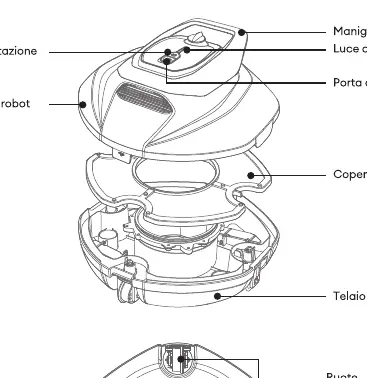
The robot consists of a main housing, handle, charging port, filter cover, and brushes. The underside features intake brushes, water inlets, and wheels. The power button is located on the top, accompanied by an LED indicator.
Operation
Powering on: Press and hold the power button until the light turns on and an acoustic signal is emitted.
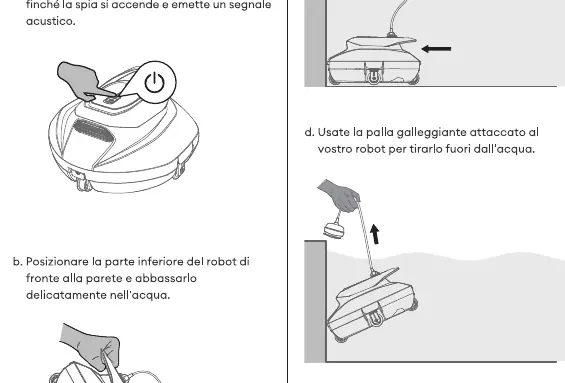
Starting operation: Place the bottom of the robot facing the pool wall and lower it gently into the water. When the battery is depleted, the robot will automatically stop near the pool wall. Use the provided floating handle to retrieve the robot from the water.
Charging: Ensure the charging terminals are dry and clean before connecting the charger.
Maintenance
Regular maintenance is required to ensure longevity and cleaning performance:
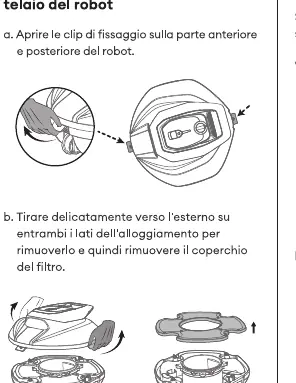
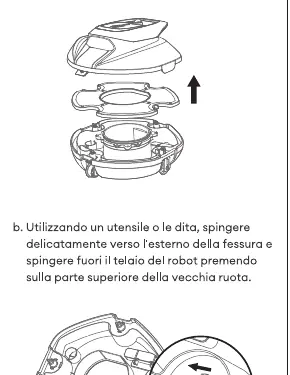
- Filter cover and housing: Open the clips on the front and rear, remove the housing, take out the filter cover, and rinse the filter and housing with clean water. Perform this after every use.
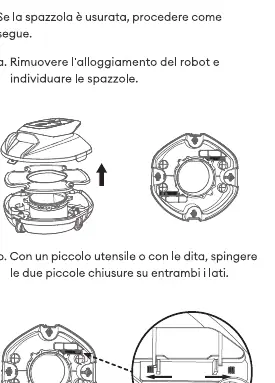
- Brushes: If worn, remove the housing, use a tool or fingers to push the small latches on both sides, and replace the brushes. Replace every 3-6 months or when worn.
- Wheels: If broken, remove the housing, push the wheel out of the slot, and snap the new wheel into place until you hear a click. Replace every 3-6 months or when worn.
Troubleshooting
- Red light always on: Low power. Charge the robot immediately.
- Red light flashing: Obstruction in the impeller or motor anomaly. Check for foreign objects in the impeller; if the issue persists, contact customer support.
- Not cleaning: Clogged filter or damaged suction brush. Clean the filter or contact support for replacements.
- Bumps on the road: Pool surface is not flat or wheels are damaged. Check and replace wheels if necessary.
Specifications
- Cleaning area: 850 sq ft / 78.9 sq m
- Voltage: 11.1 V
- Battery type: Lithium
- Max cleaning time: 90 minutes
- IP rating: IPX8 Waterproof
Practical help
Common problems
Red light always on
The battery is low. Charge the robot immediately.
Red light flashing
Check for foreign objects in the impeller. If the issue persists, contact customer support.
Robot not cleaning effectively
The filter may be clogged or the suction brush damaged. Clean the filter or replace the brush.
Robot bumps or struggles on the surface
The pool surface may not be flat, or the wheels may be damaged. Inspect and replace wheels if necessary.
Before use
- Ensure water temperature is between 10-35°C (50-95°F).
- Check that pH level is between 7.0-7.4.
- Verify chlorine concentration is max 4 ppm.
- Verify NaCl concentration is max 5000 ppm.
- Ensure charging terminals are dry and clean before charging.
- Fully charge the battery before the first use.
Specs in practice
- Max cleaning time
- 90 minutes of operation on a full charge.
- Cleaning area
- Designed for pools up to 850 sq ft (78.9 sq m).
Images and diagrams
- The product overview diagram identifies the handle, charging port, filter cover, and brushes.
- The operation diagram illustrates the power button location and the method for lowering the robot into the water.
- Maintenance diagrams show the step-by-step process for cleaning the filter and replacing brushes and wheels.
Model compatibility
- Designed for flat pool surfaces.
- Not suitable for pools outside the specified chemical and temperature ranges.

Manual page author
Emily Carter
User documentation editor
Prepares concise manual descriptions and highlights the most useful setup, operation, and maintenance information for readers.