Electronics / USB Hubs & Docking
User Manual for StarTech.com USB-C Hub 10G2A1C25EPD-USB-HUB
Quick guide for the StarTech.com USB-C Hub (10G2A1C25EPD-USB-HUB). Learn about features, connectivity, technical specifications, and setup requirements for this 2.5Gb Ethernet and 100W PD passthrough adapter.
Quick answers from the manual
Quick answer
- The 10G2A1C25EPD-USB-HUB is a USB-C hub that adds 2x USB-A ports, 1x USB-C port, and a 2.5Gb Ethernet port to your laptop, while supporting 100W Power Delivery passthrough. p. 1
Key actions
- Connect the integrated USB-C cable to your laptop. p. 1
- Connect a power adapter to the PD port for laptop charging. p. 1
Problems and fixes
Power passthrough not working
Check if the host USB-C port supports USB Power Delivery.
p. 4Technical specifications
| Parameter | Value | Meaning | Pages |
|---|---|---|---|
| Data Transfer Speed | 10Gbps | USB 3.2 Gen 2 | p. 3 |
| Ethernet Speed | 2.5Gbps | 10/100/1000/2500Mbps | p. 3 |
| Power Delivery | 85W | Max laptop charging | p. 3 |
Where to find it in the PDF
- Product Overview p. 1
- Specifications p. 3, 4
Table of contents
Quick Guide
The StarTech.com USB-C Hub (10G2A1C25EPD-USB-HUB) is a multi-port adapter designed to expand the connectivity of your USB-C enabled laptop. It provides a 2.5Gb Ethernet port, two USB-A ports, and one USB-C port, while supporting 100W Power Delivery (PD) passthrough to charge your host device.
Product Overview
This hub connects to your computer via an integrated 30cm USB-C cable. It is designed for high-speed data transfer and reliable network connectivity. It features dynamic power distribution and overcurrent protection (OCP) to ensure safe operation of connected devices.
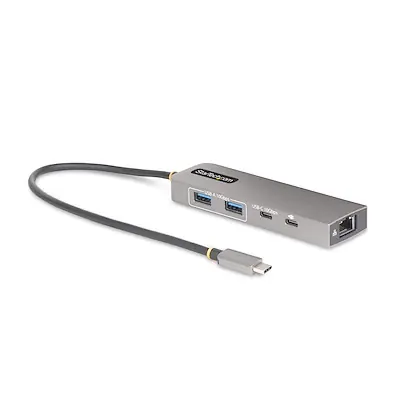
Connectivity and Ports
- Host Connection: Integrated 30cm USB-C cable.
- USB-A Ports: 2x USB 3.2 Gen 2 (10Gbps).
- USB-C Port: 1x USB 3.2 Gen 2 (10Gbps).
- Ethernet: 1x RJ-45 port supporting 10/100/1000/2500Mbps.
- Power Delivery: 1x USB-C port dedicated to PD 3.0 passthrough.
Setup and Requirements
To use the hub, simply connect the integrated USB-C cable to your laptop's USB-C port. The device is plug-and-play and will be automatically detected by major operating systems including Windows, macOS, ChromeOS, iPadOS, and Android.
Important Requirements:
- Ensure your host laptop's USB-C port supports USB Power Delivery if you intend to use the passthrough charging feature.
- If charging is required, connect a compatible USB-C power adapter to the hub's PD port.
- Note that not all USB-C ports support all USB Type-C specifications; verify your host device's capabilities.
Technical Specifications
- Data Transfer: Up to 10Gbps (USB 3.2 Gen 2).
- Ethernet: IEEE 802.3bz (2.5GBASE-T/NBASE-T) compliant.
- Power Delivery: Supports up to 100W input, providing up to 85W to the host laptop.
- Operating Temperature: 0°C to 40°C (32°F to 104°F).
- Storage Temperature: -10°C to 70°C (14°F to 158°F).
- Humidity: 10% - 85% RH.
Package Contents
- 1x USB-C Hub
- 1x Quick Start Guide
Official resources from the manual
Practical help
Common problems
Power passthrough not working
Ensure the host laptop's USB-C port supports USB Power Delivery and that a power adapter is connected to the hub's PD port.
Jumbo Frames not working
Note that macOS does not support Jumbo Frames.
Before use
- Verify the host laptop has a USB-C port.
- Confirm the host USB-C port supports USB Power Delivery for charging.
- Have a compatible USB-C power adapter ready if charging is required.
Specs in practice
- 100W PD Passthrough
- The hub supports up to 100W input, providing up to 85W to the connected laptop.
- 2.5Gb Ethernet
- Supports high-speed wired network connections (10/100/1000/2500Mbps).
- USB 3.2 Gen 2
- Supports data transfer speeds up to 10Gbps.
Model compatibility
- Compatible with Windows, macOS, ChromeOS, iPadOS, and Android.
- Requires a USB-C port on the host device.

Manual page author
David Miller
Documentation analyst
Organizes user manual content into clear summaries, with attention to model details, product context, and everyday usability.