Lighting / LED Strips
User Manual for Utilitech 16-FT Premium Continuous COB LED Strip Light
Quick guide for the Utilitech 16-FT Premium Continuous COB LED Strip Light. Includes installation steps, cutting instructions, remote control operation, and troubleshooting.
Table of contents
Manual images
Click an image to enlargeQuick guide from the manual
This document provides instructions for the Utilitech 16-FT Premium Continuous COB LED Strip Light (Model LR0037-L180K9027). The product is designed for indoor use and features adjustable color temperatures, dimming, and flash/fade modes via the included remote control. The strip is linkable up to 2 units total.
Safety Information
- Battery Safety: The remote uses a CR2025 3V battery. Keep away from children. Do not mix old and new batteries or different types.
- Installation Safety: Do not fold or bend the tape light around corners. The minimum bending radius is 1 inch (2.54 cm). Do not route cords through walls, ceilings, or similar building parts.
- Compliance: This device complies with Part 15 of the FCC Rules.
Installation
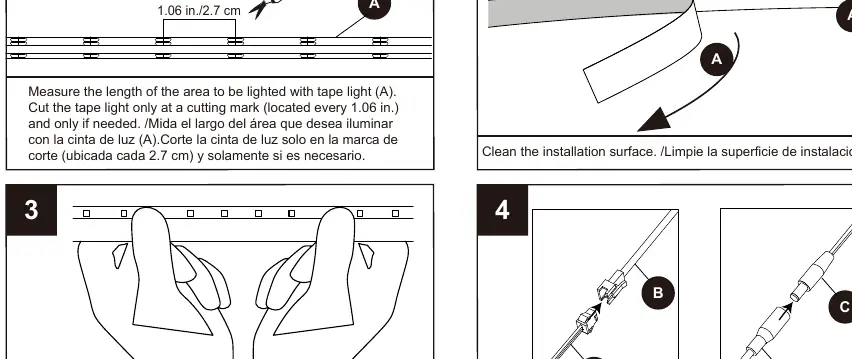
- Preparation: Ensure all parts are present before beginning. Estimated assembly time is 15 minutes.
- Measuring and Cutting: Measure the area to be lighted. Cut the tape light only at the designated cutting marks, which are located every 1.06 inches (2.7 cm).
- Surface Preparation: Clean the installation surface thoroughly before applying the adhesive backing.
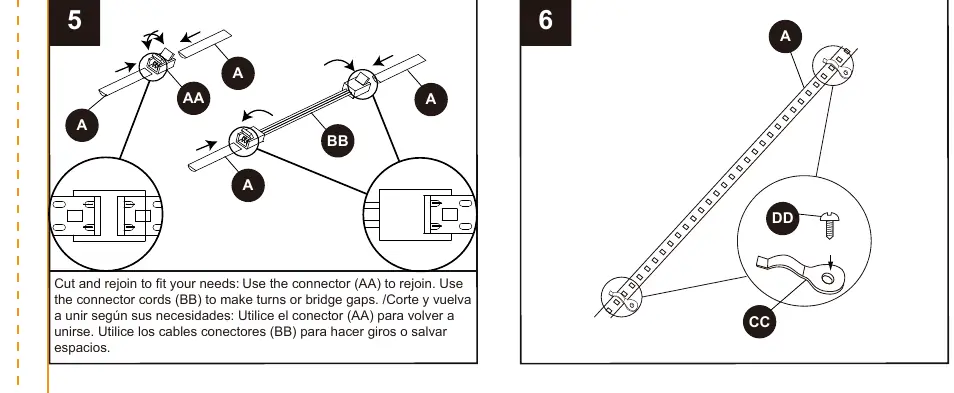
- Connecting: Use the provided connector (AA) to rejoin strips if cut. Use connector cords (BB) to make turns or bridge gaps.
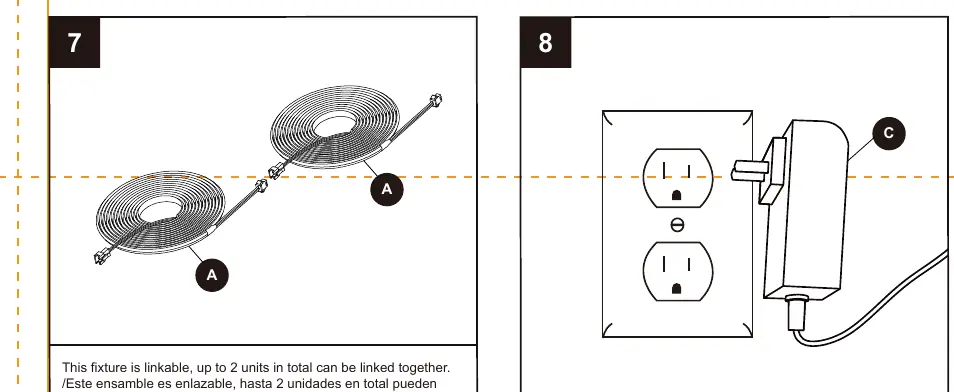
- Linking: This fixture is linkable; you can connect up to 2 units in total.
Remote Control Operation
The remote control allows for the following adjustments:
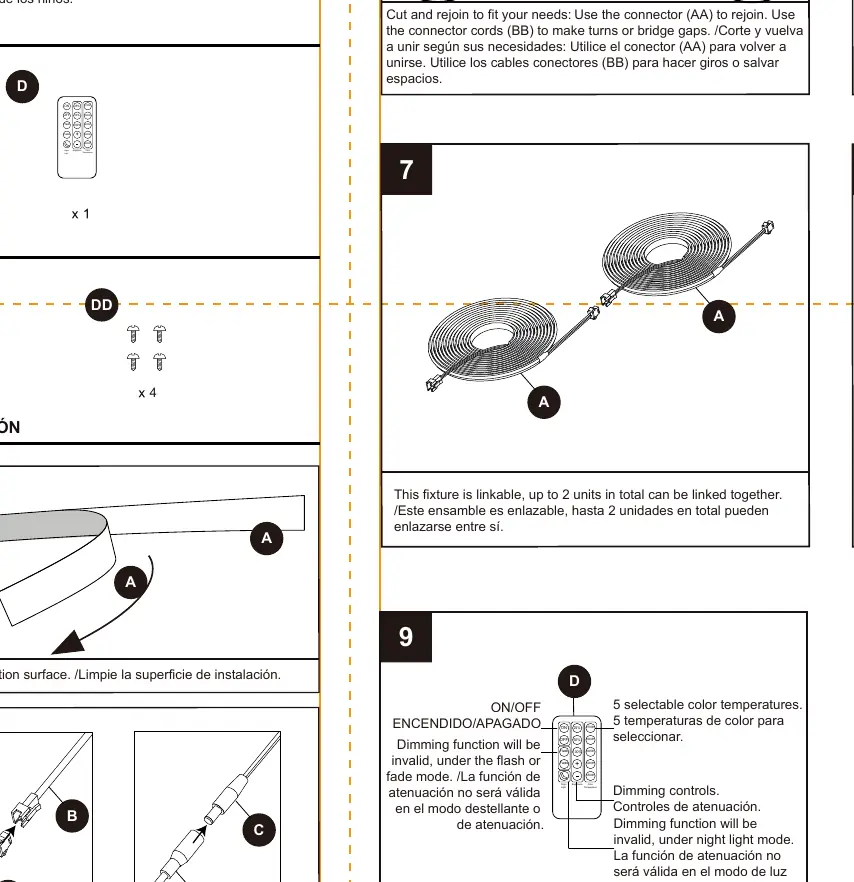
- Color Temperature: 5 selectable color temperatures (2700K to 6500K).
- Dimming: Adjustable brightness levels (25%, 50%, 100%, and +/- controls).
- Modes: Flash and Fade modes are available. Note: Dimming function is invalid when using Flash or Fade modes.
- Night Light: Dedicated mode for low-light output. Note: Dimming function is invalid in Night Light mode.
Care and Maintenance
Ensure the power is off before cleaning. Clean the fixture with a mild glass cleaner and a soft cloth. Apply the liquid cleaner to the cloth, not directly onto the fixture.
Troubleshooting
If the tape light will not operate, check the following:
- Verify that the circuit breaker is not tripped.
- Ensure the switch is in the ON position.
- Use the slide switch on the dimmer to turn on the tape light.
Manufacturer information
Utilitech
Practical help
Common problems
Tape light will not operate
Verify that the circuit breaker is not tripped and use the slide switch on the dimmer to turn on the tape light.
Before use
- Ensure all parts are present according to the package contents list.
- Check that the installation surface is clean and dry.
- Measure the area to be lighted before cutting.
- Ensure the CR2025 battery is correctly installed in the remote.
Specs in practice
- Minimum bending radius
- 1 inch (2.54 cm). Do not fold or bend sharply to avoid damage.
- Cutting interval
- 1.06 inches (2.7 cm). Only cut at the marked locations.
Images and diagrams
- Connector (AA): Used to rejoin cut strips.
- Connector cords (BB): Used to make turns or bridge gaps.
Model compatibility
- Battery type: CR2025 (3V).

Manual page author
Emily Carter
User documentation editor
Prepares concise manual descriptions and highlights the most useful setup, operation, and maintenance information for readers.