Health / Medical Devices
Varon Y-105/Y-105W Household Oxygen Concentrator
A comprehensive user guide for the Varon Y-105/Y-105W oxygen concentrator. Includes setup instructions, operation procedures, maintenance tips, and troubleshooting steps for safe and effective use.
Table of contents
Manual images
Click an image to enlargeQuick Guide from the Manual
This oxygen concentrator is designed for household use. Important safety warnings: Keep the device upright (inclination angle should not exceed 5°). Ensure the area is well-ventilated and keep the device at least 10 cm away from walls or other objects. Oxygen is flammable; do not smoke near the device and keep it away from open flames, heat sources, or oil/grease. In case of power failure or device malfunction, ensure an alternative oxygen source is available for patients in urgent need.
Product Description
The Varon Y-105/Y-105W uses Pressure Swing Adsorption (PSA) technology to separate oxygen from air. Key features include an all-plastic shell, cumulative running time display, adjustable timer, remote control, and a one-button call-for-help function.
Installation and Setup
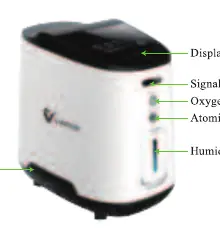
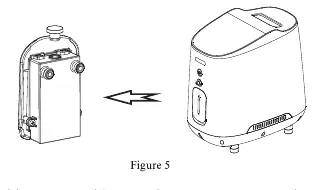
Unpacking: Check the device for damage and ensure all accessories listed in the packing list are present. Humidification Bottle: Pull out the bottle, remove the rubber cap, and fill with cold purified water up to the maximum level. The machine can operate without water, but using it provides humidified oxygen. Power Connection: Connect the power cord to the machine and a stable power outlet. If the power supply is unstable, use a 2000W voltage regulator.
Operation
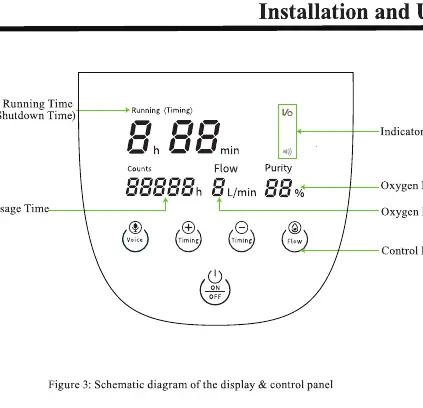
Starting the Device: Press the power switch to 'I' to enter standby mode, then press the 'ON/OFF' button on the control panel or remote to start. Adjusting Flow: Use the 'Flow' button to adjust the oxygen output as needed. Timing Function: The device allows setting an automatic shutdown time within 8 hours. Use the 'Timing +' and 'Timing -' buttons to adjust the duration. Voice and Remote: Use the 'Voice' button to toggle voice prompts. The remote control allows for remote operation; ensure it is pointed towards the machine.
Nasal Cannula and Atomizer
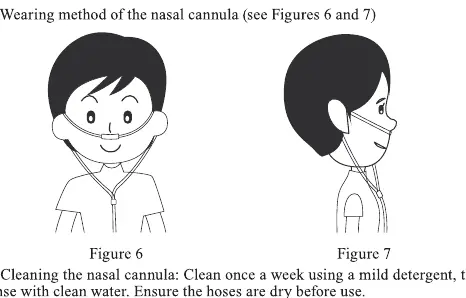
Nasal Cannula: Connect the cannula to the oxygen outlet and adjust it to a comfortable position on your ears. Clean the cannula once a week with mild detergent and rinse with clean water. Wipe inhalation heads with medical alcohol. Atomizer: Add liquid medicine to the atomizing cup, connect it to the machine, and use the mouthpiece to inhale the mist.
Maintenance
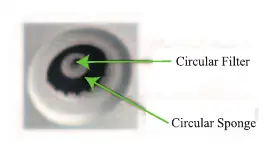
Cleaning the Housing: Disconnect power and wipe with a soft, damp cloth. Filter Replacement: Replace the filter after 300 hours of use to protect the compressor. Do not operate the device without a filter. Humidification Bottle: Replace water daily. Clean the bottle once a week and ensure the rubber cap is clean. Fuse Replacement: If the device does not power on, check the fuse located at the bottom of the machine. Use a cross-head screwdriver to remove the fuse holder and replace it if necessary.
Troubleshooting
If the device does not work, check the power connection and fuse. If there is little or no air output, check for kinked hoses, a loose rubber cap on the humidification bottle, or a dirty filter. If the display shows 'fault', the compressor may have shut down due to overheating; turn off the machine, let it cool down, and restart.
Practical help
Common problems
Device connected to power but does not work and display is blank
Check if the fuse is broken or if the power outlet has insufficient power. Do not use extension cords.
Device works but there is little or no air output
Check for kinked or blocked nasal cannula hose, ensure the rubber cap on the humidification bottle is tight, clean the humidification bottle, or replace the filter.
Device displays 'fault'
Compressor shutdown due to overheating protection. Shut down the machine, let it cool down, and restart.
Before use
- Keep the oxygen concentrator upright (inclination < 5°).
- Ensure the device is in a well-ventilated area, 10 cm away from walls.
- Fill the humidification bottle with cold purified water (do not exceed max level).
- Ensure the filter is installed correctly.
- Check that the power supply is stable (use a voltage regulator if necessary).
Specs in practice
- Oxygen Purity
- 93%±3% at 1 L/min flow rate.
- Operating Environment
- Ambient temperature 5°C-40°C, relative humidity ≤80%.
Images and diagrams
- Figure 1: Front view showing display, control panel, oxygen outlet, and humidification bottle.
- Figure 2: Rear view showing filter, power switch, and power port.
- Figure 3: Control panel layout showing buttons for Voice, Timing, Flow, and ON/OFF.
- Figure 5: Correct orientation for removing and installing the humidification bottle.
Model compatibility
- Oxygen is flammable; keep away from open flames and smoking.
- Do not apply oil or grease to any part of the device.
- Keep at least 1 meter away from other household appliances to avoid electromagnetic interference.

Manual page author
David Miller
Documentation analyst
Organizes user manual content into clear summaries, with attention to model details, product context, and everyday usability.