Health / Medical Devices
Product Alert for Abbott HeartMate II and HeartMate 3 System Controllers
Important safety information and troubleshooting guide for the Backup Battery Fault Alarm on Abbott HeartMate II and HeartMate 3 System Controllers. Learn how to identify the alarm, minimize risks, and what steps to take if the fault...
Table of contents
Manual images
Click an image to enlargeImportant Safety Information
This document is a critical product alert regarding the HeartMate II and HeartMate 3 System Controllers. It addresses an increase in customer complaints concerning the Backup Battery Fault Alarm. This action does not require device removal from where they are used or sold.
Understanding the Backup Battery Fault Alarm
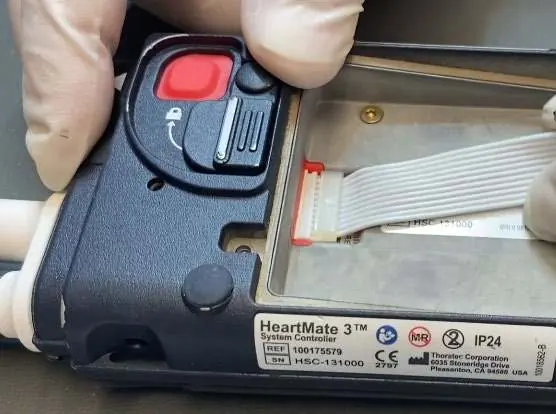
The alarm is triggered by corrosion at the connection point between the System Controller and the Backup Battery ribbon cable. This corrosion is often caused by excessive handling, movement, stress, or pulling at the ribbon cable interface during installation or replacement.
Alarm Indicators:
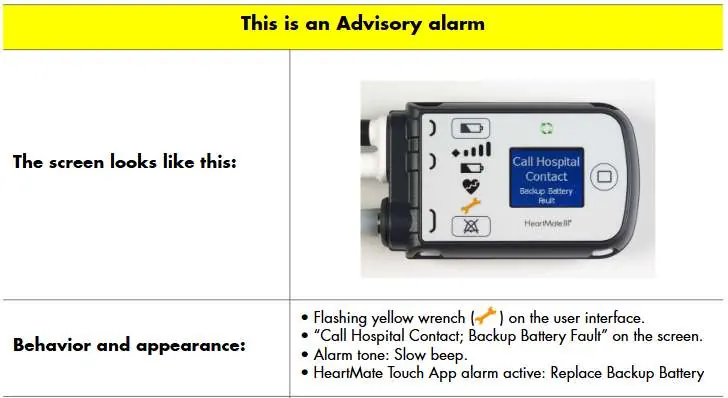
- Flashing yellow wrench on the user interface.
- "Call Hospital Contact; Backup Battery Fault" message on the screen.
- Slow beep tone.
- HeartMate Touch App alarm: "Replace Backup Battery".
When this alarm is active and the pump is running (indicated by the green arrow symbol), the alarm does not affect the controller or pump functionality, provided the patient remains on an external power source.
What to Do If the Alarm Occurs
If the Backup Battery Fault Alarm is active, follow these steps:
- Ensure the patient is connected to an external power source (e.g., 14V batteries or AC power via the Mobile Power Unit).
- Verify that no other alarms are active.
- Call your hospital contact immediately for diagnosis and instructions.
- Do not attempt to exchange the System Controller without clinical guidance.
Preventing the Fault
To reduce the risk of the Backup Battery Fault Alarm, clinicians should minimize excessive handling, movement, stress, and pulling at the interface between the ribbon cable and the controller during installation or replacement. Avoid using the ribbon cable to hold the weight of the controller.
Clinical Guidance
If a System Controller exchange is needed, a caregiver must be present, and all labeling instructions must be followed. If a backup battery replacement is needed, advise the patient to visit the clinic to have a clinician replace the 11 Volt Lithium-Ion backup battery.
Manufacturer information
Abbott Laboratories
Practical help
Common problems
Backup Battery Fault Alarm (flashing yellow wrench)
Ensure patient is on external power (14V batteries or AC), verify no other alarms are active, and call hospital contact immediately.
Corrosion at ribbon cable connection
Minimize excessive handling, movement, stress, or pulling at the ribbon cable interface during installation or replacement.
Before use
- Ensure no other alarms are active.
- Verify the pump is running and flow is maintained (green arrow symbol).
- Keep the patient on an external power source (14V batteries or AC power via Mobile Power Unit).
- Contact hospital immediately for diagnosis if the alarm is active.
Images and diagrams
- Figure 1 shows the connection point of the Backup Battery ribbon cable where corrosion may occur.
- Figure 2 illustrates the Backup Battery Fault Alarm screen, showing the flashing yellow wrench and the 'Call Hospital Contact' message.
Model compatibility
- Applies to HeartMate II and HeartMate 3 System Controllers.
- Models: 106524INT, 106531INT, 106531LF2, 106016, 106017.

Manual page author
David Miller
Documentation analyst
Organizes user manual content into clear summaries, with attention to model details, product context, and everyday usability.