Health / Medical Devices
User Manual for Precision Medical EasyDial Oxygen Regulator 168708D
Quick guide for the Precision Medical EasyDial Oxygen Regulator 168708D. Includes installation steps for CGA 870 and CGA 540 connections, safety warnings, maintenance, and troubleshooting.
Quick answers from the manual
Quick answer
- The EasyDial Oxygen Regulator is designed to regulate oxygen flow from a high-pressure cylinder for medical use. It must be installed and operated by trained professionals. p. 2
Key actions
- Installation (CGA 870) p. 6
- Installation (CGA 540) p. 6
First start
- Inspect for damage and ensure hands are clean (no oil/grease). 'Crack' the cylinder valve to clear debris before attaching the regulator. p. 6
Problems and fixes
No flow
Turn on cylinder, set to prescribed flow, replace cylinder, or turn dial to a specific number.
p. 7Maintenance and reset
- Clean exterior surfaces with a cloth dampened with disinfectant (e.g., Sporicidin R). Do not use cleaning solutions or attempt repairs. p. 7
Technical specifications
| Parameter | Value | Meaning | Pages |
|---|---|---|---|
| Accuracy | ±10% of indicated setting @ 70°F (21°C) | Precision of flow rate | p. 4 |
| Inlet Pressure Range | 300 - 3000 psi | Operating pressure range | p. 4 |
Where to find it in the PDF
- Safety Warnings p. 2, 3
- Specifications and Diagram p. 4
- Operating Instructions p. 6
- Maintenance and Troubleshooting p. 7
Table of contents
Quick Guide
The Precision Medical EasyDial Oxygen Regulator is designed to regulate oxygen flow from a high-pressure cylinder for medical use. It must be operated by trained healthcare professionals. Important: Never use oil, grease, or other hydrocarbon-based lubricants on or near the regulator, as this poses a severe fire and explosion risk.
Product Overview
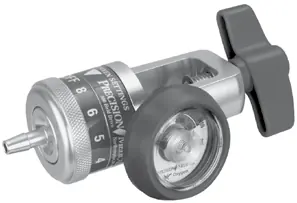
The regulator features a T-Handle for securing the unit to the cylinder, a Contents Gauge to monitor pressure, and a dial for selecting flow settings. The outlet connection is where the patient tubing is attached.
Installation
Before installing, ensure the regulator and cylinder valve are free of oil, grease, or contaminants. "Crack" the cylinder valve by opening it slightly and closing it to remove any foreign particles.
CGA 870 Connection (Yoke)
- Ensure the high-pressure inlet port has a Yoke Seal.
- Attach the regulator to the oxygen cylinder post valve, aligning index pins with mating holes.
- Hand-tighten the T-handle.
CGA 540 Connection (Nut & Nipple)
- Attach the regulator to the oxygen cylinder valve.
- Tighten securely with a wrench.
Always position the regulator so the cylinder valve opening points away from the user and others.
Operation
- Ensure the regulator is in the "OFF" position.
- Slowly open the cylinder valve counterclockwise until completely open.
- Turn the dial until the Indicating Pointer points to the prescribed flow.
- When finished, turn the dial to "OFF" and close the cylinder valve.
Maintenance and Cleaning
Disconnect all connections before cleaning. Clean exterior surfaces with a cloth dampened with a disinfectant (e.g., Sporicidin R or equivalent) and wipe dry. Do not use cleaning solutions, do not autoclave, and do not attempt to repair the unit yourself.
Troubleshooting
If there is no flow, ensure the cylinder valve is open, the regulator is not in the "OFF" position, the cylinder is not empty, and the dial is set to a specific number. If the dial will not turn, it may be seized; return the unit to Precision Medical.
Specifications
- Accuracy: ±10% of indicated setting at 70°F (21°C).
- Inlet Pressure Range: 300 - 3000 psi (2068 - 20684 kPa).
- Storage Temperature: -4°F to 140°F (-20°C to 60°C).
Practical help
Common problems
No flow
Check if the cylinder valve is closed, the regulator is in the 'OFF' position, the cylinder is empty, or the dial is set between settings.
Dial will not turn
The dial may be seized. Do not force it; return the regulator to Precision Medical, Inc.
Before use
- Inspect the regulator for visual damage.
- Ensure hands are free of oil, grease, and other contaminants.
- Check that the cylinder valve is not bent or damaged.
- Verify the regulator is in the 'OFF' position.
- For CGA 870 connections, ensure a Yoke Seal is present.
Specs in practice
- Inlet Pressure Range
- 300 - 3000 psi (2068 - 20684 kPa).
- Storage Temperature
- -4°F to 140°F (-20°C to 60°C).
Images and diagrams
- T-Handle: Used to secure the regulator to the cylinder.
- Contents Gauge: Displays the pressure inside the cylinder.
- Flow Settings: Dial to select the desired oxygen flow rate.
- Outlet Connection: Where the patient tubing connects.
Model compatibility
- Compatible with CGA 870 (Yoke) and CGA 540 (Nut & Nipple) connections.
- Not intended for use with oxygen conserving devices.
- Use only Precision Medical, Inc. Yoke Seal part number 1221; do not use plastic yoke seals.

Manual page author
Michael Turner
Technical manual editor
Reviews PDF manuals for structure, safety notes, and practical product details so readers can find the right information quickly.