Power / USB Chargers
User Manual for Verbatim 4-Port 130W GaN USB Charger VAPUC098
Quick guide for the Verbatim 4-Port 130W GaN USB Charger (VAPUC098). Includes port specifications, power distribution scenarios, safety instructions, and operating steps.
Table of contents
Manual images
Click an image to enlargeQuick guide from the manual
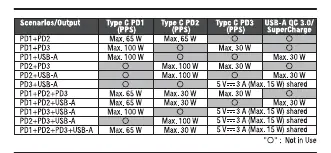
The Verbatim 4-Port 130W GaN USB Charger (VAPUC098) is designed to charge up to four devices simultaneously. It features smart charging technology that automatically detects connected devices to provide optimal current. Please note that the total power output is 130W, and the power distribution per port changes depending on how many devices are plugged in at the same time.
Safety Instructions
- Do not alter, modify, or disassemble the charging device. There are no user-serviceable parts inside.
- Do not drop or subject the charger to strong mechanical shock.
- Keep away from moisture, water, rain, snow, spray, heat, and sources of ignition.
- Do not operate if the device has been dropped or damaged.
- Charge in a well-ventilated area. Do not charge in environments exceeding 40°C/104°F.
- Keep out of reach of children.
- Unplug from the power source before attempting maintenance or cleaning.
- Clean the surface only with a damp soft cloth; do not use chemical solvents.
Product Description
This charger is equipped with GaN (Gallium Nitride) technology, offering efficient and compact power delivery. It includes built-in short circuit protection in case of current, voltage, or temperature overload.
Specifications
- Product Model: VAPUC098
- Input: 100-240 V AC 50/60 Hz 1.8 A (Max)
- Total Output: 130 W
- Materials: ABS+PC Flame resistant material
- Dimensions: 116 x 49.6 x 60.9 mm
- Weight: 223g
Port Output Specifications
The charger features three USB-C ports (PD 1, PD 2, PD 3) and one USB-A port (QC 3.0/SuperCharge). Output capabilities vary based on usage:
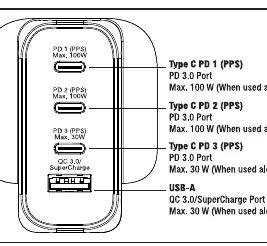
- Type C PD 1 & PD 2: Max 100W each (when used alone). Supports PPS.
- Type C PD 3: Max 30W (when used alone). Supports PPS.
- USB-A: Max 30W (when used alone). Supports QC 3.0/SuperCharge.
Operation
- Unpack the USB charger and connect it to a power supply.
- Connect your USB charging-compatible device to the charger using a compatible USB cable (not included). Charging will begin automatically.
- Disconnect the device when it is fully charged. Store the charger in a safe place when not in use.
About Smart Charging
The charger automatically detects the specifications of your connected device to define the maximum current. The output current will adjust to provide optimal charge speed and performance. Note that the charger may restart charging when a new device is plugged in; this is a normal safety feature to ensure optimal power distribution to all connected devices.
Practical help
Common problems
Charger overheating
Ensure the charger is used in a well-ventilated area and not in environments exceeding 40°C/104°F.
Charging restarts when plugging in a new device
This is normal behavior as the charger recalculates power distribution for all connected devices to ensure safety and optimal output.
Device not charging
Ensure the charger is securely plugged into a power outlet and the cable is firmly connected to both the charger and the device.
Before use
- Check that the power outlet is 100-240V AC.
- Ensure you are using a compatible USB charging cable.
- Verify the total power requirements of your devices do not exceed 130W.
- Ensure the charger is placed in a well-ventilated area.
Specs in practice
- Total Output: 130W
- The maximum combined power available across all four ports simultaneously.
- PD (Power Delivery)
- Fast charging protocol used by the USB-C ports for compatible devices.
- PPS (Programmable Power Supply)
- Allows for dynamic voltage adjustment for more efficient and cooler charging.
- QC 3.0 (Quick Charge)
- Fast charging protocol used by the USB-A port.
Images and diagrams
- The charger features three USB-C ports (PD 1, PD 2, PD 3) and one USB-A port (QC 3.0).
- Power output per port varies significantly depending on how many devices are connected simultaneously.
Model compatibility
- Compatible with iPhones, iPads, Smartphones, Tablet PCs, and MP3/MP4 players.

Manual page author
Michael Turner
Technical manual editor
Reviews PDF manuals for structure, safety notes, and practical product details so readers can find the right information quickly.