Home Appliances / Space Heaters
User Guide for Vornado Rise 12H Tower Heater
Quick guide for the Vornado Rise 12H Tower Heater. Learn how to operate, clean, and troubleshoot your heater, including safety features and reset procedures.
Table of contents
Manual images
Click an image to enlargeQuick guide from the manual
The Vornado Rise 12H is a tower heater designed for indoor floor use. Before operating, ensure the unit is placed on a level surface with at least 3 feet of clearance on all sides. Always plug the heater directly into a wall outlet; do not use extension cords, power strips, or surge-protected outlets.
Safety Instructions
To reduce the risk of fire, electric shock, and injury, observe the following precautions:
- Supervision: Extreme caution is required when used around children under 12 or individuals with reduced capabilities.
- Placement: Do not use in bathrooms, laundry areas, or damp locations. Keep away from flammable liquids like paint or gasoline.
- Clearance: Maintain at least 3 feet of space from furniture, bedding, curtains, and other objects.
- Operation: Do not leave the heater unattended. Always unplug when not in use.
Safety Features
The heater includes several built-in safety mechanisms:
- Automatic Safety Shut-Off: If airflow is blocked, the unit automatically shuts off to prevent overheating.
- Tip-Over Protection: If the heater tips over, power is cut automatically. Simply return the unit to an upright position to restore power.
- Cool Touch Case: Designed to remain safe to touch even during high heat operation.
How to Use
The heater is operated via a control dial located on the unit:
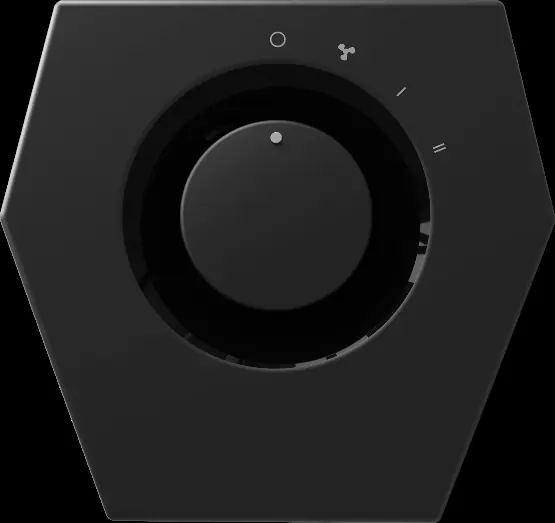
- Position the heater so airflow is not obstructed.
- Plug the power cord into a standard wall outlet.
- Turn the control dial to select your desired mode: Fan Only, Low Heat (I), or High Heat (II).
Cleaning and Maintenance
Regular cleaning is recommended to maintain performance:
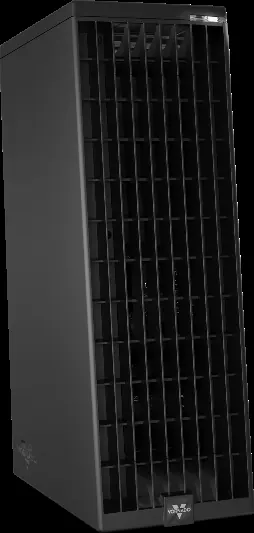
- Weekly Cleaning: Unplug the unit and use a brush attachment on a household vacuum to clean dust from the Front Outlet Grille and the Inlet Grille on the back.
- Deep Cleaning: Periodically blow out the heater with pressurized air to clear the heat element and motor of accumulated dust and debris.
- Exterior: Wipe down the unit with a soft, dry cloth.
Resetting the Heater
If the heater stops working due to overheating:
- Turn the heater off and unplug the power cord.
- Remove any obstructions blocking the inlets or outlet.
- Wait 5–10 minutes for the unit to cool down.
- Plug the power cord back in and turn the unit on.
Troubleshooting
If the unit fails to power on, check the following:
- Ensure the unit is plugged in securely.
- Check your home circuit breaker or fuse box.
- Verify if the unit has overheated (see Resetting the Heater).
- Ensure the unit is on a level surface to avoid triggering the tip-over switch.
If the unit is not producing sufficient heat, ensure it is set to High Heat and that all doors and windows are closed to trap heat.
Practical help
Common problems
Unit fails to power on
Check if plugged in, reset circuit breaker, ensure unit is not overheated (perform reset procedure), or check if the tip-over switch is engaged by placing on a level surface.
Unit not producing sufficient heat
Ensure the dial is set to High Heat, close doors and windows, and allow time for the unit to circulate heat throughout the room.
Before use
- Check appliance for visible damage.
- Place on a level floor surface.
- Ensure 3 feet of clearance on all sides.
- Plug directly into a wall outlet.
- Ensure the area is free of flammable liquids.
Specs in practice
- High Heat (II)
- Maximum power heating mode.
Images and diagrams
- The control dial allows selection between Off, Fan Only, Low Heat, and High Heat modes.
Model compatibility
- Do not use with extension cords, power strips, or smart plugs.
- Do not use on GFCI outlets.
- Not intended for use in bathrooms or damp locations.

Manual page author
Emily Carter
User documentation editor
Prepares concise manual descriptions and highlights the most useful setup, operation, and maintenance information for readers.