Toys / Pretend Play
Parent's Guide for VTech My 1st Gym Kit
Quick guide for the VTech My 1st Gym Kit. Learn how to install batteries, remove packaging locks, operate the music player, and care for your toy.
Quick answers from the manual
Quick answer
- The VTech My 1st Gym Kit is an interactive toy set. To start, remove packaging locks, install 2 AAA batteries, and toggle the power switch to exit Try-Me mode. p. 4, 5, 7
Key actions
- Install batteries p. 5
- Remove packaging p. 4
First start
- Exit Try-Me mode p. 7
Problems and fixes
Unit powers down or light fades
Install a new set of batteries.
p. 7Maintenance and reset
- Cleaning p. 9
Technical specifications
| Parameter | Value | Meaning | Pages |
|---|---|---|---|
| Batteries | 2 x AAA | Required for operation | p. 5 |
Where to find it in the PDF
- Getting Started p. 5
- Product Features p. 6, 7
- Care & Maintenance p. 9
Table of contents
Manual images
Click an image to enlargeQuick guide from the manual
The VTech My 1st Gym Kit is designed to support physical development and encourage role play. Before using the toy, you must remove all packaging materials, including packaging locks and cable ties. The unit comes in a "Try-Me" mode for packaging; you must turn the unit off and on again after unboxing to enable normal play.
Included in the package
- Music Player
- Textured Fitness Ball
- Water Bottle
- Sport Towel
- Dumbbell
- Parent's Guide
Getting started
Battery Removal and Installation:

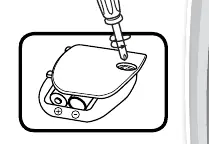
- Ensure the unit is turned OFF.
- Locate the battery cover on the back of the music player.
- Use a screwdriver to loosen the screw and open the cover.
- Remove old batteries if present.
- Install 2 new AAA batteries following the diagram inside the battery box.
- Replace the battery cover and tighten the screw.
Important Battery Information:
- Use new alkaline batteries for maximum performance.
- Do not mix old and new batteries, or different battery types.
- Insert batteries with the correct polarity (+ and -).
- Remove batteries during long periods of non-use.
Product features
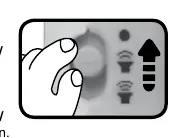
On/Off/Volume Switch: Located on the side of the music player. Slide to the Low or High volume position to turn the unit on. Slide to the Off position to turn it off.
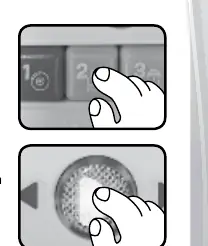
Number Buttons: Press these buttons to learn about fitness tools, numbers, and colours.
Light Up Music Button: Press to hear upbeat songs and music for exercising or relaxing. The light will flash with the sounds.
Automatic Shut-Off: To preserve battery life, the music player automatically shuts off after each audio response. Press any button or slide the power switch to turn it back on.
Care and maintenance
- Keep the unit clean by wiping it with a slightly damp cloth.
- Keep the unit out of direct sunlight and away from direct heat sources.
- Remove batteries if the unit will not be in use for an extended period.
- Do not drop the unit on hard surfaces or expose it to moisture or water.
Consumer services
If you encounter issues, contact VTech Consumer Services:
UK Customers: 0330 678 0149 or www.vtech.co.uk/supportAustralian Customers: 1800 862 155 or support.vtech.com.auNZ Customers: 0800 400 785 or support.vtech.com.au
Official resources from the manual
Practical help
Common problems
Unit does not turn on
Check if batteries are installed correctly or replace with 2 new AAA batteries.
Unit powers down during play
Replace the batteries; the unit may be in Try-Me mode or batteries are exhausted.
Before use
- Remove all packaging locks by rotating them 90 degrees anticlockwise.
- Cut and discard cable ties attaching the toy to the box.
- Install 2 new AAA batteries.
- Turn the unit off and on again to exit Try-Me mode.
Images and diagrams
- Battery compartment: Located on the back of the music player; requires a screwdriver to open.
- On/Off/Volume Switch: Located on the side of the music player.
Model compatibility
- Designed for infants and toddlers.

Manual page author
Michael Turner
Technical manual editor
Reviews PDF manuals for structure, safety notes, and practical product details so readers can find the right information quickly.