Power / Portable Power Stations
User Manual for VTOMAN Jump 1800 Portable Power Station
Comprehensive user guide for the VTOMAN Jump 1800 portable power station. Learn how to charge the unit, use the jump starter, operate AC/DC/USB outputs, and troubleshoot common issues.
Quick answers from the manual
Quick answer
- The VTOMAN Jump 1800 is a 1800W portable power station with a 1548Wh LiFePO4 battery. It supports AC, DC, and USB output, and includes a jump starter function for 12V vehicle batteries. p. 1
Key actions
- Charging the unit p. 1
- Jump starting a vehicle p. 1
First start
- Charge the unit fully before first use using the provided AC adapter. p. 1
Problems and fixes
AC output shuts off
Check for short-circuit or overload (>1800W). Resolve issue and press AC button to reset.
p. 1Maintenance and reset
- Recharge every 3 months if stored for a long time. p. 1
Technical specifications
| Parameter | Value | Meaning | Pages |
|---|---|---|---|
| Capacity | 1548Wh | Total energy storage | p. 1 |
| AC Output | 1800W | Continuous power output | p. 1 |
Where to find it in the PDF
- Product Overview and Specifications p. 1
- Jump Start Instructions p. 1
Table of contents
Manual images
Click an image to enlargeQuick guide from the manual
The VTOMAN Jump 1800 is a high-capacity portable power station designed for powering electronic devices and jump-starting 12V vehicle batteries. Before first use, it is recommended to fully charge the unit using the provided AC adapter.
- Charging: Can be charged via AC adapter (8-9 hours), solar panels (12-30V), or car charger (9-10 hours).
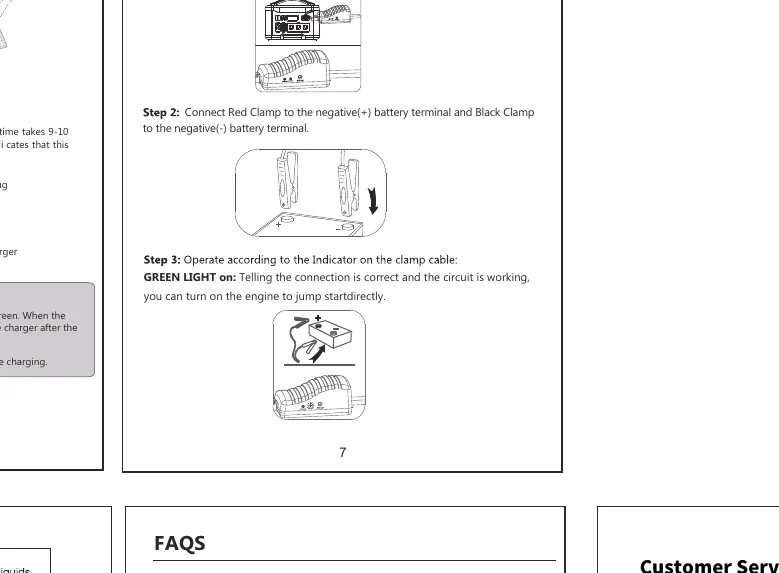
- Jump Starting: Connect clamps to the vehicle battery, press the BOOST button if the battery is low, wait for the green light, and start the engine.
- Safety: Do not exceed 1800W rated power. Keep away from water, fire, and extreme temperatures.
Product Overview
The device features an LCD screen that displays battery percentage, available time, power consumption, and active output methods. Ports include:
- AC Output: 110V/60Hz, 1800W continuous (3600W peak).
- DC Output: 12V cigarette lighter socket and DC ports (120W max total).
- USB Output: 3x USB-A (5V/2.4A) and 1x Quick Charge 3.0 port.
- Type-C Output: Supports PD100W max.
Operating Instructions
To use the power station, press the corresponding power switch (AC, DC, USB) to activate the output. The LCD screen will display the function icons when active. If the unit is not in use, turn off the switches to save power; the unit will automatically shut down after 30 seconds if no load is detected.
Jump Starting a Vehicle
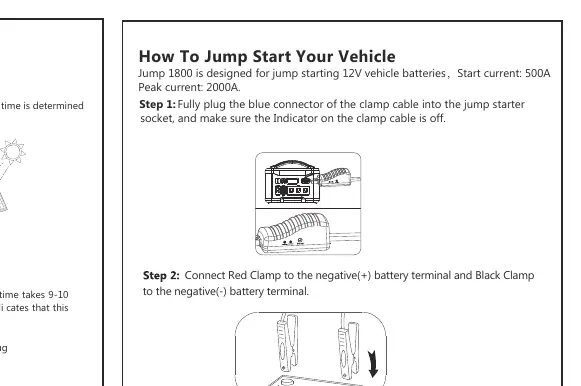
- Plug the blue connector of the clamp cable into the jump starter socket.
- Connect the Red Clamp to the positive (+) terminal and the Black Clamp to the negative (-) terminal of the vehicle battery.
- If the GREEN LIGHT is solid, start the engine.
- If the GREEN LIGHT is blinking, the vehicle battery is low; press the BOOST button, wait for the light to become solid, then start the engine.
- Once started, remove the clamp cable from the jump starter first, then remove the clamps from the battery.
Safety and Maintenance
To maintain the LiFePO4 battery life, do not let the power run out completely. Recharge immediately if the battery level drops below 5%. If storing for a long time, recharge every 3 months and keep the battery above 80%. Do not disassemble, modify, or expose the unit to fire or temperatures above 266°F.
Troubleshooting
If the AC output turns off, it may be due to a short-circuit or overload (load > 1800W). Resolve the issue and press the AC button to reset. If the jump starter locks down, turn it off, remove clamps, and restart the process.
Practical help
Common problems
AC output turns off automatically
The unit has entered protection mode due to short-circuit or overload (>1800W). Resolve the load issue and press the AC button to reset.
Vehicle jump start fails
Check clamp connections. If the battery is low, press the BOOST button and wait for the green light before starting.
LCD display shows capacity < 5%
Recharge the unit immediately to maintain battery health.
Before use
- Charge the unit fully using the provided AC adapter before first use.
- Verify that the total power consumption of your devices is under 1800W.
- Ensure the operating environment is between 32°F and 113°F.
- Check that the AC/DC/USB switches are turned off when not in use.
Specs in practice
- Battery Type
- LiFePO4 (Lithium Iron Phosphate)
Images and diagrams
- LCD Screen: Displays battery percentage, available time, power consumption, and active output methods.
- Jump Start Clamps: Red clamp connects to positive (+), Black clamp connects to negative (-).
Model compatibility
- AC Output supports laptops, displays, and home appliances under 1800W.
- DC Output (12V) supports car air pumps, vacuum cleaners, and refrigerators.
- Type-C port supports PD100W charging for laptops and smartphones.

Manual page author
Michael Turner
Technical manual editor
Reviews PDF manuals for structure, safety notes, and practical product details so readers can find the right information quickly.