Furniture / Sofas & Couches
Assembly Instructions for Wayfair Leandro 2-Drawer Dining Sideboard Server
Complete assembly and setup guide for the Wayfair Leandro 2-drawer dining sideboard. Includes step-by-step installation, hardware details, hinge adjustments, weight limits, and LED light strip app control instructions.
Quick answers from the manual
Quick answer
- This manual provides assembly instructions for the Wayfair Leandro 2-drawer sideboard, including hardware lists, step-by-step construction, hinge adjustments, and LED light strip app configuration. p. 1, 6, 7, 24
Key actions
- Assemble with 2 people p. 1
- Install anti-tilt device p. 19
Problems and fixes
Doors misaligned
Adjust hinge screws vertically, laterally, or adjust the gap.
p. 7Maintenance and reset
- Remove protective plastic film from parts 12, 13, 14, 15, 16, 21. p. 22
Technical specifications
| Parameter | Value | Meaning | Pages |
|---|---|---|---|
| Max load top | 50 kg | Maximum weight capacity for the top surface | p. 23 |
| Max load drawer/shelf | 5 kg | Maximum weight capacity per drawer or shelf | p. 23 |
Where to find it in the PDF
- Assembly Instructions p. 1, 8, 21
- LED App Setup p. 24, 28
Table of contents
Manual images
Click an image to enlargeQuick guide from the manual
This sideboard requires 2 people for assembly and takes approximately 45 minutes. Ensure you have a flat surface and a soft blanket or rug to protect the furniture from scratches during assembly. Important: This product must be installed with the included anti-tilt device to prevent serious injury from tipping. If you notice scratches on parts 12, 13, 14, 15, 16, or 21, please remove the protective plastic film.
Assembly and Installation
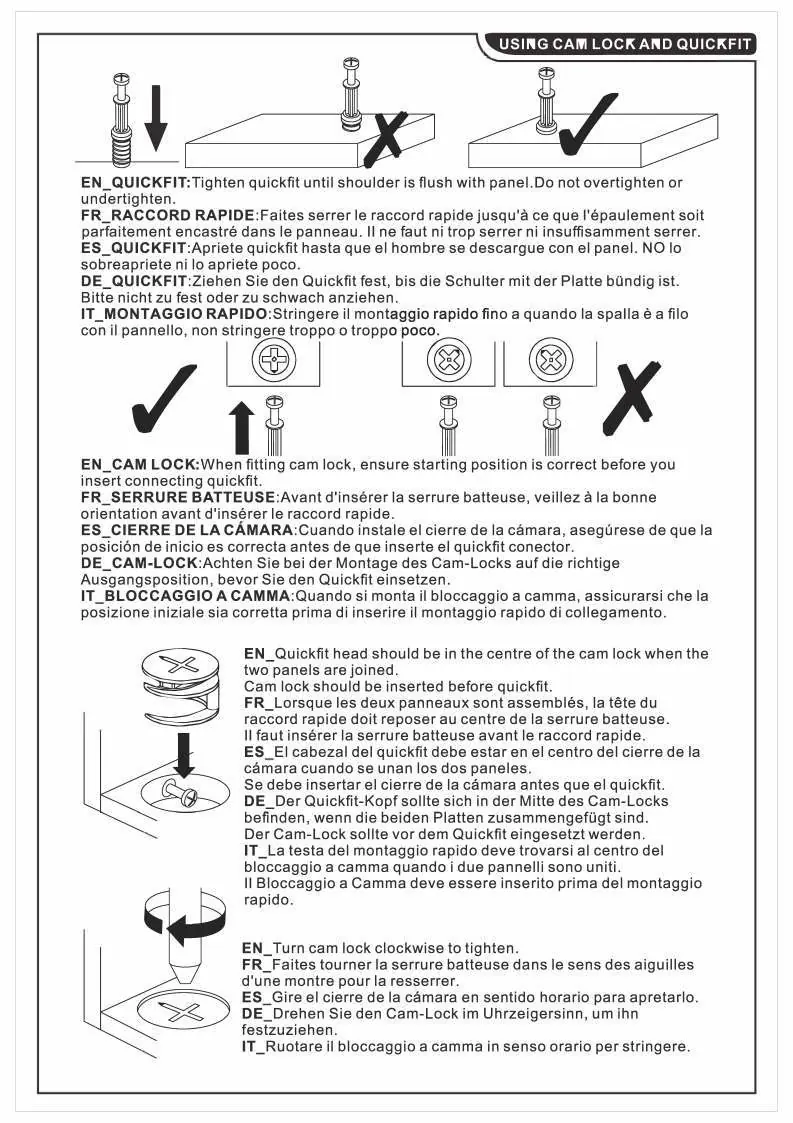
The assembly process involves using cam locks and quickfit connectors. Ensure the quickfit is tightened until the shoulder is flush with the panel, but do not overtighten. When fitting the cam lock, ensure the starting position is correct before inserting the quickfit. The cam lock should be turned clockwise to tighten.



Hinge Adjustment
If the doors are not aligned, use the hinge adjustment screws:
- Vertical adjustment: Loosen the screw and move the door up or down.
- Gap adjustment: Turn the screw clockwise or anti-clockwise to adjust the gap between the door and the main frame.
- Lateral adjustment: Turn the screw to adjust the door laterally.
LED Light Strip Setup
The sideboard includes an LED light strip controlled via a mobile app. To set it up:
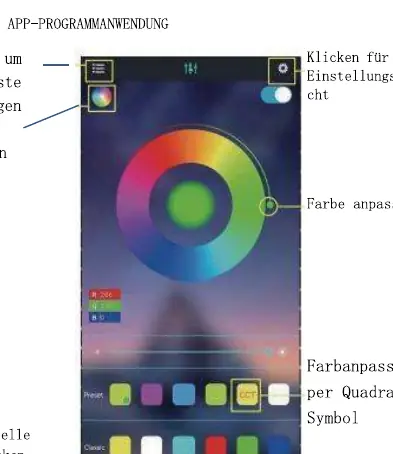
- Connect the LED strip and controller, then power on the controller.
- Scan the QR code provided in the manual to download the app.
- Start the app, search for the controller, and connect.
- Enjoy Bluetooth wireless control.
Weight Limits
To ensure safety and product longevity, adhere to the following weight limits:
- Top surface: Max 50 kg
- Drawers and shelves: Max 5 kg each
Manufacturer information
Wayfair LLC
Practical help
Common problems
Doors are misaligned
Use the hinge adjustment screws to move the door vertically, laterally, or adjust the gap between the door and the frame.
Missing white glue particles on the board
Press part P into the board.
Scratches on the surface after assembly
Remove the protective plastic film from parts 12, 13, 14, 15, 16, and 21.
Before use
- Ensure 2 people are available for assembly.
- Prepare a flat surface with a soft blanket to prevent scratches.
- Check all parts against the parts list (pages 3-4).
- Ensure you have the required tools (not provided).
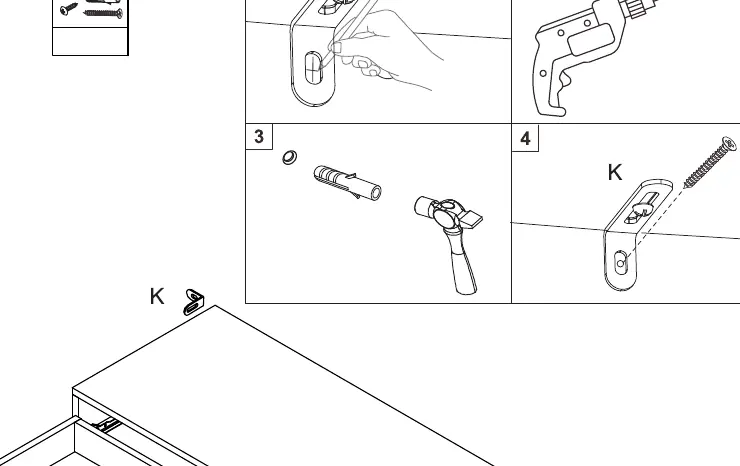
- Install the anti-tilt device (page 19).
Specs in practice
- Max load (top)
- 50 kg maximum weight capacity for the top surface.
- Max load (drawers/shelves)
- 5 kg maximum weight capacity per drawer or shelf.
Images and diagrams
- Cam lock and quickfit installation guide (page 6).
- Hinge adjustment guide for door alignment (page 7).
- LED light strip app control setup (page 24).
Model compatibility
- LED controller supports up to 10m RGB(W) strip.
- App control requires Bluetooth connection.
- Input voltage: 4.5-26V.

Manual page author
David Miller
Documentation analyst
Organizes user manual content into clear summaries, with attention to model details, product context, and everyday usability.