Garden / Hedge Trimmers
Westinghouse 20V Power Inverter User Manual
Quick guide for the Westinghouse 20V Power Inverter. Learn how to operate the device, check specifications, and follow safety guidelines for optimal performance.
Quick answers from the manual
Quick answer
- The Westinghouse 20V Power Inverter converts 18V DC battery power to 110V AC. It supports 150W of continuous power and 300W of peak surge power. p. 1, 2
Key actions
- Insert the inverter into a fully charged 20V battery and wait for the green LED to light up before plugging in your device. p. 2
First start
- Ensure the battery is charged, insert it into the inverter, verify the green LED is on, then connect your device. p. 2
Problems and fixes
Inverter shuts off
Device is pulling more than 150W; do not overload.
p. 1Technical specifications
| Parameter | Value | Meaning | Pages |
|---|---|---|---|
| Running watts | 150W | Continuous power capacity | p. 2 |
| Peak watts | 300W | Startup surge power capacity | p. 2 |
Where to find it in the PDF
- Safety and Description p. 1
- Operation and Specifications p. 2
Table of contents
Quick guide from the manual
The Westinghouse 20V Power Inverter is designed to convert power from a 20V battery into 110V AC power for portable devices. It provides 150W of continuous power and 300W of startup surge power. Before use, ensure your device's power requirements do not exceed the inverter's capacity to prevent automatic shutdown.
Safety and precautions
- Environment: Do not expose the unit to rain or water. Operate only in ambient temperatures between 32°F (0°C) and 113°F (45°C).
- Ventilation: Ensure at least 2 inches (5cm) of air space around the fan. Keep away from heat vents.
- Usage: For DC 18V batteries only. Do not operate if hands are wet. Keep away from children. Do not disassemble the unit.
- USB Port: The USB port is for charging only. Always use the proper charging cable for the device being charged.
Operation
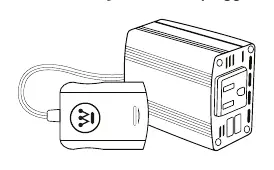
- Insert the plastic plug-in box into a fully charged Westinghouse 20V battery.
- Check that the green LED light on the inverter is lit.
- Once the green LED is on, plug in your device.
- When finished, unplug the inverter from the battery. Note that the inverter will continue to pull power from the battery until it is unplugged.
Technical specifications
The inverter operates with the following parameters:
- Input voltage: DC 18V (16-21V)
- Output voltage: AC 110V
- Frequency: 60Hz
- USB output: DC 5V/2.1A+1A
- Running watts: 150W
- Peak watts: 300W
- Under-voltage shutdown: 15.4V
- Over-voltage shutdown: 23.4V
Practical help
Common problems
The inverter shuts off during use.
Your device is likely pulling more than 150W of power for an extended period. Check your device's power requirements.
Green LED light is not lit.
Ensure the battery is fully charged and properly inserted into the inverter.
Before use
- Ensure the Westinghouse 20V battery is fully charged.
- Verify the device you intend to power requires 150W or less.
- Check that the ambient temperature is between 32°F and 113°F.
- Ensure there is at least 2 inches of clearance around the fan for ventilation.
Specs in practice
- Running watts (150W)
- The maximum continuous power the inverter can supply to your device.
- Peak watts (300W)
- The maximum power the inverter can handle for a short startup surge.
- Under-voltage shutdown (15.4V)
- Safety feature that turns off the unit to prevent battery over-discharge.
- Over-voltage shutdown (23.4V)
- Safety feature that turns off the unit to protect against voltage spikes.
Images and diagrams
- The diagram shows the connection between the inverter and the battery.
- The inverter features a standard AC outlet and a USB charging port.
Model compatibility
- Compatible with Westinghouse 20V batteries only.
- Designed for DC 18V input systems.

Manual page author
Emily Carter
User documentation editor
Prepares concise manual descriptions and highlights the most useful setup, operation, and maintenance information for readers.