HVAC / Thermostats & Controls
User Manual for White-Rodgers Emerson Blue Easy Set Thermostat 1F86EZ-0251
Comprehensive user guide for the White-Rodgers Emerson Blue Easy Set 1F86EZ-0251 thermostat. Includes installation instructions, wiring diagrams, configuration settings, and troubleshooting steps.
Quick answers from the manual
Quick answer
- The 1F86EZ-0251 is a non-programmable thermostat with 3 temperature presets (Home, Sleep, Away). It supports single-stage heating and cooling systems and requires low voltage NEC Class II wiring. p. 1
Key actions
- Set Temperature Presets p. 3
- Reset Thermostat p. 6
First start
- Install batteries, mount the base, connect wires, and configure settings via the menu. p. 4, 5
Problems and fixes
Display blank or erratic
Perform a reset by holding the up and down buttons for 10 seconds.
p. 6Maintenance and reset
- Reset operation: Hold up and down buttons for 10 seconds. p. 6
Technical specifications
| Parameter | Value | Meaning | Pages |
|---|---|---|---|
| Setpoint Range | 45° to 90°F (7° to 32°C) | Operating temperature range | p. 8 |
| Electrical Rating | mV to 30 VAC, 50/60 Hz or DC | Power requirements | p. 8 |
Where to find it in the PDF
- Getting to know your thermostat p. 2
- Using your thermostat p. 3
- Installation p. 4
- Configuration Menu p. 5
- Troubleshooting p. 6
- Technical Data p. 7, 8
Table of contents
Manual images
Click an image to enlargeQuick Guide from the Manual
The Emerson Blue Easy Set 1F86EZ-0251 is a non-programmable thermostat designed for single-stage heating and cooling systems. It features three temperature presets (Home, Sleep, Away) for quick adjustments. This device is intended for low voltage NEC Class II systems only and should not be used with line voltage systems.
Getting to Know Your Thermostat
The thermostat features a digital display and physical buttons for control:
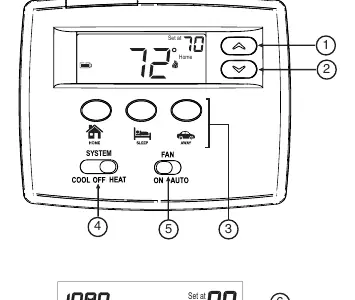
- Buttons: Up/Down arrows for temperature adjustment, dedicated buttons for Home, Sleep, and Away presets, and switches for System (Cool/Off/Heat) and Fan (On/Auto).
- Display: Shows current and desired temperature, system mode (Heat/Cool), battery status, and "Change Filter" reminders.
- Batteries: Uses two AA alkaline batteries. A battery icon appears when power is low.
Using Your Thermostat
Temperature Presets: You can customize the Home, Sleep, and Away temperatures. To set them: move the system switch to Heat, use the arrow buttons to set the desired temperature, and press and hold the specific preset button (Home, Sleep, or Away) for 3 seconds until the display flashes.
Sleep Timer: Automatically switches from Sleep to Home temperature after a set duration (default 8 hours, adjustable 1-12 hours).
Change Filter Reminder: Displays a reminder to change air filters based on a set number of hours (default 200 hours, adjustable 25-1975 hours).
Cool Savings: When enabled, the thermostat makes small adjustments to the desired temperature during high demand periods to save energy.
Installation
Preparation: Turn off power to the heating and cooling system. Remove the old thermostat cover and disconnect wires one by one, ensuring they do not fall back into the wall.
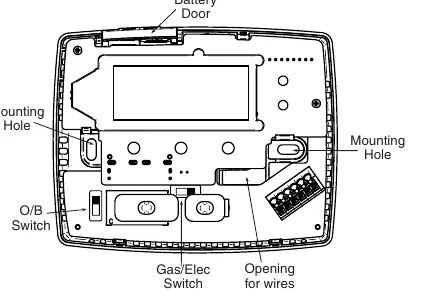
Mounting: Detach the new thermostat cover from the base, mark mounting holes, drill, and secure the base to the wall. Connect wires to the corresponding terminals as shown in the wiring diagrams.
Switches: Ensure the Gas/Elec switch is set correctly (ELEC for heat pumps, GAS for single-stage systems). The O/B switch is factory set to "O" for most heat pump applications.
Configuration Menu
To enter the configuration menu, press and hold the arrow buttons for 3 seconds. Use the arrow buttons to change settings and the Home button to navigate. Settings include:
- 01: Single Stage (SS) or Heat Pump (HP) selection.
- 02-03: Sleep Timer settings.
- 04-05: Cool Savings feature settings.
- 06-07: Adjustable anticipation (cycle rate) for Heat and Cool.
- 08: Compressor Lockout (prevents short cycling).
- 09: Display Light settings.
- 10: Room temperature calibration.
- 11: Fahrenheit or Celsius display.
- 12-13: Change Filter reminder settings.
Troubleshooting
If the thermostat experiences erratic operation or a blank display, perform a reset: ensure the system switch is in Cool or Heat, then simultaneously press the up and down arrow buttons for approximately 10 seconds until the display goes blank.
Technical Data
The thermostat operates on 20 to 30 VAC (mV to 30 VAC, 50/60 Hz or DC). The setpoint range is 45° to 90°F (7° to 32°C). It is designed for 90% non-condensing maximum humidity and ambient temperatures between 32° and 105°F.
Practical help
Common problems
No Heat/No Cool/No Fan
Check for a blown fuse or tripped circuit breaker, ensure the furnace power switch is ON, and verify the furnace blower compartment door is properly closed.
Blank Display
Check battery levels or perform a reset by holding the up and down buttons for 10 seconds.
Heat/Cool/Fan runs constantly
Check for shorted wiring, ensure no bare wire is touching other terminals, or check if the Fan switch is set to ON.
Before use
- Verify the system is a low voltage NEC Class II system.
- Install two AA alkaline batteries.
- Set the Gas/Elec switch according to your system type.
- Set the O/B switch correctly for your heat pump configuration.
- Check all wiring connections against the provided diagrams.
Specs in practice
- Setpoint Range
- The temperature range the thermostat can control: 45° to 90°F (7° to 32°C).
- Terminal Load
- Maximum 1.0 A per terminal, 1.5A total combined load.
- Operating Humidity
- Maximum 90% non-condensing.
Images and diagrams
- Figure 1: Shows the thermostat base, mounting holes, and switch locations.
- Figure 2-4: Wiring diagrams for single and two transformer systems.
Model compatibility
- Not compatible with line voltage systems.
- Requires low voltage NEC Class II system.
- Supports single-stage heating and cooling systems.

Manual page author
David Miller
Documentation analyst
Organizes user manual content into clear summaries, with attention to model details, product context, and everyday usability.