Lighting / Outdoor Landscape
WiZ 12V Ground Spot Extension User Manual
Quick guide for installing and operating the WiZ 12V Ground Spot Extension. Learn how to connect, mount, and pair your outdoor lighting system.
Table of contents
Manual images
Click an image to enlargeQuick guide from the manual
This guide provides instructions for the installation and operation of the WiZ 12V Ground Spot Extension. Ensure you follow all safety precautions and electrical guidelines when installing outdoor lighting.
Installation
Before beginning, ensure the power supply is turned off. The system is designed for low-voltage operation.
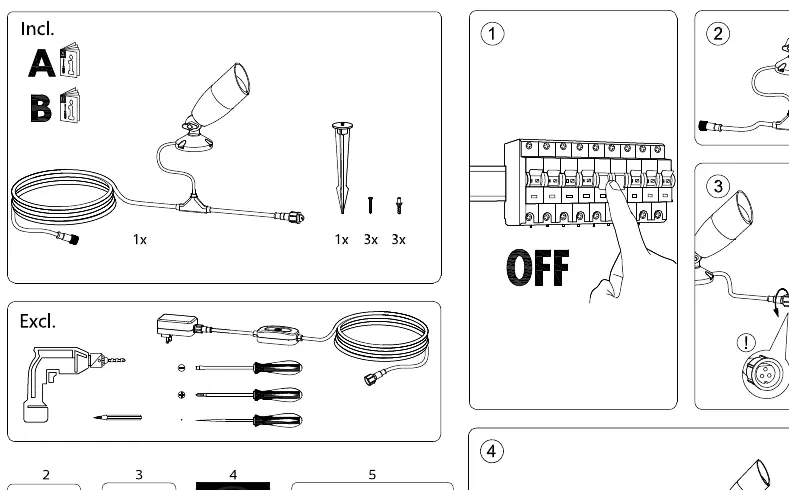
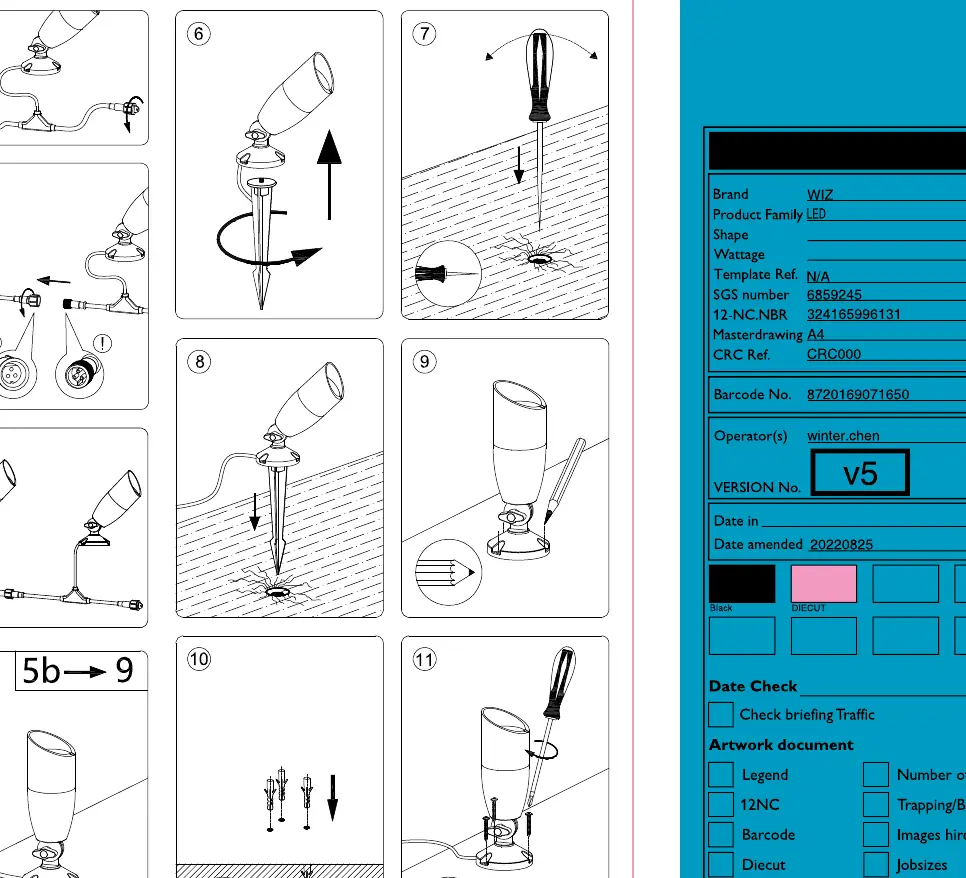
- Wiring: Connect the extension cables according to the provided diagrams. Ensure all connections are secure and protected.
- Daisy Chaining: You can connect multiple units in a series. Do not exceed a maximum of 5 units in a single daisy chain.
- Mounting: The unit can be installed in the ground using the provided stake or mounted to a surface using screws. Ensure the mounting surface is stable.
- Positioning: Ensure the light is positioned at least 1 foot (0.305m) away from the power source or connector to prevent strain on the cables.
Operation
The WiZ 12V Ground Spot Extension is controlled via the WiZ app or compatible smart home systems.
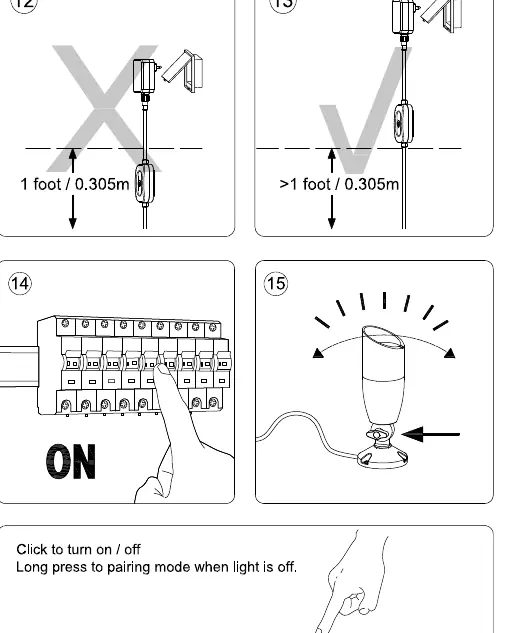
- Turning On/Off: Click the control button to toggle the light on or off.
- Pairing Mode: If the light is off, perform a long press on the control button to enter pairing mode. This allows the device to be discovered by the WiZ app.
Safety and Specifications
- IP Rating: The device is rated IP65, making it suitable for outdoor use with protection against dust and water jets.
- Voltage: Operates on a 12V system.
- Class III: This is a low-voltage safety extra-low voltage (SELV) product.
Practical help
Common problems
Light not pairing
Ensure the light is turned off, then perform a long press on the control button to enter pairing mode.
System not working
Check that the daisy chain does not exceed the maximum limit of 5 units.
Before use
- Ensure the main power supply is turned off before starting installation.
- Verify that you have all necessary components (spot, stakes, screws).
- Check that the installation location is suitable for IP65 rated equipment.
- Ensure the distance from the power source is at least 1 foot (0.305m).
Images and diagrams
- Steps 1-4 illustrate the wiring and daisy-chain connection process.
- Steps 5-9 show the two mounting options: ground stake installation and surface screw mounting.
- Steps 14-15 demonstrate the physical control button usage for power and pairing.
Model compatibility
- Designed for use with WiZ 12V outdoor lighting systems.
- Requires WiZ app for smart features.

Manual page author
David Miller
Documentation analyst
Organizes user manual content into clear summaries, with attention to model details, product context, and everyday usability.