Power / Power Banks
User Manual for XD Collection P322.45 10,000 mAh Solar Power Bank
Quick guide for the XD Collection P322.45 10,000 mAh solar power bank. Learn how to charge the device via cable or solar, use wireless charging, and maintain battery health.
Table of contents
Important Information
Before using the power bank for the first time, please charge it for at least 6 hours or until the first 3 LED lights stay on. Only use included or certified accessories to charge the power bank. Using third-party accessories can influence the safety of the item.
Device Overview
The power bank features the following components:
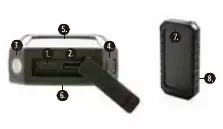
- 1. Type-C Input/Output
- 2. USB Output
- 3. LED lamp
- 4. On/Off button
- 5. Solar Panel
- 6. Wireless charging Output
- 7. Solar LED indicator
- 8. LED indicator
Charging the Power Bank
By Cable
Plug the supplied Type-C cable into your wall charger or computer USB port. The USB connector goes to your charger, and the Type-C goes to your power bank. The blue indicator lights will start blinking when charging. When 3 lights are full, the item is fully charged. Disconnect the power bank when fully charged.
Solar Charging
Place the solar panel of the power bank in direct sunlight. While charging via the solar panel, the solar indicator will turn green. Charging time depends on factors like light brightness and angle.
Charging Your Mobile Device
By Cable
Plug your cable into the USB port on the power bank and the other end into your device. Your device will show a charging condition, and a blue light will show on the power bank. It takes approximately four hours to charge a mobile device to 95%. Recharge the power bank after use.
Wireless Charging
Ensure your phone is compatible with wireless charging. Switch on the power bank using the On/Off button. Place your wireless charging-enabled device on the wireless charging surface of the power bank.
Safety Warnings
- Do not vigorously shake, hit, or throw the product.
- If the power bank is not used for a long time, charge/discharge it once every three months to ensure service life.
- Some phone cases may block wireless charging.
- Do not place metal objects, magnets, or magnetic stripe cards between the mobile device and the wireless charger pad.
- Do not expose this device to moisture or heat sources.
- This is not a toy; it is not suitable for children under the age of 7.
Technical Specifications
- Battery size: 10,000 mAh / 37 Wh
- Type-C Input: 5V/2.4A, 9V/1.67A
- USB Output: 5V/2.4A
- Type-C Output: 5V/2.4A
- Wireless Output: 5W/7.5W/10W
Practical help
Common problems
Wireless charging not working
Ensure your phone is compatible with wireless charging. Remove any metal objects, magnets, or magnetic stripe cards between the phone and the charger. Check if your phone case is blocking the charging.
Device not charging properly
Ensure the mobile device is placed accurately on the charging surface. Use only included or certified cables and chargers.
Before use
- Charge the power bank for at least 6 hours before first use
- Verify phone compatibility for wireless charging
- Use only certified cables and chargers
- Remove metal objects from the charging surface
Specs in practice
- Battery Capacity
- 10,000 mAh / 37 Wh
- Wireless Output
- Supports 5W, 7.5W, and 10W charging
- Type-C Input
- Supports fast charging at 9V/1.67A or standard 5V/2.4A
Images and diagrams
- 1. Type-C Input/Output port
- 2. USB Output port
- 4. On/Off button
- 5. Solar Panel
- 6. Wireless charging surface
Model compatibility
- Wireless charging requires a compatible mobile device
- Some phone cases may interfere with wireless charging
- Do not place metal objects or magnets on the wireless charging surface

Manual page author
Michael Turner
Technical manual editor
Reviews PDF manuals for structure, safety notes, and practical product details so readers can find the right information quickly.