Computers / Mobile Computers
Regulatory Guide for Zebra TC78 Mobile Computer
Essential regulatory, safety, and compliance information for the Zebra TC78 mobile computer. Includes battery safety, RF exposure guidelines, laser safety, and proper handling instructions.
Table of contents
Important Information from the Manual
This document provides critical regulatory, safety, and compliance information for the Zebra TC78 mobile computer. Users must adhere to these guidelines to ensure safe operation and compliance with international standards. Key safety measures include proper battery handling, RF exposure precautions, and laser safety protocols.
Safety and Handling
To ensure safe operation, follow these guidelines:
- Ergonomics: Follow good workplace practices to minimize the risk of ergonomic injury.
- Vehicle Installation: Ensure the device is installed to avoid driver distraction and does not interfere with vehicle safety systems.
- Medical Devices: Maintain a minimum separation distance of 20 cm between the wireless device and medical devices like pacemakers.
- Hospitals and Aircraft: Switch off the device when requested in hospitals, clinics, or by airline staff.
Battery Safety
Use only Zebra-approved batteries and chargers. Using incompatible equipment may cause fire, explosion, or other hazards.
- Approved Battery Models: BT-000442, BT-000442B, BT-000442A, BT-000442C.
- Charging: Charge only in temperatures between 0°C and 40°C. Do not charge damp or wet devices.
- Storage: Store batteries at half charge in a cool, dry place. If stored for over six months, verify the charge level and recharge to half capacity.
- Disposal: Dispose of used batteries according to local regulations. Do not dispose of them in fire.
RF Exposure and Laser Safety
RF Exposure: To satisfy RF exposure requirements, the device must operate with a minimum separation distance of 1.5 cm from the user's body.
Laser Safety: The device uses a Class 2 laser scanner. Do not stare into the laser beam. Momentary exposure is generally not harmful, but avoid direct contact.
Scanner Labeling
The device features specific laser warning labels. Ensure these labels remain legible. Do not modify or perform procedures other than those specified in the documentation, as this may result in hazardous laser exposure.
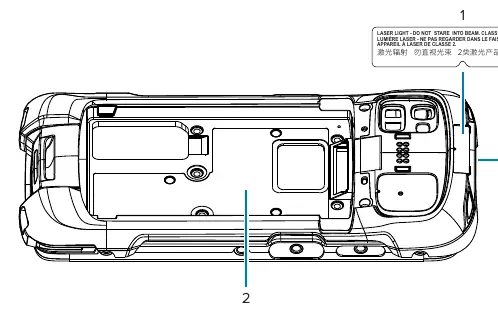
Compliance and Support
The device complies with various international regulations, including FCC and ISED standards. For detailed compliance information, including the Declaration of Conformity, visit zebra.com/doc. For technical support, software downloads, or repair requests, visit zebra.com/support.
Official resources from the manual
Manufacturer information
Zebra Technologies
Practical help
Common problems
Battery not charging or performance issues
Ensure you are using a Zebra-approved battery and charger. Check that the charging environment is between 0°C and 40°C.
Potential interference with medical devices
Maintain a minimum separation distance of 20 cm between the mobile computer and medical devices like pacemakers.
Laser safety concerns
Do not stare directly into the laser beam. Ensure the device is used only as described in the documentation.
Device wet or damp
Do not attempt to charge the device. Ensure all components are completely dry before connecting to a power source.
Before use
- Verify the battery is a Zebra-approved model (BT-000442 series).
- Ensure the device and battery are dry before charging.
- Check that the charging area is free of debris and combustible materials.
- Confirm the device is configured for your facility's network.
- Ensure the device is kept at least 1.5 cm from the body during operation.
Specs in practice
- Operating Temperature (Charging)
- 0°C to 40°C (32°F to 104°F). Charging outside this range may be unsafe.
- RF Exposure Distance
- Minimum 1.5 cm separation from the body is required to meet safety standards.
Images and diagrams
- The scanner labeling diagram indicates the location of laser warning labels on the device and specifies the laser class and output power for the SE4770 and SE5500 scanners.
Model compatibility
- Compatible with Zebra-approved batteries: BT-000442, BT-000442B, BT-000442A, BT-000442C.
- Use only Zebra-approved, Certified ITE SELV power supplies.

Manual page author
Emily Carter
User documentation editor
Prepares concise manual descriptions and highlights the most useful setup, operation, and maintenance information for readers.