Power / Solar Inverters
User Manual for 2E Mini DC 17W UPS
Quick guide for the 2E Mini DC 17W UPS. Learn how to connect devices, select output voltage, understand LED indicators, and safely operate your power backup.
Quick answers from the manual
Quick answer
- The 2E Mini DC 17W is a portable UPS designed to provide backup power for digital devices. To start, hold the power button for 2-3 seconds. Always verify the voltage and polarity of your devices before connecting them to the corresponding output ports. p. 4
Key actions
- Power on the UPS p. 4
- Select POE voltage p. 4
First start
- Charge the UPS fully before initial use. p. 5
Problems and fixes
Overload protection triggered (all lights flash)
Remove the overloaded load. The UPS will restart every 5 seconds.
p. 4Maintenance and reset
- Charge the battery every 3 months if not in use. p. 5
Technical specifications
| Parameter | Value | Meaning | Pages |
|---|---|---|---|
| Max Output Power | 17 W | Maximum power capacity | p. 5 |
| Battery | 2200 mAh * 4 | Battery capacity | p. 5 |
Where to find it in the PDF
- Component Overview p. 2
- Usage Instructions p. 4
- Specifications p. 5
Table of contents
Manual images
Click an image to enlargeQuick guide from the manual
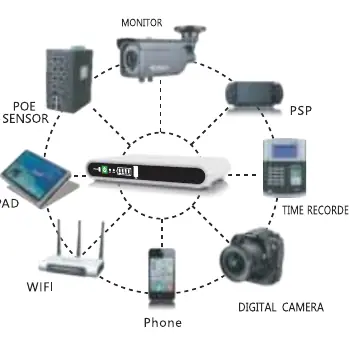
The 2E Mini DC 17W is an uninterruptible power supply (UPS) designed to provide backup power to digital devices such as routers, cameras, and other low-voltage equipment. Before use, ensure the device is fully charged. Always verify the voltage, current, and polarity of your load devices before connecting them to the UPS to prevent damage.
Package Contents
- UPS 2E Mini DC 17W
- AC power cable
- DC output cables (2 ends)
- User manual
- Warranty card
Component Overview
The device features various ports and indicators:
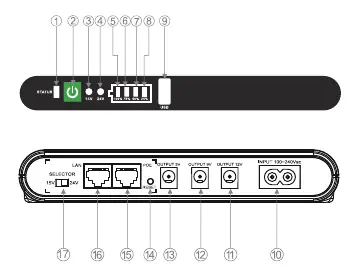
- Indicators: Work status, 15V/24V output indicators, and battery capacity indicators (25%, 50%, 75%, 100%).
- Outputs: USB (5V), 12V socket, 9V socket, 5V socket, and Ethernet (POE) interface.
- Controls: ON/OFF switch, Reset button for POE devices, and Output Voltage Selector (15V/24V).
- Inputs: AC input socket.
Operation and Usage
Starting the UPS: Press and hold the power button for 2-3 seconds to turn the unit on. If the 24V or 15V indicator is green, the DC port is active.
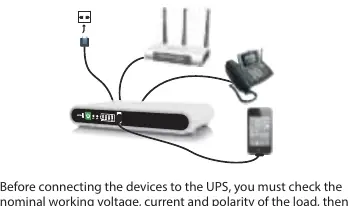
Connecting Devices:
- Check the nominal working voltage, current, and polarity of your load.
- Adjust the UPS output voltage to match your device.
- Connect the device to the appropriate port.
Overload Protection: If the total power exceeds the limit, all 4 power indicator lights will flash, and all output ports will turn off. Remove the overloaded device; the UPS will restart every 5 seconds.
Charging: When connected to AC mains, the status indicator turns green. The battery capacity indicators show the charging progress. When disconnected from the grid, the battery backup indicator turns red.
Safety and Maintenance
- Initial Use: Charge the device fully before the first use.
- Storage: If not used for a long time, keep the device fully charged, turn it to the OFF state, and store it in a cool place.
- Maintenance: It is recommended to charge the battery every 3 months.
- Prohibitions: Do not disassemble, hit, drop, or expose the unit to water, fire, or flammable environments. Keep out of reach of children.
Technical Specifications
- Model: 2E-DC17
- Input Voltage: 100-240 Vac / 50-60 Hz
- Max Output Power: 17 W
- Battery: 2200 mAh * 4
- Dimensions: 175 x 105 x 30 mm
- Weight: 0.4 kg
Manufacturer information
2E
Practical help
Common problems
All 4 power indicator lights flash and output ports turn off.
The total power load exceeds the UPS capacity. Remove the overloaded device. The UPS will automatically restart every 5 seconds.
25% battery indicator flashes.
Battery power is very low. The UPS will stop output at any time. Connect to AC power to recharge.
Device not powering on.
Ensure the power button was held for 2-3 seconds. If the battery is depleted, connect to AC power.
Before use
- Charge the device fully before initial use.
- Verify the nominal working voltage, current, and polarity of your load devices.
- Ensure the UPS output voltage matches your device requirements.
- Confirm the correct port is used for the specific device voltage.
Specs in practice
- Output Power (Max)
- The maximum total power the UPS can supply to all connected devices simultaneously (17W).
- Battery Capacity
- 2200 mAh * 4 cells, providing the energy storage for backup.
- Output Voltage Selector
- Switch to toggle POE output between 15V and 24V.
Images and diagrams
- The component diagram on page 2 identifies all ports (10-17) and LED indicators (1-8).
- The connection diagram on page 4 illustrates how to connect multiple devices to the UPS ports.
Model compatibility
- Suitable for digital products like mobile phones, PDAs, PSPs, iPods, MP4 players, and network equipment.
- POE port supports 15V or 24V output.

Manual page author
Michael Turner
Technical manual editor
Reviews PDF manuals for structure, safety notes, and practical product details so readers can find the right information quickly.