Power / Uninterruptible Power Supplies
User Manual for Tripp Lite Internet Office and BC Personal UPS Systems
Quick start guide for Tripp Lite Internet Office and BC Personal UPS systems. Includes safety instructions, installation steps, basic operation, and service information.
Table of contents
Quick guide from the manual
To get your UPS system running, follow these steps:
- Plug the UPS into an outlet that does not share a circuit with heavy electrical loads like refrigerators or air conditioners.
- Press and hold the ON/OFF/TEST button for one second to power on the unit. The alarm will beep once.
- Plug your equipment into the UPS outlets. Use the battery backup outlets (marked with a battery symbol) for essential equipment like computers and monitors.
- Note: The UPS will function immediately, but maximum battery runtime is only available after charging the unit for 24 hours.
Important Safety Instructions
Location Warnings:
- Install indoors in an area free from moisture, heat, dust, and direct sunlight.
- Maintain an operating temperature between 32°F and 104°F (0°C to 40°C).
- Leave adequate space around all sides for ventilation; do not obstruct vents.
- When mounting in tower orientation, ensure the LCD screen panel is at the top.
Connection Warnings:
- Connect only to a properly grounded AC outlet.
- Do not plug the UPS into itself.
- Do not connect surge protectors or extension cords to the output of the UPS.
- If using a motor-powered AC generator, it must provide filtered, frequency-regulated computer-grade output.
Basic Operation
The UPS features several indicators and ports to manage your power:
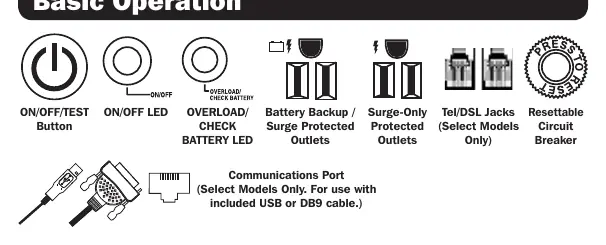
- ON/OFF/TEST Button: Used to power the unit on and perform self-tests.
- ON/OFF LED: Indicates the power status of the unit.
- OVERLOAD/CHECK BATTERY LED: Alerts you to overload conditions or battery issues.
- Battery Backup/Surge Protected Outlets: Provide power during outages.
- Surge-Only Protected Outlets: Provide surge protection without battery backup.
- Communications Port: Available on select models for use with included USB or DB9 cables.
- Resettable Circuit Breaker: Protects the unit from electrical overloads.
Service and Support
If you encounter issues, first review the installation and operation procedures in this manual. If the problem persists, do not return the product to the dealer. Visit www.tripplite.com/support to request a Returned Material Authorization (RMA) number for service. Ensure you have your unit's model and serial numbers ready when contacting support.
Official resources from the manual
Practical help
Common problems
UPS is overloaded
Calculate the total VA rating of connected equipment. If the total exceeds the UPS capacity, remove some devices. Multiply amps by 120 to determine VA.
Short battery runtime
The battery may not be fully charged. Ensure the unit has been plugged in and charging for at least 24 hours.
Unit will not power on
Ensure the unit is connected to live utility power and press/hold the ON/OFF/TEST button for one second.
Before use
- Ensure the installation area is free from moisture, dust, and heat.
- Verify that the UPS vents are not obstructed.
- Calculate the total VA rating of all equipment to be connected to ensure it does not exceed UPS capacity.
- Charge the UPS for 24 hours before expecting maximum battery runtime.
- Ensure the UPS is plugged into a properly grounded AC outlet.
Images and diagrams
- The Basic Operation diagram identifies the ON/OFF/TEST button, status LEDs, battery backup outlets, surge-only outlets, communications port, and the resettable circuit breaker.
Model compatibility
- Not suitable for mobile applications.
- Designed for electronic equipment only.
- Do not connect life support equipment to this UPS.

Manual page author
Michael Turner
Technical manual editor
Reviews PDF manuals for structure, safety notes, and practical product details so readers can find the right information quickly.