Electronics / Video Transmission
User Manual for Accsoon CoMo SE Wireless Intercom System
Quick guide for the Accsoon CoMo SE wireless intercom system. Learn how to set up, pair headsets, adjust volume, use ENC, and troubleshoot connection issues.
Quick answers from the manual
Quick answer
- The Accsoon CoMo SE is a full-duplex wireless intercom system. To start, insert the battery, power on the headsets, and they will automatically connect if pre-paired. Use the volume buttons to adjust sound and the microphone boom to mute/unmute. p. 6, 7, 9
Key actions
- Pairing headsets p. 10, 13
- Muting microphone p. 7, 10
First start
- Insert battery, power on both host and remote headsets. They are pre-paired by default and will connect automatically. p. 6, 9
Problems and fixes
Connection drops
Move closer to host or power cycle. If disconnected >30 mins, it powers off.
p. 10, 13Maintenance and reset
- To clear pairing memory, power on host, then press and hold volume '+' and '-' buttons for 3 seconds. p. 11, 14
Technical specifications
| Parameter | Value | Meaning | Pages |
|---|---|---|---|
| Range | 400m | Line of sight | p. 9, 12 |
| Battery Life | 30 hours | Operating time | p. 9, 12 |
Where to find it in the PDF
- Packaging List p. 4, 5, 6
- Specifications p. 12
Table of contents
Manual images
Click an image to enlargeQuick guide from the manual
The Accsoon CoMo SE is a full-duplex wireless intercom system designed for teams of up to five people. It operates on the 2.4GHz frequency and provides a 400-meter line-of-sight range. The system is pre-paired out of the box, allowing for immediate use upon powering on.
Packaging List
The package contents vary by model configuration (1 host + 4 remotes, 1 host + 2 remotes, or single headset). Standard items include:
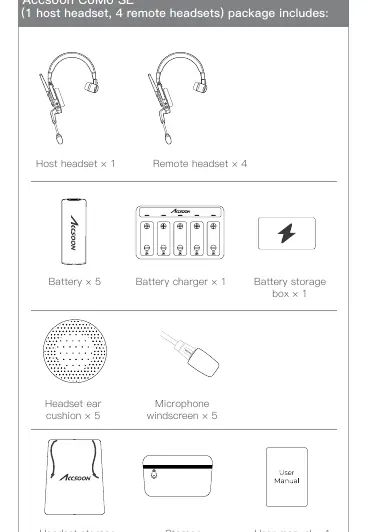
- Host and/or Remote headsets
- Batteries
- Battery charger and storage box
- Headset ear cushions
- Microphone windscreens
- Headset storage bags and container
Product Overview
The headset features an external antenna, a microphone boom, and a battery slot. The volume buttons are orange on the host headset and black on the remote headset. The ENC (Environmental Noise Cancellation) switch is located on the side of the headset.
First Use and Setup
- Battery Installation: Open the battery slot and insert the battery.
- Power On: Push the power switch to the ON position. The headset will play a "Power On" voice prompt, and the indicator will show a slow green flicker.
- Connection: Host and remote headsets are pre-paired by default. They will automatically connect when powered on. Remote headsets will play a "Connected" voice prompt upon successful connection.
Operation
Microphone Control
The microphone boom acts as a mute switch. When the boom is placed at a 45-degree angle, the microphone is muted (indicator shows red light). Pushing the boom forward to 45 degrees turns the microphone on (indicator shows green light).
Volume Control
Use the "+" or "-" buttons on the side of the headset to adjust the hearing volume. There are 5 levels of volume, with level 3 being the default. The headset remembers the last volume setting.
ENC (Noise Cancellation)
Environmental Noise Cancellation is enabled by default when the headset is powered on. You can manually toggle it off or on by clicking the ENC switch button.
Pairing and Troubleshooting
If headsets become disconnected, they will play a "Disconnected" voice prompt. To reconnect, ensure they are within range and powered on. If they remain disconnected for more than 30 minutes, they will automatically power off.
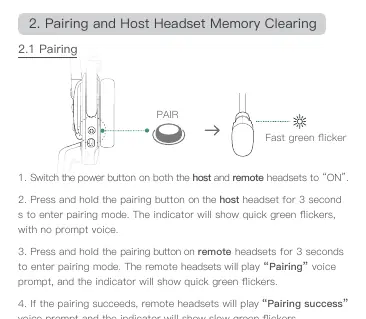
To pair new headsets:
- Power on both host and remote headsets.
- Press and hold the pairing button on the host headset for 3 seconds to enter pairing mode (indicator flashes green quickly).
- Press and hold the pairing button on the remote headset for 3 seconds.
- Once paired, the remote headset will play "Pairing success".
- Press the pairing button on the host headset to exit pairing mode.
Specifications
- Communication Range: 400m (1312ft) line-of-sight
- Operating Time: 30 hours
- Frequency: 2.4GHz
- Battery Capacity: 2320 mAh
- Microphone Type: Electret
- Operating Temperature: -15 to 45 degrees Celsius
Practical help
Common problems
Headset disconnected
Ensure the host is powered on and within range. If disconnected for more than 30 minutes, the headset will automatically power off.
Pairing failed
Ensure you are within the 120-second pairing window. Follow the pairing steps again, ensuring both host and remote are in pairing mode.
Before use
- Charge batteries fully using the provided charger
- Insert battery into the headset battery slot
- Power on the host headset
- Power on the remote headset(s)
- Verify connection via voice prompt and indicator light
Specs in practice
- Communication Range
- 400 meters (1312 feet) in line-of-sight conditions without barriers.
- Operating Time
- Approximately 30 hours of continuous use.
Images and diagrams
- Host headset volume buttons are orange; remote headset volume buttons are black.
- Microphone boom at 45 degrees mutes the microphone.
- Indicator light status: Slow green flicker means disconnected/power on; solid green means connected.
Model compatibility
- One host headset supports up to 4 remote headsets.

Manual page author
Emily Carter
User documentation editor
Prepares concise manual descriptions and highlights the most useful setup, operation, and maintenance information for readers.