Home / Clocks
AcuRite 14-Inch Indoor/Outdoor Wall Clock with Thermometer
Quick guide for the AcuRite 14-Inch Indoor/Outdoor Wall Clock. Learn how to set the time, install batteries, and choose the best location for accurate temperature readings.
Table of contents
Quick guide from the manual
This manual provides instructions for the AcuRite 14-Inch Indoor/Outdoor Wall Clock. Key requirements include using the correct battery type for the environment and proper placement to ensure accurate temperature readings.
Battery Installation
To install or replace the battery:
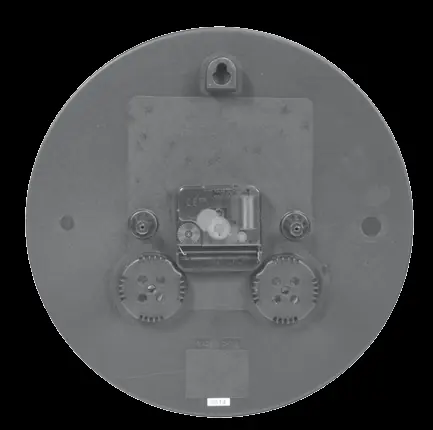
- Remove the weather-resistant cover from the back of the clock.
- Insert 1 x AA battery into the compartment.
- Follow the polarity (+/-) diagram located inside the battery compartment.
- Replace the weather-resistant cover securely.
Battery Recommendations: AcuRite recommends high-quality alkaline or lithium batteries. Do not use heavy-duty or rechargeable batteries. For temperatures below -4°F / -20°C, lithium batteries are required as cold temperatures can cause alkaline batteries to function improperly.
Setting the Time
To set the time, locate the set knob on the back of the clock and turn it in either direction until the desired time is reached.
Placement and Temperature Accuracy
Do not hang the clock in direct sunlight. For the most accurate temperature and humidity readings, choose a location that is not exposed to direct sunlight or other direct heat sources.
Battery Safety
Clean battery contacts and device contacts before installation. Remove batteries from equipment that will not be used for an extended period. Promptly remove dead batteries. Do not mix old and new batteries, or different types of batteries. Do not dispose of batteries in fire.
Customer Support
For assistance, contact AcuRite customer support at 877-221-1252 or email [email protected]. Support is available 24/7 at www.AcuRite.com.
Official resources from the manual
Manufacturer information
AcuRite
Practical help
Common problems
Inaccurate temperature readings
Ensure the clock is not placed in direct sunlight or near direct heat sources.
Clock not working in cold weather
Use lithium batteries instead of alkaline batteries for temperatures below -4°F / -20°C.
Before use
- Remove the weather-resistant cover from the back.
- Ensure you have 1x AA battery (alkaline or lithium).
- Check the polarity (+/-) diagram inside the battery compartment.
- Choose a location away from direct sunlight.
Specs in practice
- Battery Type
- 1x AA Alkaline or Lithium.
- Cold Weather Operation
- Lithium batteries required below -4°F / -20°C.
Images and diagrams
- The back of the clock features a battery compartment and a time-setting knob.
- The weather-resistant cover protects the battery compartment from outdoor elements.
Model compatibility
- Suitable for indoor or outdoor use.
- Not compatible with rechargeable batteries.

Manual page author
David Miller
Documentation analyst
Organizes user manual content into clear summaries, with attention to model details, product context, and everyday usability.