Home Appliances / Ovens
Acurite 00891W3 Thermometer with Wired Temperature Sensor User Guide
Quick guide for the Acurite 00891W3 thermometer, covering battery installation, sensor placement, time setting, and MAX/MIN memory operation.
Table of contents
Quick guide from the manual
This document provides instructions for the Acurite 00891W3 thermometer. Before use, ensure you remove the clear protective film from the LCD screen. The device requires one AA alkaline battery (not included) for operation. If the display fades or the unit stops functioning, replace the battery.
Setup
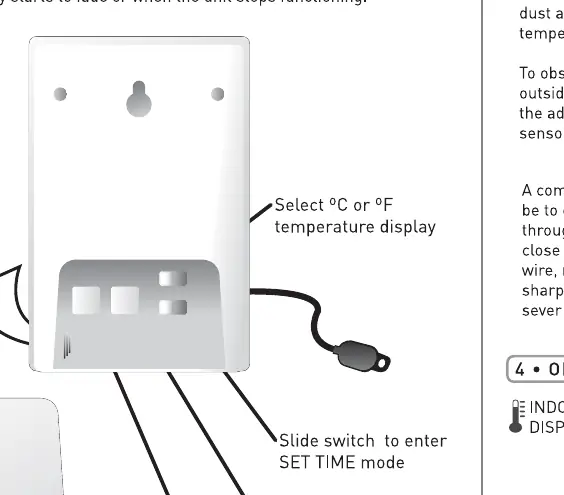
To set up the device, slide open the battery compartment cover on the back. Insert one AA battery, ensuring the positive (+) and negative (-) polarities match the markings inside. Inside the battery compartment, you will also find the switch to select between Celsius (°C) or Fahrenheit (°F) and buttons to set the time.
Placement
Choose an indoor location free from water, dust, and direct heat sources to ensure accurate readings. The wired temperature probe must be routed outside. A common method is to pass the wire through a window opening, ensuring the window frame does not pinch or damage the wire or its plastic coating. The probe can be secured using the provided adhesive pad or the integrated screw/nail hole.
Operation
You can toggle between viewing the current time and indoor temperature by pressing the Indoor Temperature/Clock Selection button. To view recorded temperature or humidity extremes, press the corresponding MAX/MIN button. The MAX and MIN indicators will appear on the screen. To clear these values, press the C button. If readings exceed the specified range, the display will show LO or HI.
Technical Specifications
- Temperature Wired Probe Range: -58°F to 140°F (-50°C to 70°C)
- Humidity Range: 20% to 90% RH
- Battery: 1 x AA alkaline
Manufacturer information
AcuRite
Practical help
Common problems
Display is fading or unit stops functioning
Replace the AA battery with a fresh one.
Display shows LO or HI
The temperature or humidity reading is outside the specified operating range.
Before use
- Remove the clear protective film from the LCD screen.
- Ensure you have one fresh AA alkaline battery.
- Check that the battery polarity (+/-) matches the compartment markings.
- Select your preferred temperature scale (°C or °F) inside the battery compartment.
Specs in practice
- Temperature Range
- The wired probe measures between -58°F and 140°F (-50°C to 70°C).
- Humidity Range
- The device measures relative humidity between 20% and 90%.
Images and diagrams
- The battery compartment contains the °C/°F switch and time setting buttons.
- The wired probe should be routed through a window, ensuring the wire is not pinched by the frame.

Manual page author
Emily Carter
User documentation editor
Prepares concise manual descriptions and highlights the most useful setup, operation, and maintenance information for readers.