Lighting / LED Strips
User Manual for American Lighting REC-DMX-RJ45A-5CH DMX 5 Channel RJ45 Decoder
Quick guide for the American Lighting REC-DMX-RJ45A-5CH DMX 5 Channel RJ45 Decoder. Includes installation wiring diagrams, DMX configuration, operating modes, and technical settings.
Table of contents
Manual images
Click an image to enlargeQuick guide from the manual
The American Lighting REC-DMX-RJ45A-5CH is a 5-channel DMX decoder designed for controlling LED fixtures. It requires a 12-24V DC power supply and a DMX master controller (both sold separately). The device supports various fixture types, including single color, Tunable CCT, RGB, RGBW, and RGB+Tunable CCT. Always ensure power is disconnected at the source before installation.
Installation
Wiring the Receiver:
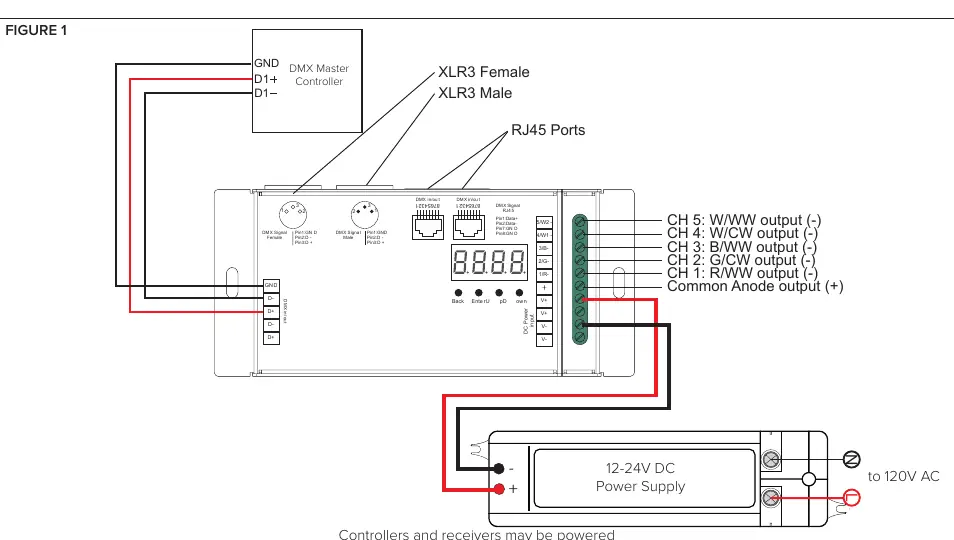
- Determine the mounting location and secure the receiver using the mounting tabs.
- Connect the fixture to the output terminals (CH1-CH5) following the fixture's specific wiring diagram and ensuring correct polarity.
- Connect the 12-24V DC power supply to the power input, ensuring correct polarity.
- Do not connect cables while the power is on.
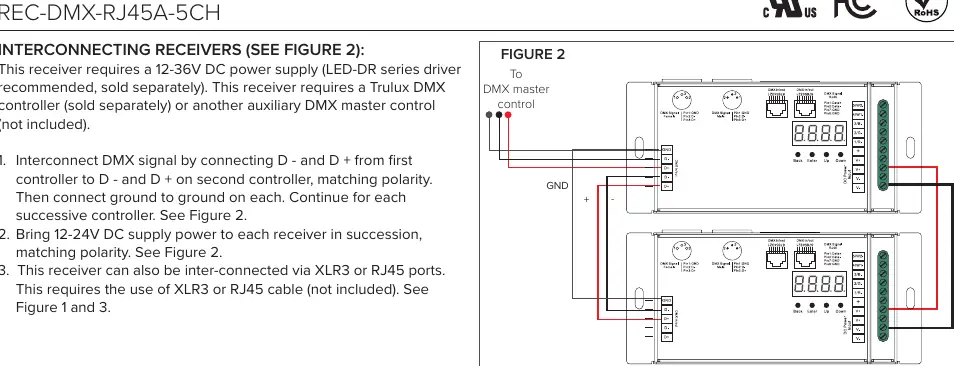
Interconnecting Receivers:
- To daisy-chain multiple receivers, connect the D- and D+ terminals from the first controller to the D- and D+ terminals on the second controller, matching polarity.
- Connect ground to ground on each unit.
- Alternatively, use XLR3 or RJ45 ports to interconnect units using appropriate cables.
Operation
The receiver features a digital display and four buttons: Back, Enter, Up, and Down.
- Mode Selection: Before configuring, choose the operating mode: run1 for DMX Decoder Mode or run2 for Standalone Mode.
- Navigation: Use the Up and Down buttons to toggle through menu selections. Use Enter to select and Back to return to the main menu.
- Factory Reset: Press and hold both the Back and Enter buttons until the digital display turns off, then release. The system will reset to default settings.
Settings
The following settings can be adjusted via the menu:
- A.XXX: DMX Address (Default 001).
- CHXX: DMX Channel Quantity (Default CH05).
- btXX: PWM Resolution (8bit or 16bit, Default 16bit).
- PFXX: PWM Frequency (00~30, Default 1kmHz).
- gAXX: Dimming Curve Gamma Value (0.1~9.9, Default gA1.5).
- dPXX: Decoding Mode (Default dp1.1).
Technical Specifications
- Input Voltage: 12-24V DC.
- Output Terminals: 5 channels, rated for 8A/96-192W each.
- Operating Temperature: -20°C to 50°C.
- Protection Rating: IP20 (Indoor, dry locations only).
Official resources from the manual
Manufacturer information
American Lighting Inc.
Practical help
Common problems
Device not responding to DMX
Check DMX address settings and ensure correct polarity of D+ and D- connections.
Overheating
Ensure the controller is mounted in an area with proper ventilation and operating temperature is within -20°C to 50°C.
Micro dimming effect not visible
Ensure the dimming curve gamma value (gAXX) is set lower than 1.4.
Before use
- Verify power supply is 12-24V DC.
- Ensure all wires are secured tightly in connectors.
- Check that the DMX controller is compatible.
- Verify polarity before connecting power.
- Ensure the installation environment is dry and indoor.
Specs in practice
- Input Voltage
- 12-24V DC required for operation.
- Output Terminals
- 5 channels, each rated for 8A/96-192W.
- PWM Frequency
- Adjustable from 500Hz to 30kHz to prevent flickering.
Images and diagrams
- Figure 1: Wiring diagram showing connection to DMX Master Controller and 12-24V DC Power Supply.
- Figure 2: Interconnecting multiple receivers using DMX signal cables.
- Figure 4: Interface layout showing digital display and control buttons (Back, Enter, Up, Down).
Model compatibility
- Requires 12-24V DC power supply (sold separately).
- Requires Trulux DMX controller or auxiliary DMX master control (sold separately).
- Compatible with single color, Tunable CCT, RGB/RGBW, or RGB+Tunable CCT fixtures.

Manual page author
David Miller
Documentation analyst
Organizes user manual content into clear summaries, with attention to model details, product context, and everyday usability.