Lighting / LED Strips
User Manual for American Lighting Spektrum+ Smart Gateway SPKPL-GTWY
Quick guide for the American Lighting Spektrum+ Smart Gateway (SPKPL-GTWY). Learn how to install, power, and pair your smart hub with the Spektrum+ app.
Table of contents
Quick guide from the manual
The American Lighting Spektrum+ Smart Gateway (SPKPL-GTWY) is a hub designed to connect your smart lighting devices. It requires a 2.4GHz WiFi signal to operate and is intended for indoor, dry locations only. The device is powered by a 120V AC adapter that outputs 5V DC.
Installation
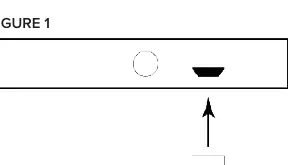
- Ensure the installation location is within 18 inches of a power receptacle.
- Connect the mini USB power adapter to the Gateway (see Figure 1).
- Plug the power adapter into the wall receptacle.
- Verify the device is powered by checking the blue power indicator light (see Figure 2).
- Pair the device using the Spektrum+ Smart Lighting app on your mobile phone or tablet.
Safety Information
- Environment: Rated for dry, indoor locations only. Keep away from water and moisture.
- Temperature: Optimal operating temperature is -10°C to 55°C (14°F to 131°F).
- Compatibility: Not intended for use with a standard wall plate dimmer switch. Use only with the Spektrum+ Smart Lighting Bluetooth App or the Spektrum+ handheld remote controller (sold separately).
- Maintenance: There are no serviceable parts inside. Do not attempt to dismantle, open, or service the gateway.
- Electrical: Ensure power supply is turned off at the fuse box or circuit breaker prior to installation.
Manufacturer information
American Lighting Inc.
Practical help
Common problems
Device not pairing with the app
Ensure you are connected to a 2.4GHz WiFi network, as the gateway does not support 5GHz.
Power indicator light is off
Check that the power adapter is securely plugged into both the wall outlet and the gateway, and ensure the circuit breaker is on.
Cannot use with existing wall dimmer
This gateway is not compatible with standard wall plate dimmer switches. Remove the dimmer or bypass it.
Before use
- Verify you have a 2.4GHz WiFi signal available.
- Ensure the installation site is dry and indoors.
- Download the Spektrum+ Smart Lighting app.
- Confirm the power outlet is within 18 inches of the intended gateway location.
Specs in practice
- Operating Temperature
- -10°C to 55°C (14°F to 131°F).
- Connectivity
- Requires 2.4GHz WiFi signal.
Images and diagrams
- Figure 1 illustrates the connection of the mini USB power adapter to the gateway unit.
- Figure 2 identifies the location of the blue power indicator light on the gateway.
Model compatibility
- Compatible with Spektrum+ Smart Lighting Bluetooth App.
- Compatible with Spektrum+ handheld remote controller (SPKPL-CTRL-W-RGBTW).
- Not compatible with standard wall plate dimmer switches.

Manual page author
Michael Turner
Technical manual editor
Reviews PDF manuals for structure, safety notes, and practical product details so readers can find the right information quickly.